
because even well illustrated, the “web-installer” often don’t work, and because the install instructions provided by /e/ can be imbuvable for some new users and can lead to errors.
Here is a safe guide to install /e/OS
we will take the Fairphone 6 as example,
.
Expand to see the guide :
according to “Smartphone Selector” for your device → “Official or Community install doc” for your device → “Command line” install page for your device !
Things you must take care about
Warning: Before proceeding with the installation, log out of any accounts you may have set on the stock ROM. Also, remove any screen locks that have been set on the device.
Use a USB-A to USB-C cable on a rear USB port if possible, to avoid hub even internal
If you plan to relock the bootloader after the installlation
this is not mandatoty, and only available with Official version, why relocking ?
Most important thing to take care about is the “android Security Update" aka "Security Patch Level” date (SPL) included in the installed Operating System on your device at time of the unlock.
new version on witch you want to relock the bootloader, must included a NEWER (or the same) “android Security Update" aka "Security Patch Level” date (SPL),
otherwise you risk to change your device into Brick.
- You will find this information about stock OS on the Fairphone website The Fairphone Release Notes
or on the device :
settings --> about phone --> android version 15 --> android security update
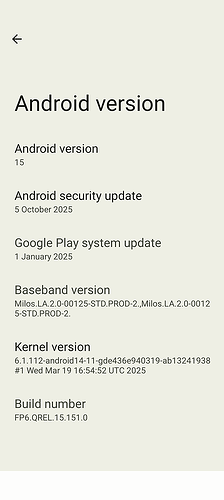
- you will find this information about /e/OS
on the /e/OS website / e / os  Releases
(the title of the article need to match both “/e/OS version” and “android level”)
here "e-3.2-a15"
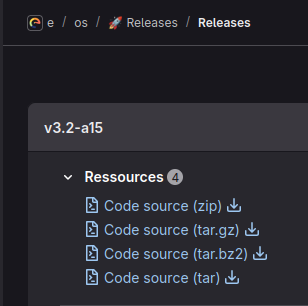

or on the device :
settings --> about phone --> android version 15 --> android security update
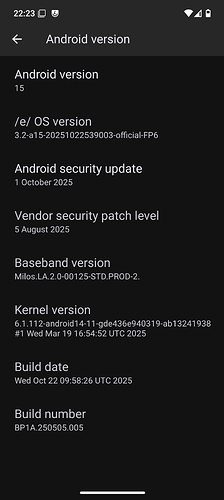
more detailled explications here : (answered) Install /e/ on FP5 with newer Security Patches - Fairphone - /e/OS community
1. Unlocking the bootloader
(this will erase personnal datas on the device)
The “Unlocking the bootloader” step may differ from device to an other, so to be safe, allways have a read on
“Smartphone Selector” → “Official or Community install doc” for your device → “Command line” install page for your device !
In case of Fairphone devices, get the Unlock code from Fairphone before proceeding with the next steps.
On your device, enable Developer Options, USB debugging and allow OEM unlocking .
you will be asked for the code.
- Reboot the device to bootloader mode with the command
adb reboot bootloader,
or with the device powered off - hold Volume Down + Power
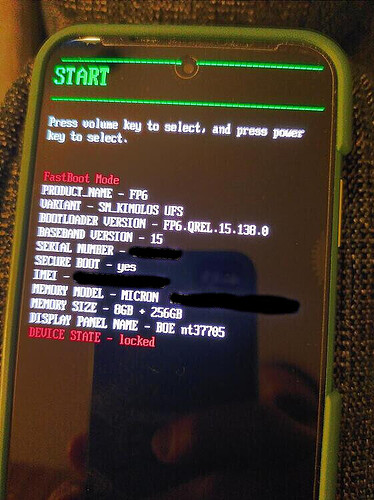
On your Computer :
Expand if you have a windows Computer :
-
install Git-bash,
-
and confirm all preselected options.
-
download the “platform-tools for windows”,
-
just extract the .ZIP, not more.
open the newly created “platform-tools” folder in your file manager, then
- Use the right click of your mouse, and choose
open Git Bash here
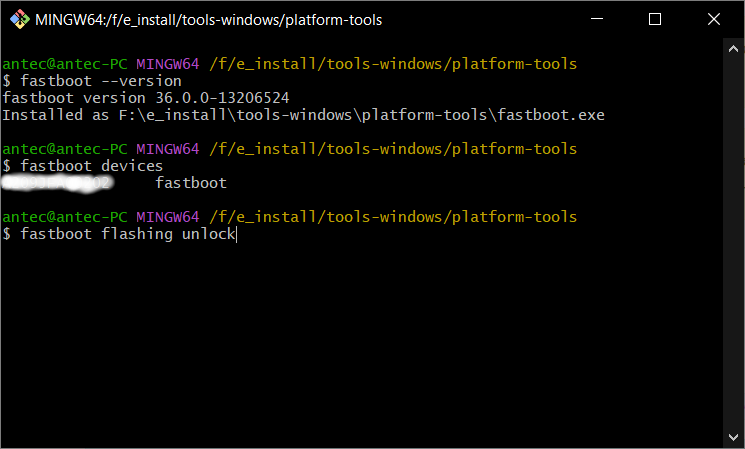
(it is the same as"open a terminal in this folder").you will get something like :
Expand if you have a Linux Computer :
-
download the “platform-tools for Linux”,
-
just extract the .ZIP, not more.
open the newly created “platform-tools” folder in your file manager, then
- Use the right clic of your mouse, and choose
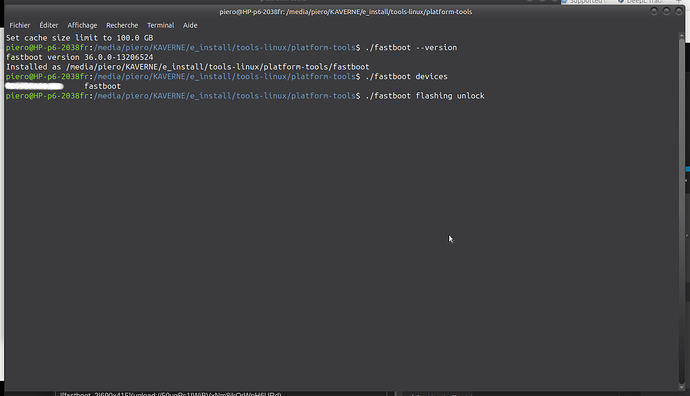
"open a terminal in this folder").you will get something like :
Expand if you have a macOS Computer :
-
download the “platform-tools for macOS”,
-
just extract the .ZIP, not more.
open the macos terminal from “Applications” → utilities → terminal.
cd ~/Downloads/platform-tools(it is the same as “open a terminal in this folder”)
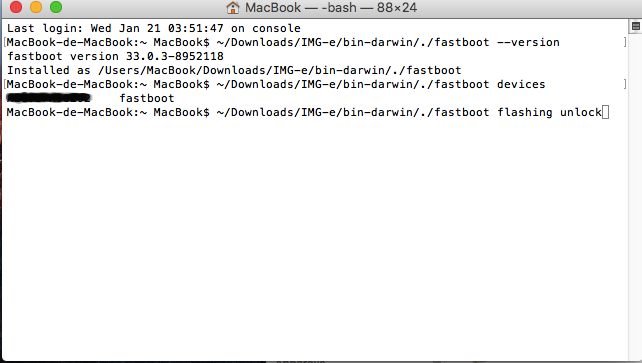
you will see something like :
check bootloader status by copy this command, and paste it into the terminal and press enter :
./fastboot oem device-info
./fastboot flashing get_unlock_ability
if the return is 1
→ you will be able to unlock
if the return is 0
→ you will not be able to unlock now, it is advised to
- reboot and re-enable Developer Options, USB debugging and allow OEM unlocking . (to get
=1)
or - reinstall FairphoneOS and re-enable Developer Options, USB debugging and allow OEM unlocking . (to get
=1), and then reinstall /e/OS.
- Ask for unlock bootloader by running :
./fastboot flashing unlock
- Approve with volume + then power
Your device proceed with a factory reset, and automatically reboots
On your device, re-enable Developer Options, USB debugging and allow OEM unlocking .
and reboot again into bootloader

check
./fastboot flashing get_unlock_ability
if the return is 1
→ you will be able to unlock
if the return is 0
→ you will not be able to unlock now, it is advised to
- reboot and re-enable Developer Options, USB debugging and allow OEM unlocking . (to get
=1)
or - reinstall FairphoneOS and re-enable Developer Options, USB debugging and allow OEM unlocking . (to get
=1), and then reinstall /e/OS.
- Ask to unlock critical partitions by running
./fastboot flashing unlock_critical
- Approve with volume + then power
Your device proceeds with a factory reset, and automatically reboots
the Bootloader is now unlocked
2. Installing /e/OS
On the device, re-enable Developer Options, USB debugging and allow OEM unlocking.
Again reboot the device into bootloader mode.
On the PC, download latest build from /e/OS website,
→ “Smartphone Selector” → “Official or Community install doc” for your device → “Command line” install page for your device !
in case here : /e/OS official FP6 download,
just extract it, not more.
- (Windows) : Use the right clic of the mouse,
and chooseopen Git Bash here - (Linux) : Use the right clic of the mouse, and choose
open a terminal in this folder - (macOS) : rename the newly extracted folder
/IMG-e-3.2-a15-20251022539003-official-FP6
into
IMG-e,
then copy / paste
cd ~/Downloads/IMG-e.
into the terminal
Then
- Copy this commands and paste them into the terminal :
(replace “FP6” by your device codename)
chmod +x flash_FP6_factory.sh
./flash_FP6_factory.sh
you are done with installing /e/OS
now, if you don’t want to relock the bootloader,
just run :
./fastboot reboot
But if you want to relock the bootloader, continue with next step.
3. Finally, relock the bootloader (optional)
only how it is mentioned at the bottom of the official instructions in the “Smartphone Selector” for your device → “Official or Community install doc” for your device → “Command line” install page for your device !
only if the android security update in the previously installed OS was older than the android security update included in the version you want to install
only if the newly installed version is an Official one, not a Community version.
re-enable Developer Options, USB debugging and allow OEM unlocking
with the device in bootloader mode,
- Open a terminal from the “/platform-tools” location
- and check bootloader status by running :
./fastboot oem device-info
./fastboot flashing get_unlock_ability
if the return is 1
→ you will be able to relock
if the return is 0
→ relock is doable, but you may not be able to unlock again in the future…
IT IS ADVISED to not relock now, but boot into the OS to re-enable Developer Options, USB debugging and allow OEM unlocking . (to get =1),
OR reinstall FairphoneOS, then re-enable Developer Options, USB debugging and allow OEM unlocking . (to get =1),
and then reinstall /e/OS.
- to relock the bootloader, copy / paste this command :
./fastboot flashing lock_critical
- Approve with volume + then power
then- Hold the volume Down button immediately as your Fairphone reboots to return to fastboot mode.
otherwise the device will try to reboot into system,
if so : re-enable Developer Options, USB debugging and allow OEM unlocking if needed,
re-run
fastboot flashing get_unlock_ability
if the return is 1
→ you will be able to relock
if the return is 0
→ relock is doable, but you may not be able to unlock again in the future…
IT IS ADVISED to not relock now, but boot into the OS to re-enable Developer Options, USB debugging and allow OEM unlocking . (to get =1),
OR reinstall FairphoneOS, then re-enable Developer Options, USB debugging and allow OEM unlocking . (to get =1),
and then reinstall /e/OS.
- copy / paste this command :
./fastboot flashing lock
- Approve with volume + then power
- the device must reboot, if not, copy / paste this command
./fastboot reboot
- boot to the system,
- BUT NEVER DISABLE “allow OEM unlocking”, in “Developer Options”
the bootloader is now relocked
.
What could go wrong :
[Solved] Windows does not see my phone in Fastboot mode - Setup - /e/OS community because needed drivers are not correctly installed
Tip :
even if not properly "installed in your path” as explained in
Installing adb and fastboot on Windows PC or on macOS and Linux PC,
recommended is to extract the .ZIP, open a terminal from the newly created “platform-tools” folder
and simply add ./ at the beginning of all your adb or fastboot commands, it will use the binary included into the relative folder (the latest version you just downloaded) instead of the version installed on your system (that can be outdated)
.
Feel free to ask if you still encountred issue.
or want i made some corrections / additions
you may also be interested by :
A clear guide to Upgrade your /e/OS to a new Android major version without loosing /data