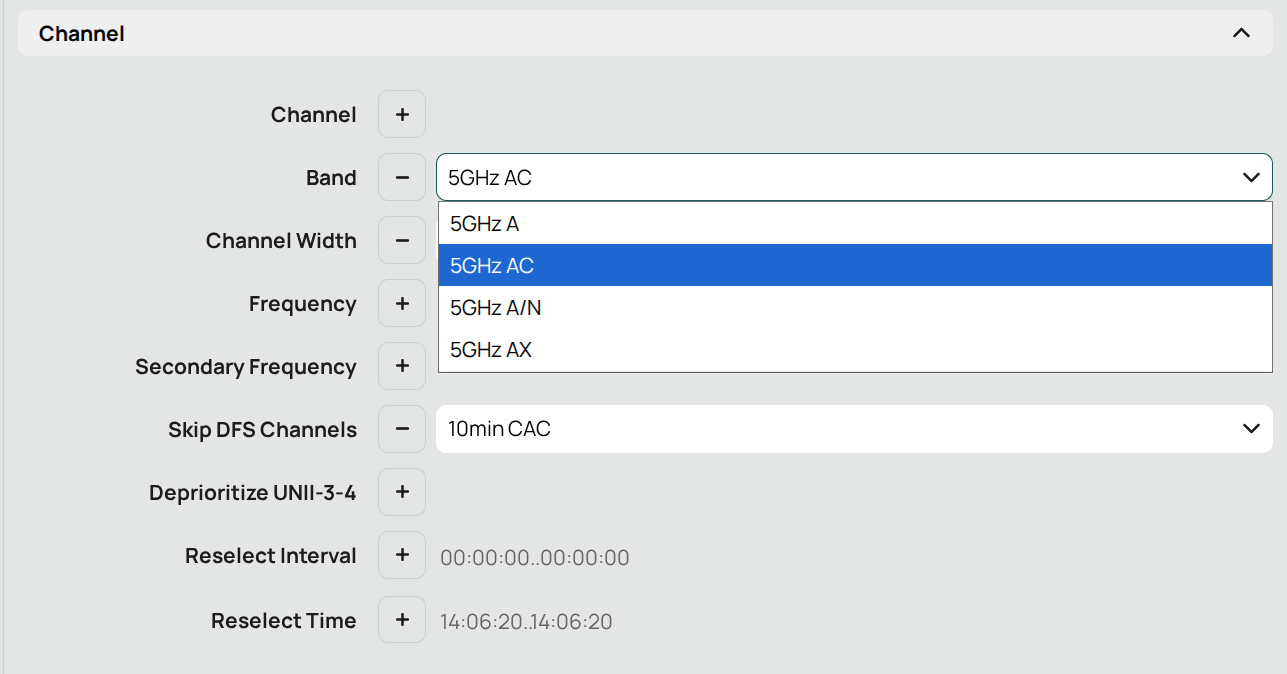
Configuring wi-fi network to use 802.11ac instead 802.11ax fixed this issue immediately and permanently for me.
Went from 25-30% lost packets to 0%.
Configuring wi-fi network to use 802.11ac instead 802.11ax fixed this issue immediately and permanently for me.
Went from 25-30% lost packets to 0%.
Where can this be configured in the phone?
This is not possible, as I’m not the administrator of the networks which I’m using.
I’m still trying to find a practical solution that simply works reliably on Wi-Fi, without having to depend on workarounds, or depend on workarounds that are not real workarounds like making changes to the Router/AccessPoint because often I am not the Admin but need access to the local WiFi.
What is still unclear to me: Is the FP6+ affected by the same IPv6-over-Wi-Fi issue as the FP6 ?
Has anyone who experienced the bug on FP6 switched to FP6+ and the problem disappeared?
I’m considering ordering a FP6+ to have a solution. If it shows the same problem, I can return it. If it works correctly, I have a solution, and I can share the results here.
Before I do that: has anyone already tested this directly and can confirm or rule out that the FP6+ behaves differently/without a Bug?
This user stated that the FP6+ also shows the same behaviour.
I have the FP6+ too, and the Problem is already there.
I made a new ssid and enabled only the 5ghz on that ssid.
It seems to work for me, apps load way faster and seems more stable.
I kept ipv6 on.
I need to be on the WiFi of a restaurant-hotspot were we rented a meeting space, on that wifi network I can then control the lights and audio. How do I make that change on my phone?
Thanks. So unfortunate this route is not an option.
We are still trying to figure out what is going on, a few posts ago it looked like the problem was ipv6 and now it seems the .ax connection. I’m only reacting to post that when i changed it it seems to do something.
I’m not saing this is the solution or anything, FP should fix their drivers but do you see all the responses from Fairphone on this topic? Do you see them telling us they figured it out and there is a fix coming next update? Exactly…
For me this is somewhat of a fix btw, i don’t use any other wifi connections on my devices than the ones i own. I have an unlimited data plan on my mobile and only need wifi to locally connect with devices.
I hope FP wil release a real fix to this problem…
I am still having issues and have to rely on mobile data every day. I will look into German consumer protection laws regarding software defects, and if the next update doesn’t fix this, I will demand a full refund. You should review this internally as well. I am not willing to keep a buggy device, especially one intended to last for 10 years.
No, thanks…
Hello I’m having a similar issue specifically with twitch, my solution is to use protonvpn when I’m on WiFi it’s going around the bug not solving it but works fine for me.
<Hi everyone,
I've had the classic symptoms discussed in this thread (and the German Wi-Fi problems thread): the phone shows "connected" but no app moves a byte, sometimes followed by full disconnects. Like @Nab above, I found that a VPN makes everything work — except my VPN endpoint is a server inside my own home LAN, which rules out any routing/MTU explanation and pointed at the local path. That paradox didn't fit any usual explanation, so I ran a read-only forensic analysis via adb (dumpsys/getprop/live probes) and pulled an official adb bugreport zip. Below is what's actually failing — and I think the data also explains why the recent workarounds in this thread work: the 802.11ax→ac switch (@kamwolter, #583), the 5-GHz-only SSID (@micnocom, #590) and the VPN route (@Nab, #595) all make sense from the same measurements. Skip to the workarounds if you just want relief.
Two links in one chain, both visible in the data:
1. The Wi-Fi uplink (Tx direction) is defective at the driver/firmware interface. During bad phases, up to 93–98 % of transmitted packets needed retries (WifiScoreReport: 98–158 retries vs 1–9 successful packets per interval, up to 98.7 %), with DATA_STALL_BAD_TX events and FIRMWARE_ALERT codes 266/4102 and 14 — the firmware itself reports the Tx stall. Important detail: the heavy storms all ran on 2.4 GHz (2462 MHz — the router's 2.4 GHz BSSID and the repeater), never on the 5 GHz main BSSID. The kernel log shows the defect even in a quiet window: 16× qca6750: dp_tx_update_peer_stats: Release source:3 is not from TQM, once caught mid-EAPOL-rekey (the Tx completion of an EAPOL M4 returns through an unexpected release path), plus the 2-second HW-stats poller failing permanently (Failed to get hw stats: 6, at an exact 2.0035 s cadence for the entire window). There are zero FATAL/assert/reset events — no firmware crash; the defect sits in the Tx-completion path and the dead stats request, not a crashed FW.
2. That loss tears down the network and DNS in stages. Lost multicast/broadcast frames kill ARP/neighbor discovery, so Android's IpReachabilityMonitor hits NUD_CONFIRM_FAILED_CRITICAL on the gateway and the framework itself drops the connection. Between 22:25 and 23:00 on Sept 22: 26 framework teardowns in 34 minutes, 24 of 25 disconnects locally generated (reason=3 DEAUTH_LEAVING) — the single exception, a 22:57:58 four-way-handshake timeout (reason=15), falls on the same millisecond as FIRMWARE_ALERT code 14. One 81-second window of literally zero Rx/Tx bytes while the icon still said "connected". Separately, with Private DNS (DoT, strict mode) enabled, DoT fails deterministically during lossy phases (AAAA timeouts at exactly \~5 s, probe timeouts at exactly \~10 s) while HTTP probes over TCP still return 204 — IP connectivity alive, DNS dead, and strict mode blocks all name resolution. Since the network stays VALIDATED (exactly one validation ever recorded), Android never falls back to cellular. That's the full "connected but 0 bits" picture.
Three mechanisms stack: (a) the tunnel endpoint is on-link, so no gateway NUD is involved — the NUD failures hit only router addresses; (b) the VPN brings its own DNS, eliminating the strict-mode DoT bootstrap over the broken uplink entirely; (c) one persistent, retransmitting flow rides out short loss phases, while per-app UDP/DNS dies on the first lost packet. The VPN masks the symptom; it does not fix the underlying Tx defect.
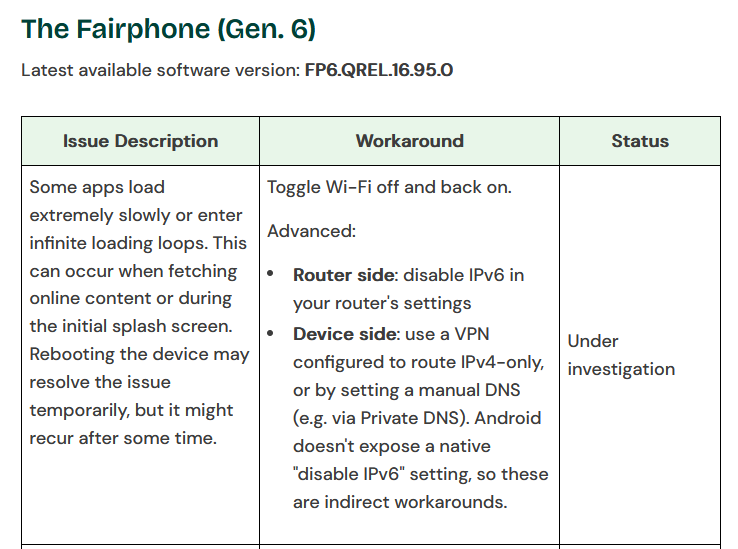
Support recommends disabling IPv6 (see the linked thread). I'm not calling that wrong — but on my device IPv6 was live-verified intact during the disturbance: global-address pings 4/4, IPv6 default route present and renewing, PMTUD working at MTU 1492. The one genuinely broken item was my FRITZ!Box's RDNSS-advertised ULA DNS address, which timed out 100 % of the time throughout, independent of everything else — so if IPv6-off helps anyone, I'd suspect the DNS chain, not IPv6 routing. (Worth checking your own router for this: my box advertises a v6 DNS address it never answers on.)
Hardware context: Qualcomm QCA6750 (HW rev. WCN6750_V2), integrated in SoC SM7635 ("volcano"), attached via icnss2 — no PCIe/USB. Driver qca_cld3_qca6750 5.2.1.96X, firmware 3.0.1.0.591.1 (identical across both builds), kernel 6.1.138 GKI on Android 16, OS FP6.QREL.16.100.0. AP: FRITZ!Box (WPA3-SAE, dual-band, meshed with one AVM repeater; exact BSSIDs redacted — they're in the bugreport if Fairphone needs them).
One honest limitation: the dmesg ring buffer covers only \~5 minutes (21:51:59–21:57:13), a quiet window \~30 min before the disturbance phase — churned by 394 SELinux audit lines, with the bugreport taken \~2 h later. The disturbance itself had to be reconstructed from WifiMetrics. But that strengthens the case: the Tx-path defect shows up even when nothing is visibly wrong.
| Finding | Evidence (bugreport lines) |
|---|---|
| Tx-completion defect | 16× Release source:3 is not from TQM (84944–86346), incl. during EAPOL M4 TX 21:54:50.641 |
| HW-stats poll dead | 156× Failed to get hw stats: 6, 2.0035 s cadence (84893–86393) |
| No FW crash | 0 FATAL/assert/reset (84884–86409) |
| Framework self-teardown | 3× NUD_CONFIRM_FAILED_CRITICAL → LOST_PROVISIONING (1320324, 1320996, 1321040); 26 teardowns 22:25–23:00 (\~1322400–1323800) |
| Tx retry storms, 2.4 GHz only | DATA_STALL_BAD_TX, txRetries 98–150 vs txSuccess 1–9 (1323696–1323707), all on 2462 MHz |
| FW self-reporting stalls | FIRMWARE_ALERT 266/4102 and 14 (1323700–1323706) |
| IPv6 intact | default route table 1023 mtu 1492; GUA ping 4/4; PMTUD verified |
| RDNSS pathology | FritzBox ULA DNS 100 % timeout (13/13, BROKEN), repeater-independent |
Questions I'd love an answer to: Is a QCA6750 Tx-completion/HW-stats fix planned for this driver/FW combination? Is setWifi7Enabled=true intentional on a Wi-Fi-6-only, non-DBS chip? And is the IPv6 workaround tracked against this — given it plausibly works via the DNS chain (removing the broken RDNSS ULA) rather than routing itself?
I have the full adb bugreport zip (FP6.QREL.16.100.0, 2026-09-22 23:56 — it captures both the disturbance and the calm afterwards) with line numbers for every quote above, and I'm happy to attach it to a support ticket or paste specific excerpts here — just tell me what's most useful. If your symptoms match the German Wi-Fi problems thread linked at the top: check whether you run Private DNS in strict mode and whether a weak mesh node keeps getting roamed to; I'd genuinely like to hear whether DoT-strict users are over-represented there.
I’ve seen similar reports after major Android updates. If several apps stopped working at the same time, it may be worth checking app updates, clearing the affected apps’ cache, and testing after a reboot. Hopefully Fairphone can identify the cause and include a fix in a later update.
Hi everyone,
I switched from an FP4 to an FP6 and am really very happy with the device. However, I’m also plagued by Wi-Fi issues and am currently trying to troubleshoot them. I thought I was the only one with this problem because I couldn’t imagine such a great device having so many issues.
Context:
I have a Fritzbox 6670, and the first thing I did was ensure that no DNS filters were interfering. I then tested various WPA settings, but ultimately, I keep running into the same problems everyone else here is experiencing. The connection exists, but certain apps are having issues. In my case, it’s MS Teams and MS Outlook, plus a few problems with WhatsApp—for instance, when creating backups. At least, those are the issues I’ve noticed in the short time I’ve had the device.
Today, I’m going to test whether switching “DNS over TLS” from “Automatic” to “Off”—as recommended here in the forum—helps. Maybe that will do the trick. Above all, I hope Fairphone has acknowledged the issue and is working on a fix. A workaround isn’t a real solution; that should go without saying. Many thanks to everyone contributing to getting this problem under control.
Edit:
Thank You @Fairphone_CM to investigate the Problem <3
I set that up on the FritzBox as well. I simply turned off the 2.4 GHz band, but that didn’t help in my case either. Everything stayed the same.
I installed /e/OS 4.3 and that has the following in the release notes;
Fixed apps timing out over Wi-Fi since Android 16, caused by an unreachable IPv6 resolver.
I now reconnected to the normal .ax wifi and so far so good.
I guess the new Fairphone Google Android update will have the same fix.
Yeah, I can confirm that e/OS 4.3 fixed it for me as well on my mikrotik-network.
Good morning everyone,
I was very pleased to read that /e/OS is now getting a fix for this, and I really hope it comes to Android 16 as well. I’ve tried all the tips shared here, but nothing really works; the problem returns after a short while.
I’ve tried the following in conjunction with my FritzBox 6670:
Different Wi-Fi versions (Wi-Fi 4, 6, 7) – no success
Tested different WPA versions and settings – no success
Disabling Wi-Fi frequencies (i.e., using only 5 GHz or only 2.4 GHz) – no success
Disabling DHCPv6 (for IPv6) and running only IPv4 – no success (see image)
Tried the function shown in the image – no success
Disabled Private DNS on the smartphone – no success
The only thing that actually works is disabling IPv6. At work, we have a Wi-Fi network that runs solely on IPv4, and I have absolutely no issues there. The annoying thing, however, is that if you have a Dual-Stack (DS) connection, things don’t work properly when you disable IPv6. That’s why I really hope the issue gets resolved quickly and reliably.