Getting tired of facing this over and over again. I do not come here often, I started reading the above on LibertyGlobal-branded home routers (which I don’t have). But I now changed this Default setting in my Fritz!Box about 24 hours ago, and I did not face the issue anymore? So clearly Android introduced a bug in v16. But I am happy on the WiFi again.
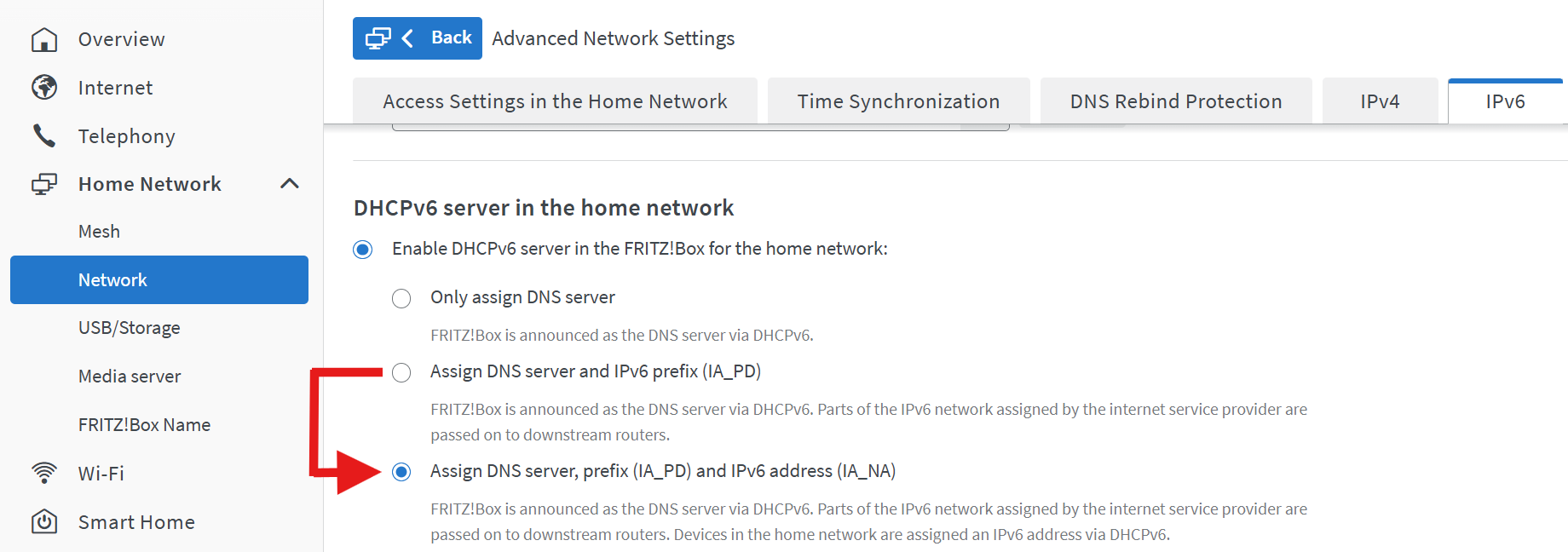
This was my standard setting right from the start. It won’t work persistently…
This has ended up being my go-to fix. Just turn off WiFi.
Unfortunately it seems that “don’t turn it back on again automatically” is sometimes ignored.. another bug.
The cellular signal is poor in my home so I’m still having to hop back on to WiFi for anything more than messaging.
I’ve just been informed that because I need to use Phone over Wi-Fi because my cell signal is so bad, sometimes I am just not reachable because of this bug. I am rate limited on my mobile plan, this is one of the most idiotic places I’ve been in with a phone. Amazing that it’s ok to remotely break the one part of my phone I can’t repair and then just not do anything about it for months. Can’t believe I let myself be scammed again.
The workarounds are unacceptable. I’ve asked this before, but does anyone know how to get a warranty return going with Fairphone? The website process seems to be broken too, like with a general ticket as soon as I pick the options I want I am redirected to useless portals.
The app Intra helps a lot in my case (France, Freebox). It works very well !
The app Redthink DNS can help too with the right settings.
The only workaround fix that works for me is to disable IPv6 in my router (France, Livebox).
The problem is that it impacts all my other devices. I’ve not encountered any issues for any websites, but it could happen at some point.
For me the only viable workaround without compromising my router settings is to switch Wi-Fi off (and on again). It is annoying AF (as is the waiting for a fix), but being 74 I know for sure that there’s worse in life…
Please open a seperate topic for this.
Hi,
it’s now some weeks after the update to 16 and still when opening apps, they just stuck at the starting screen. Only rebooting the phone works, but this is just a temporary solution because later the same day, same apps don’t open anymore again. More seriously, my mail app (Spark) refreshed mails and it ends, showing me no new mail, but there are. So within 2-3h, all new mails are shown new at once. This is something that didn’t happen before the update. I’m about to quit using Fairphone 6 because I have so many problems. I needed my wallet and it took >2min to open, same for my navigational app. Only restarting the phone helps, but as I said, just for hours.
I moved your post here, assuming it mainly happens when connected to wifi? If xo did xou try to shortly disable Wifi insteaf of rebooting? Do you use any VPN, DNS…?
Hi, thank you for your screenshot. I’ll try the same, let see if that nervy issue disappears.
Don’t put your hope in that setting.
Do you have a better solution? Please share!
There is none. Disabling IPv6 is the only reliable option
Using a vpn app, doesn’t need to be one that connects to a server somewhere. Even rethinkDNS works. You can also use 1.1.1.1 from cloudlfare, but that connects to cloudlfare servers.
This is currently the only workaround i know of that fixes the problem till the vpn connection is active
Thank you for the hint with the rethinkDNS App. Works like a charm til FP will fix that OS-based.
This issue is slowly but surely driving me mad. How is it acceptable that you can’t seem to get this fixed? Basic features not working and not being fixed for so long is just ridiculous. I initially liked fairphone a lot and was happy with mine. I also don’t expect everything to run smoothly right from the start with this project but you’re really playing with our patience here. It is not acceptable to have us tweak our router settings or get vpns etc. I think I will look for another phone because this is rendering a phone pretty useless if you don’t want to use all your mobile data on everything you should be able to do without.
Welcome to the club…
I’ve been pushed to the point where the phone is largely unusable, between this problem that manifest itself everytime I put it out of my pocket after been screen off for like 5 minutes…
Anything I open, web browser, social network, bank app, is taking more than 30 sec to load.
Taking this in account plus all other problems (touch ghost input, camera not recording pics, flashlight not going on or late, moment switch serving absolutely no purpose because not personnalisable…) I’ve decided to buy another phone, this one clearly not being usable without being frustrated by all of those problems on a daily basis.
Very deceiving.
Problems like this can happen even to the largest manufacturers. There are reports of pixel phones losing WiFi connectivity after the recent Android 17 update if IPv6 is disabled. Good luck to those using phones of Google and Fairphone in the same network.
I would love to see a post-mortem after this is resolved to get an idea on what really went wrong, but don’t have high hopes on this.
Currently we do not know if Fairphone already identified the root cause or not. We do not even know how widespread the problem is. A Fritzbox seems reliably triggering the problem, but even this is guesswork.
The problem is an android problem. I posted the link to the google issue tracker on April 12 in this thread but I hope it is okay to link it again.
You can vote “I am impacted” in the top right corner.