To find more information about updates, please visit this page on software longevity. You can also find our support article on how to check and update your software version here.
Thanks to all the beta testers! If you want to become a Fairphone beta tester you can apply here.
Update went well
Update available but failed to download or install
The update went well, however coming from the previous release it downloaded 593 MB instead of 25.35 MB. No big deal on the home WiFi, just saying.
Thanks for reintroducing the brief vibration as feedback from touching the fingerprint sensor. What I don’t fully understand: When it was removed we couldn’t get an answer on what the expected correct behavior would be. We learned to live with the new behavior (no vibration). And now it is fixed, suggesting that the removal was a mistake. It’s okay to make mistakes, but I’d appreciate a somewhat better explanation on such things. Especially while real issues like the GPS jitter aren’t fixed since the introduction of Android 14(!) which was more than 1.5 years ago.
I don’t want to chime in into the choir of people who only can complain, but I’m always looking forward to the updates not only for the security patches but also because I hope that some of the issues that were heavily discussed in the forum might have been addressed. The last really big thing was the OLED display switch off on black areas, but that’s some time ago now already…
maybe cos of this update (february 2026 sec level), vibrations feedback notifications or what ever it is related to, came activated, for example for fairemail app when refreshing/checking mails (imap). anyone else having vibration activated somwhere? everywhere?
never used vibrations for anything before on android and turned it off ages ago i guess.
anyone? thanks.
p.s. maybe? another side effect: after this february 2026 upgrade, the “google play system update” area is greyed and unclickable only displaying “couldnt check setting”…. odd.
Interesting, I only used that app the first time after the update this morning. You are right: When sending an email or when refreshing the inbox, there’s this brief vibration. However in the misc settings of FairEmail there is a setting called “Haptic feedback on important actions” or similar (translated from German) which by default seems to be on. Given the fact that for the first time we notice this it seems like the update did indeed correct something…
Update installed flawless. However, when I pull down the notification center from the top off my screen downwards, the date in the top bar is displayed as ‘M02 25, Wed’, where it should be ‘Wo 25 februari’ (Dutch date format). Do others have this problem too?
Some comments above describe the problem that in the settings the “Google Play System Update” area is greyed out and unclickable. It seems like this problem has nothing to do with the last FP5 update. I had the same problem on my FP4 two days ago. The cause of the problem could be a faulty update of Google Play Store or Google Play Services. These updates are performed automatically. On my FP4, I was able to fix the problem by ending all existing Google Play Store and Google Play Services processes. Thereafter the “Google Play System Update” was not more greyed out and was clickable.
Those still waiting: This update has become available on the SIM-less FP5 here over night. it was not there yet at midnight, but is downloading now (560 MB for me, coming from FP5.VT2K.C.076.20251222).
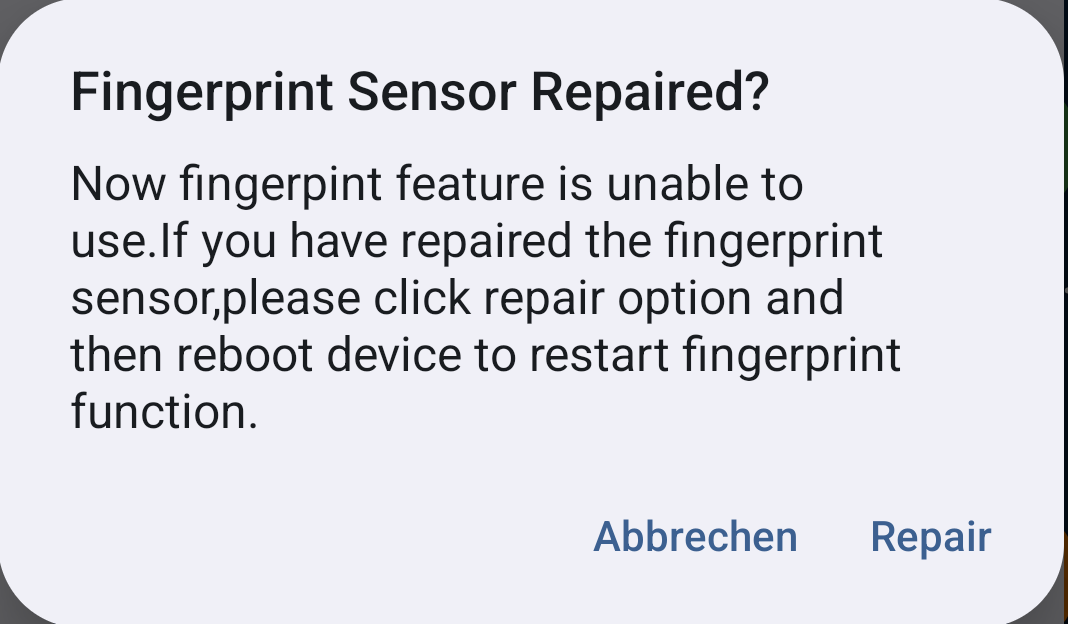
The text is “Fingerprint Sensor Repaired? Now fingerprint feature is unable to use.If you have repaired the fingerprint sensor,please click repair option and then reboot device to restart fingerprint function.”
I have no idea what this wants to tell me, can anyone help me?
Why does my German-language Fairphone greet me with an English message with bad grammar?
Has the update broken my fingerprint sensor? How could I determine this?
Would clicking “Repair” repair it? Or do I have to repair the sensor first before clicking “Repair”, and how would I do this?
How can I reach this screen again? I had to click “Cancel” to use the phone.
More information: This is a FP5 with the standard Android but most Google stuff disabled. No hardware issues so far, but I have never used the fingerprint sensor. Magisk is installed.
Appalling grammar and spelling, I agree, to say nothing of wrong language, though there are reasons for that (I’m not saying good ones) :
This will be related presumably to the patch correcting the bug that prevented FP5s with faulty sensors booting A15.
My interpretation is as follows:
“Your Fingerprint sensor is currently deactivated, having been detected as defective. If it has recently been repaired, please tap ‘Repair’ and then reboot the device to enable its use.”
However, since you don’t use it anyway, you might just ignore the message.
 Resolved issues:
  If you want to become a Fairphone beta tester you can apply here.