Hi. I’ve installed idéo 15 on my Fairphone 4, believing it to be on the same security patch level as the stock android image I had installed right before. I’ve been using /e/OS for years, but decided to explore other options. After installing the stock OS I could then install iodé without any problems. But now I can’t go back to the stock OS because I cannot toggle the OEM unlocking setting in developer options, if I try to enable the option it just loads the settings homepage, and upon browsing back to developer settings it shows that it is still not enabled. Restarting the OS into fastboot fastboot flashing get_unlock_abilityreturns 0. Also, I can’t install any apps on idéoOS, nor can I setup a pin for locking.
I used iodeOS-installer-v0.3.0-windows, and checked that the latest build for the FP4 was up to date with the October security patch: ota / ota · GitLab
I had this stock OS build installed: FP4.QREL.15.14.3.20250923075848.user-factory.zip
I’ve tried running the iodé OS installer again, which works except that at the end it errors saying “boatloader already locked”. I’ve also tried running the FP4 install script with modified INTEGRITY_CHECK and is_unlocked as specified in the guide linked above.
Am I really required to send my phone to France now for them to unbrick it? It seems that I should be able to solve such an arbitrary problem at home.
Pretty sure its possible to flash stock even with locked boot loader. You’d have to change a few things in the stock flash tool, I unfortunately dont remember what. I think disabling verification and boot loader unlocked check or something. Edit: I found it for fp5, pretty sure its same or similar on fp4:
Edit the install script: `flash_fp5_factory.command`
1. `INTEGRITY_CHECK=“false”` (Do not detect you’ve been editing this script)
`#is_unlocked` (comment out the lock check)
I think you should be able to open the .command file by right clicking on it and clicking open with, then notepad. Then with the changes done, click file and then save. Never done this personally though.
Could you post the output of fastboot oem device-info please so we can get a clear starting point
That’s an interesting failure, I wonder what they’re checking against that makes that message trigger for your phone. I can’t find sources for the iodé installer on their GitLab though, no idea where those are…
Since you’re still able to (somewhat) successfully run the iodé installer I’m pretty sure this is fixable, we just need to find the specific issue
No, if the bootloader is actually locked (which it doesn’t appear to be in this case), then you lose access to fastboot flash etc., changing a variable in the install script won’t magically enable those commands again.
In the case of an unbootable system with a locked bootloader and get_unlock_ability at 0 the only way out is EDL-mode, and the community doesn’t have the keys for that (at least not for the FP4), only Fairphone can fix a phone that’s fully bricked.
I would also strongly advise against disabling integrity checking, because that also makes sure that the partitions you are flashing to the phone actually match what is expected.
The proper route is changing the checksum for the install script in the right location:
I already did the editing of the install script which is called flash_fp4_factory.command for the FP4. That didn’t work. It just output the usual “waiting for input” for any commands that required an unlocked bootloader. Though it was strange that it didn’t stop at any one of them but kept going, as shouldn’t it have stalled the script at the first one? Or is there some sort of parallel execution the system does automatically for lines that don’t depend on each other in those scripts?
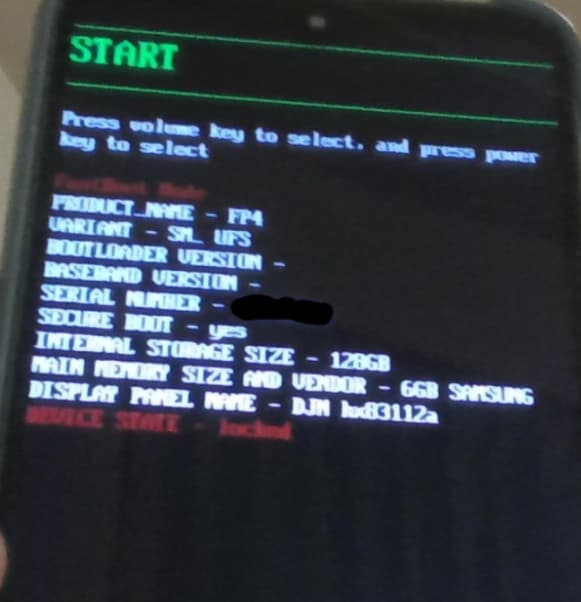
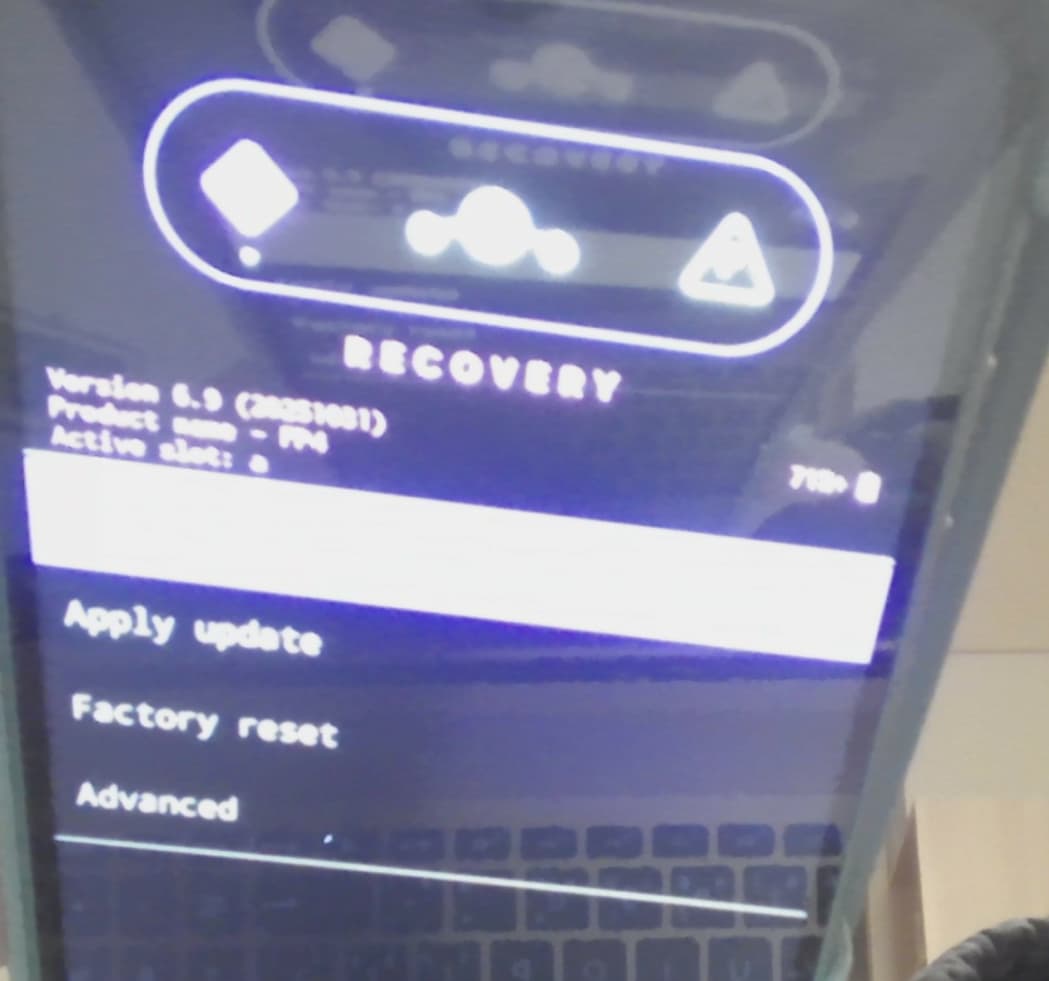
I hope that is the case that it is fixable, but thus far all of the commands I tried seem to suggest it is locked. Though the iodéOS install works fine except for installing apps and setting up a pin. I can make calls, be called, and I was able to install a Magisk .apk file via the commandline from my laptop (Windows 11), which disappeared again, because I then reinstalled iodéOS which put it back to a clean install. I am also able to load the LineageOS recovery and fastbootd screens (holding down the volume down button). I attached an image of this at the bottom of this reply. I tried applying an update from this screen, sending it “iode-6.9-20251105-FP4-ota“, which is a newer version than I have on the phone (it seems the iodéOS installer doesn’t automatically use the latest version), but no success there. It got to 95% uploading, then prompted as to whether to restart now or later. I did now at first which caused the adb sideload command on my laptop to return an error. So I then tried to redo it and select restart later. Which caused the adb sideload command to return something text like “2.00x” (I don’t remember exactly). And then I could manually select reboot. Though nothing else changed.
I’ve seen Active slot: say b as well. Not sure if trying to run fastboot --set-active=b caused that (me thinking maybe there is some other OS in the other slot, which was really a guess as I have no idea how this works). But that didn’t seem to complete succesfully.
I checked something else. I can indeed install .apk files using adb install from my laptop, but those same .apk files I cannot install from my phone. Not even directly without using a store, as the GUI then mentions that it wasn’t installed.
That is an interesting state for the phone to be in, very weird
Alright, since the iodé installer apparently still works for some reason, lets check a few things why that might be the case.
You said that fastboot flashing get_unlock_ability returns 0, but somehow the installer still runs. Does it prompt you to unlock the phone while it runs? (sources for the installer would be really nice at this point, I know why I only switched to iodé OS begrudgingly… )
Check that value again and even if it returns 0 try fastboot flashing unlock. That shouldn’t work, but the phone is getting unlocked for the installation somehow. Maybe they’re detecting an already installed iodé system and switch to a factory reset or ota install, again sources would be nice…
I could imagine the process is similar to the Fairphone install script which wipes data first, before checking if the bootloader is unlocked. So what you're seeing might look like a freshly installed system but is in fact just a factory reset one, and the installer doesn't communicate that failure mode clearly enough :thinking:
Edit: nope it doesn't wipe, it only asks the user for confirmation
If that’s the case we need to figure out why toggling the OEM unlocking switch in developer options glitches out. Is the phone connected to some form of internet when you try that switch? Shouldn’t be necessary on iodé, but on Fairphone OS that’s required to unlock.
Did you disable any apps or changed any other settings, if so enable them again and try one more time. If that doesn’t work, run the iodé installer again, don’t change any of the defaults of the first run dialog when the device first boots, connect it to the internet, and try toggling it again.
That’s just the vendor of the memory
Don’t touch the slots, ever, unless you absolutely know what you’re doing and why.
The slot you’re in will get managed by the system and is an important part of automatic disaster recovery, changing it can make your system unbootable in some cases, they’re not meant as a user accessible way to roll back to a previous version.
Huh, that’s weird, does the application you are trying to install them from on the phone (file manager probably) have the “Install unknown apps” permission set? Which app are you trying to install specifically, there are a few bundled apps in iodé, could it be clashing with one of them?
No there is no prompt for an unlock. The last prompt that happened was to relock it which the iodé installer caused. I selected yes thinking the iodé installer must know what they were doing. Before that I had ran the lock_critical manually after having already booted the stock Android installation. I didn’t run the fastboot lock command but instead started the iodé installer at this point because it required an unlocked but locked critical state.
Yes I saw the internet thing in a post somewhere on this forum so I tried doing it with an internet connection, but seems to not have any effect. I’ve done pretty much exactly that, not changing any defaults and using iodéOS that way, so I’ve already ruled that out.
Yes all places I tried to install .apk files from have the install apps permission enabled, I got prompted to enable this for the browser (the iodé browser which is Firefox) and the file manager. I also checked the Aurora store, which also has this permission enabled by default, and it cannot be revoked (it looks like it can in the GUI, but if you try it just doesn’t toggle it).
That’s weird, it’s been a few weeks since I last performed an iodéOS installation but I seem to remember they guided me through the unlock process.
If that doesn’t happen in your case then they’re detecting a system already running iodé somehow. I still haven’t found any sources (admittedly I didn’t have much time to look) so not sure what’s happening exactly
Entirely expected but thanks for checking.
We need to get you access to the OEM unlocking switch, I currently don’t see another way forward.
Lets start with the least amount of log output and increase the verbosity until we get a failure that actually tells us what’s happening.
Run adb logcat -c && adb logcat *:F > logcat.txt (I hope that works on Windows, I have no idea about the syntax there, you might need to run both commands separately and/or escape the *)
While that’s running try toggling the OEM switch in the settings, stop the command afterwards, and see if there’s anything interesting in logcat.txt. If you don’t see any output, change *:F (Fatal) to *:E (Error) and then to *:W (Warning), repeating the process each time.
Hopefully that will give us a clue
I’m not sure I entirely understand the question. Rollback protection is enabled once you lock the bootloader. At that point the bootloader checks the security patch level (SPL) of the installed systems against the rollback index stored in temper resistant storage.
That rollback index can only ever go up and will get increased whenever you install a ROM with a higher SPL.
So if the next iodé update increases the SPL (which is usually the case, unless it’s just a feature update), then the rollback index will also get increased.
If you install a ROM with a lower SPL and lock the bootloader, then that’s going to result in a brick.
Rollback protection will stay enabled until you unlock the bootloader again (at least in the Fairphone case, some manufacturers have it always enabled).
Is this sufficient information? I ran adb logcat -c; adb logcat *:E > logcat.txt. *:F resulted in an empty file. I ran the command twice to get logcat_oem.txt and logcat_noise.txt, to see if I only swipe up and down what noise there is in the log. From that the only difference when toggling the OEM setting is this:
--------- beginning of crash
11-25 18:50:40.726 13958 13958 E AndroidRuntime: FATAL EXCEPTION: main
11-25 18:50:40.726 13958 13958 E AndroidRuntime: Process: com.android.settings, PID: 13958
11-25 18:50:40.726 13958 13958 E AndroidRuntime: java.lang.SecurityException: FRP is active
11-25 18:50:40.726 13958 13958 E AndroidRuntime: 	at android.os.Parcel.createExceptionOrNull(Parcel.java:3261)
11-25 18:50:40.726 13958 13958 E AndroidRuntime: 	at android.os.Parcel.createException(Parcel.java:3245)
11-25 18:50:40.726 13958 13958 E AndroidRuntime: 	at android.os.Parcel.readException(Parcel.java:3228)
11-25 18:50:40.726 13958 13958 E AndroidRuntime: 	at android.os.Parcel.readException(Parcel.java:3170)
11-25 18:50:40.726 13958 13958 E AndroidRuntime: 	at android.service.oemlock.IOemLockService$Stub$Proxy.setOemUnlockAllowedByUser(IOemLockService.java:280)
11-25 18:50:40.726 13958 13958 E AndroidRuntime: 	at android.service.oemlock.OemLockManager.setOemUnlockAllowedByUser(OemLockManager.java:116)
11-25 18:50:40.726 13958 13958 E AndroidRuntime: 	at com.android.settings.development.OemUnlockPreferenceController.onOemUnlockConfirmed(OemUnlockPreferenceController.java:145)
11-25 18:50:40.726 13958 13958 E AndroidRuntime: 	at com.android.settings.development.DevelopmentSettingsDashboardFragment.onOemUnlockDialogConfirmed(DevelopmentSettingsDashboardFragment.java:439)
11-25 18:50:40.726 13958 13958 E AndroidRuntime: 	at com.android.settings.development.EnableOemUnlockSettingWarningDialog.onClick(EnableOemUnlockSettingWarningDialog.java:68)
11-25 18:50:40.726 13958 13958 E AndroidRuntime: 	at androidx.appcompat.app.AlertController$ButtonHandler.handleMessage(AlertController.java:168)
11-25 18:50:40.726 13958 13958 E AndroidRuntime: 	at android.os.Handler.dispatchMessage(Handler.java:109)
11-25 18:50:40.726 13958 13958 E AndroidRuntime: 	at android.os.Looper.loopOnce(Looper.java:232)
11-25 18:50:40.726 13958 13958 E AndroidRuntime: 	at android.os.Looper.loop(Looper.java:317)
11-25 18:50:40.726 13958 13958 E AndroidRuntime: 	at android.app.ActivityThread.main(ActivityThread.java:8934)
11-25 18:50:40.726 13958 13958 E AndroidRuntime: 	at java.lang.reflect.Method.invoke(Native Method)
11-25 18:50:40.726 13958 13958 E AndroidRuntime: 	at com.android.internal.os.RuntimeInit$MethodAndArgsCaller.run(RuntimeInit.java:591)
11-25 18:50:40.726 13958 13958 E AndroidRuntime: 	at com.android.internal.os.ZygoteInit.main(ZygoteInit.java:911)
11-25 18:50:40.726 13958 13958 E AndroidRuntime: Caused by: android.os.RemoteException: Remote stack trace:
11-25 18:50:40.726 13958 13958 E AndroidRuntime: 	at com.android.server.pdb.PersistentDataBlockService.enforceFactoryResetProtectionInactive(PersistentDataBlockService.java:1270)
11-25 18:50:40.726 13958 13958 E AndroidRuntime: 	at com.android.server.pdb.PersistentDataBlockService.getBlockOutputChannel(PersistentDataBlockService.java:470)
11-25 18:50:40.726 13958 13958 E AndroidRuntime: 	at com.android.server.pdb.PersistentDataBlockService.doSetOemUnlockEnabledLocked(PersistentDataBlockService.java:800)
11-25 18:50:40.726 13958 13958 E AndroidRuntime: 	at com.android.server.pdb.PersistentDataBlockService.-$$Nest$mdoSetOemUnlockEnabledLocked(PersistentDataBlockService.java:0)
11-25 18:50:40.726 13958 13958 E AndroidRuntime: 	at com.android.server.pdb.PersistentDataBlockService$1.setOemUnlockEnabled(PersistentDataBlockService.java:1133)
11-25 18:50:40.726 13958 13958 E AndroidRuntime:
11-25 18:50:40.829 14109 14109 E ndroid.settings: Not starting debugger since process cannot load the jdwp agent.
11-25 18:50:40.992  1185  1185 E BpTransactionCompletedListener: Failed to transact (-32)
11-25 18:50:41.410  1185  1185 E BpTransactionCompletedListener: Failed to transact (-32)
So in case a “bricked” device has the SPL/rollback index increased by an update, it doesn’t “unbrick” the device? Someone somewhere mentioned the term efuse. Why is it difficult to reset/unbrick that yourself?
Here additionally doing the same as I did above but with *:W
11-25 19:00:07.043  1485  2284 W InputReader: Received unexpected event (0x35, 0x358) for slot 0 with tracking id 8193
11-25 19:00:07.043  1485  2284 W InputReader: Received unexpected event (0x36, 0x519) for slot 0 with tracking id 8193
--------- beginning of system
11-25 19:00:07.141  1485 17936 W PersistentDataBlockService: Attempt to update PDB was blocked because FRP is active.
--------- beginning of crash
11-25 19:00:07.142 14109 14109 E AndroidRuntime: FATAL EXCEPTION: main
11-25 19:00:07.142 14109 14109 E AndroidRuntime: Process: com.android.settings, PID: 14109
11-25 19:00:07.142 14109 14109 E AndroidRuntime: java.lang.SecurityException: FRP is active
11-25 19:00:07.142 14109 14109 E AndroidRuntime: 	at android.os.Parcel.createExceptionOrNull(Parcel.java:3261)
11-25 19:00:07.142 14109 14109 E AndroidRuntime: 	at android.os.Parcel.createException(Parcel.java:3245)
11-25 19:00:07.142 14109 14109 E AndroidRuntime: 	at android.os.Parcel.readException(Parcel.java:3228)
11-25 19:00:07.142 14109 14109 E AndroidRuntime: 	at android.os.Parcel.readException(Parcel.java:3170)
11-25 19:00:07.142 14109 14109 E AndroidRuntime: 	at android.service.oemlock.IOemLockService$Stub$Proxy.setOemUnlockAllowedByUser(IOemLockService.java:280)
11-25 19:00:07.142 14109 14109 E AndroidRuntime: 	at android.service.oemlock.OemLockManager.setOemUnlockAllowedByUser(OemLockManager.java:116)
11-25 19:00:07.142 14109 14109 E AndroidRuntime: 	at com.android.settings.development.OemUnlockPreferenceController.onOemUnlockConfirmed(OemUnlockPreferenceController.java:145)
11-25 19:00:07.142 14109 14109 E AndroidRuntime: 	at com.android.settings.development.DevelopmentSettingsDashboardFragment.onOemUnlockDialogConfirmed(DevelopmentSettingsDashboardFragment.java:439)
11-25 19:00:07.142 14109 14109 E AndroidRuntime: 	at com.android.settings.development.EnableOemUnlockSettingWarningDialog.onClick(EnableOemUnlockSettingWarningDialog.java:68)
11-25 19:00:07.142 14109 14109 E AndroidRuntime: 	at androidx.appcompat.app.AlertController$ButtonHandler.handleMessage(AlertController.java:168)
11-25 19:00:07.142 14109 14109 E AndroidRuntime: 	at android.os.Handler.dispatchMessage(Handler.java:109)
11-25 19:00:07.142 14109 14109 E AndroidRuntime: 	at android.os.Looper.loopOnce(Looper.java:232)
11-25 19:00:07.142 14109 14109 E AndroidRuntime: 	at android.os.Looper.loop(Looper.java:317)
11-25 19:00:07.142 14109 14109 E AndroidRuntime: 	at android.app.ActivityThread.main(ActivityThread.java:8934)
11-25 19:00:07.142 14109 14109 E AndroidRuntime: 	at java.lang.reflect.Method.invoke(Native Method)
11-25 19:00:07.142 14109 14109 E AndroidRuntime: 	at com.android.internal.os.RuntimeInit$MethodAndArgsCaller.run(RuntimeInit.java:591)
11-25 19:00:07.142 14109 14109 E AndroidRuntime: 	at com.android.internal.os.ZygoteInit.main(ZygoteInit.java:911)
11-25 19:00:07.142 14109 14109 E AndroidRuntime: Caused by: android.os.RemoteException: Remote stack trace:
11-25 19:00:07.142 14109 14109 E AndroidRuntime: 	at com.android.server.pdb.PersistentDataBlockService.enforceFactoryResetProtectionInactive(PersistentDataBlockService.java:1270)
11-25 19:00:07.142 14109 14109 E AndroidRuntime: 	at com.android.server.pdb.PersistentDataBlockService.getBlockOutputChannel(PersistentDataBlockService.java:470)
11-25 19:00:07.142 14109 14109 E AndroidRuntime: 	at com.android.server.pdb.PersistentDataBlockService.doSetOemUnlockEnabledLocked(PersistentDataBlockService.java:800)
11-25 19:00:07.142 14109 14109 E AndroidRuntime: 	at com.android.server.pdb.PersistentDataBlockService.-$$Nest$mdoSetOemUnlockEnabledLocked(PersistentDataBlockService.java:0)
11-25 19:00:07.142 14109 14109 E AndroidRuntime: 	at com.android.server.pdb.PersistentDataBlockService$1.setOemUnlockEnabled(PersistentDataBlockService.java:1133)
11-25 19:00:07.142 14109 14109 E AndroidRuntime:
11-25 19:00:07.145  1485 17936 W ActivityTaskManager:   Force finishing activity com.android.settings/.SubSettings
11-25 19:00:07.170  1485  2283 W InputDispatcher: channel '27ec3f2 com.android.settings/com.android.settings.SubSettings' ~ Consumer closed input channel or an error occurred.  events=0x9
11-25 19:00:07.170  1485  2283 E InputDispatcher: channel '27ec3f2 com.android.settings/com.android.settings.SubSettings' ~ Channel is unrecoverably broken and will be disposed!
11-25 19:00:07.183  1485  1776 W ActivityManager: setHasOverlayUi called on unknown pid: 14109
11-25 19:00:07.185  1485  2250 W UsageStatsService: Unexpected activity event reported! (com.android.settings/com.android.settings.SubSettings event : 23 instanceId : 150985225)
11-25 19:00:07.215 14253 14253 E ndroid.settings: Not starting debugger since process cannot load the jdwp agent.
11-25 19:00:07.249 14253 14253 W BatteryUsageContentProvider: create content provider from null
11-25 19:00:07.261  1485 17936 W UserManagerService: Requested status bar icon for non-badged user 0
11-25 19:00:07.312  1485  2321 E WifiStaIfaceAidlImpl: getCachedScanData failed with service-specific exception: android.os.ServiceSpecificException:  (code 4)
11-25 19:00:07.389  1185  1185 E BpTransactionCompletedListener: Failed to transact (-32)
11-25 19:00:07.415 14253 14253 W ElapsedTimeUtils: getElapsedTime: sSuwFinishedTimeStamp is null
11-25 19:00:07.425 14253 14253 W HWUI    : Unknown dataspace 0
11-25 19:00:07.647  1485  1776 W ActivityTaskManager: Activity top resumed state loss timeout for ActivityRecord{127402486 u0 com.android.settings/.SubSettings t99 f} isExiting}
11-25 19:00:07.776  1485  2518 W ActivityManager: pid 1485 system sent binder code 7 with flags 1 to frozen apps and got error -32
11-25 19:00:07.776  1485  2518 W WindowManager: Exception thrown during dispatchAppVisibility Window{27ec3f2 u0 com.android.settings/com.android.settings.SubSettings EXITING}
11-25 19:00:07.776  1485  2518 W WindowManager: android.os.DeadObjectException
11-25 19:00:07.776  1485  2518 W WindowManager: 	at android.os.BinderProxy.transactNative(Native Method)
11-25 19:00:07.776  1485  2518 W WindowManager: 	at android.os.BinderProxy.transact(BinderProxy.java:592)
11-25 19:00:07.776  1485  2518 W WindowManager: 	at android.view.IWindow$Stub$Proxy.dispatchAppVisibility(IWindow.java:557)
11-25 19:00:07.776  1485  2518 W WindowManager: 	at com.android.server.wm.WindowState.sendAppVisibilityToClients(WindowState.java:3317)
11-25 19:00:07.776  1485  2518 W WindowManager: 	at com.android.server.wm.WindowContainer.sendAppVisibilityToClients(WindowContainer.java:1343)
11-25 19:00:07.776  1485  2518 W WindowManager: 	at com.android.server.wm.WindowToken.setClientVisible(WindowToken.java:437)
11-25 19:00:07.776  1485  2518 W WindowManager: 	at com.android.server.wm.ActivityRecord.setClientVisible(ActivityRecord.java:7171)
11-25 19:00:07.776  1485  2518 W WindowManager: 	at com.android.server.wm.ActivityRecord.postApplyAnimation(ActivityRecord.java:5865)
11-25 19:00:07.776  1485  2518 W WindowManager: 	at com.android.server.wm.ActivityRecord.commitVisibility(ActivityRecord.java:5808)
11-25 19:00:07.776  1485  2518 W WindowManager: 	at com.android.server.wm.Transition.finishTransition(Transition.java:1375)
11-25 19:00:07.776  1485  2518 W WindowManager: 	at com.android.server.wm.TransitionController.finishTransition(TransitionController.java:986)
11-25 19:00:07.776  1485  2518 W WindowManager: 	at com.android.server.wm.WindowOrganizerController.finishTransition(WindowOrganizerController.java:526)
11-25 19:00:07.776  1485  2518 W WindowManager: 	at android.window.IWindowOrganizerController$Stub.onTransact(IWindowOrganizerController.java:293)
11-25 19:00:07.776  1485  2518 W WindowManager: 	at com.android.server.wm.WindowOrganizerController.onTransact(WindowOrganizerController.java:215)
11-25 19:00:07.776  1485  2518 W WindowManager: 	at android.os.Binder.execTransactInternal(Binder.java:1406)
11-25 19:00:07.776  1485  2518 W WindowManager: 	at android.os.Binder.execTransact(Binder.java:1350)
11-25 19:00:07.776  1485  2518 W Process : Unable to open /proc/14109/status
11-25 19:00:07.782  1485 17936 W UserManagerService: Requested status bar icon for non-badged user 0
11-25 19:00:07.782  1485  1688 W UserManagerService: Requested status bar icon for non-badged user 0
11-25 19:00:07.824  1185  1185 E BpTransactionCompletedListener: Failed to transact (-32)
Factory Reset Protection (FRP) kicks in when you have a Google account linked to your device and factory reset it without removing it first, also explains why you can’t install apps.
That information gets stored in the FRP partition, when you install a ROM that partition gets overwritten with an empty one which removes FRP. Now that obviously didn’t happen in your case for some reason.
On regular Fairphone OS you’d just have to log in to your Google account on first boot (actually you wouldn’t, because FP flash FRP as well, but in the case of a full factory reset not a reinstall that’s what happens), but I don’t think that works on iodé, that might need proper Google Play services. I’ve never linked my device to a Google account so not entirely sure
I don’t expect this to work but lets try if adding a Google account changes anything. Go to Settings → Passwords, passkeys and accounts → Add account → Google.
If there’s already a Google entry in the list of accounts then this route clearly doesn’t work.
I don’t think unlinking the device from your Google account via a PC works, Google doesn’t mention anything like that in the docs and even if that’s a viable option, that would probably also require Play Services on the phone to remove FRP.
Real catch 22 here, can’t flash FRP because the bootloader is locked, can’t unlock the bootloader because FRP got triggered, can’t bypass FRP because there are no Play Services, can’t install a ROM with Play services because the bootloader is locked…
If adding a Google account doesn’t fix it, this might be a case for contactsupport
I’m extremely baffled by the fact that you still have a FRP partition on the phone that wasn’t wiped during one of the installs, the install script should overwrite it, you performed several installations… (or it could be something else that just looks like a FRP issue, but all the signs point towards FRP)
Edit: There have been similar reports on the iodé forum, so maybe they don’t flash FRP for some reason, again, no sources for the installer so far, not sure exactly.
That case was solvable because the bootloader was still unlocked, so doesn’t help other than provide more data points.
Edit 2: OK, I checked the manual installer for iodé OS and they indeed don’t flash FRP.
Wow, just wow, I can’t even, there’s no words
If the GUI installer follows the same procedure then yeah, that’s the issue right there.
If you still have access to recovery and can sideload an ota with a newer SPL, that should in theory get the device working again, but I wouldn’t consider a device with access to recovery fully bricked, and I’m not entirely sure if triggering rollback protection removes recovery access
You can’t fix a proper brick yourself because:
You can actually get into EDL-mode on the FP4, I’ve played around with it, but you need a signed loader to do anything useful with it and the one for the FP4 hasn’t leaked yet, and I don’t expect it to anytime soon.
The FP3 didn’t require the loader to be signed, so you could fix a bricked FP3 yourself, because of NDAs etc. and general lockdown of the platform I don’t think we’ll see that level of access for us users again.
I actually added a Google account during setup. Because I have some paid for apps I use. And I prefer to always install some apps via the app store, such as government apps. Though I guess on Aurora that part doesn’t matter. Though I do also have a Youtube Music subscription.
I have already opened a repair case, the mail label is already in my inbox. I haven’t sent it yet though, should I? I have arranged a spare phone as well.
Yeah, that’s what I expected. I would have been very surprised if removing FRP was possible with microG.
I don’t see another way out of this one, sorry
There are a few tools out there that claim FRP bypass, but mostly with phones from larger brands, older Android versions etc. …
Ultimately you still would probably need Play Services to clear it, the necessary mechanism doesn’t seem to be available from microG, and without access to fastboot flash there’s not really a lot of options left.
Honestly surprised you’re the first person I see running into this issue, not flashing FRP seems like a major oversight on the iodé side, there’s no reason to keep it intact.
I also checked the manual installer for /e/OS in the meantime, unless there’s something I’m missing they don’t seem to flash FRP either, apparently my experiences with CalyxOS and a few others were actually an outlier.
I don’t get it, flashing FRP should be default, there’s nothing to be gained from keeping it around, especially since both ROMs don’t ship Play Services, the only thing you’re accomplishing are potential bricks, like in your case…
No, sorry, your issue isn’t related to rollback protection, which didn’t trigger, otherwise you wouldn’t be able to boot the phone at all.
FRP is a completely different security mechanism. Unless the new iodé update ships with Google Play Services (extremely unlikely) it won’t help you.
The only way an update could help, and I have no idea if this is even possible at all, would be iodé including an empty FRP partition that overwrites the current one.
No idea if that partition can be flashed from an ota update though, at the very least you’d need an update signed by them.
If you wanna try that route, I’d suggest opening a topic in their community forum, not sure how reactive the devs are.
Might be worth a try, maybe they at least start flashing FRP in the future
@hirnsushi apparently there is a beta for iodeOS. Would that be something worth trying? It only requires installing an apk which I assumes replaces the updater apk.
You can try it, but my previous points still stand.
Unless that beta overwrites your FRP partition, or there’s a mechanism included that let’s you disable FRP, then I don’t see the beta changing anything for you.
Nothing in the announcement indicates either of those might be the case, I would be very surprised if that issue got fixed.
One of the team members reacted to the iodé community thread I linked further above, apparently they weren’t even aware of FRP (doesn’t mean the whole team wasn’t necessarily).
Your best bet is to try to get in touch with the devs directly. Whatever fix might be possible has to come from them, your bootloader is locked and ota updates need to be signed by iodé, nothing we can do here really.
If it’s possible to flash the FRP partition from ota (again, not sure if it is), then maybe they are willing to provide you with a build for you specifically that does just that.
And hopefully they just flash FRP during first install in the future…
is there a fastboot command to erase (format) FRP ?
would it be the same as flashing an empty image of FRP
FRP is related to still registred Gogol account more than iodé, isn’t it ?



 )
)

