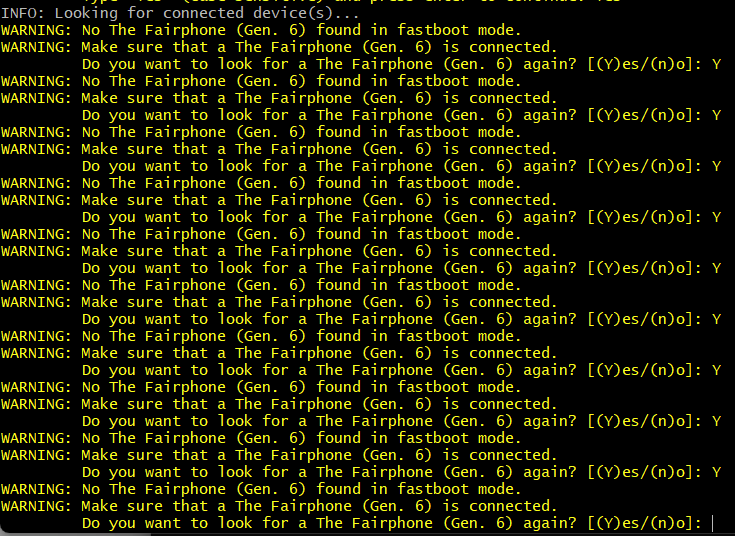
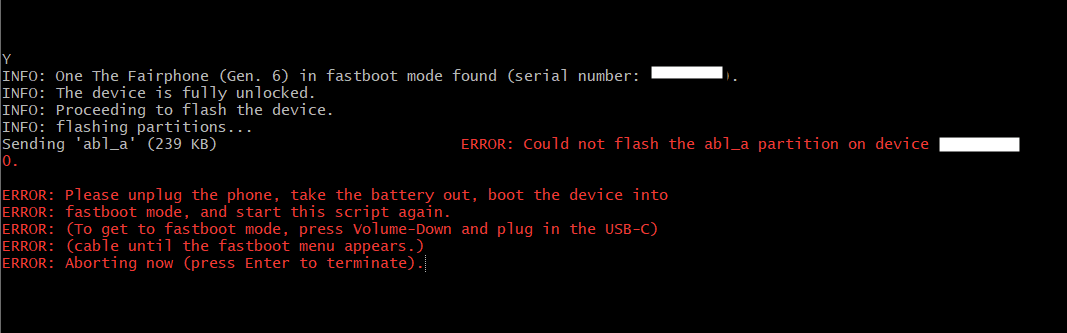
Hello, as a long time user of iode OS (on FP4, FP5) i wanted to install it on FP6, i made a mistake during the install and long story short, i’m stuck on the fastboot dialog (not the one with small blue letters but the one with black screen, white letters and you have to do vol+ or vol- to choose the thing you want to boot to.)
The thing is i can’t go to recovery it does not work. i can’t start the OS it does not work
I can detect the phone when i do "fastboot devices" but not much else
on the iodeOS forums someone told me to install FPos back and then reinstall iodeOS.
however, i can’t since i don’t know why the manual install software is almost every time i run it crashing and when it’s not it’s closing because it does not detect the fairphone.
Unfortunately I am afraid that your FP6 is “bricked” (and can only be made working again by Fairphone’s repair contractor Cordon in France). This happens when you are trying to install an operating system with older Android security patch level (SPL) than what is currently installed. I cannot say if your Iodé version had a more recent SPL than the Android OS you were trying to install, but the symptoms you describe sound like it.
If this is confirmed, you will need to contact support.fairphone.com and explain that your FP6 is bricked. From recent reports, it will cost around 50 € to get this resolved by Cordon. The device will need to be sent in for this.
EDIT: OK, going by your IodeOS topic, it seems a bit more unclear what has happened and what your options are. Your conversation partner there is probably more knowledgeable about this than I am.
Thank you for your reply, i did not know about cordon it’s cool to know that even if it’s bricked there is a workaround somehow, i know i made a mistake so that’s my bad.
But i created this topic to talk about why the FPOS software does not work right, and maybe you know if there is logs of the app somewhere in the folder we download when we manual install ?
So your bootloader is unlocked, correct? Fastboot devices is detecting the phone? Thus no its not a brick normally and could be fixed by yourself. So did you also try to reinstall Iode?
What PC OS do you use?
And to understand why its not working with the FPOS installer, more info would be helpful I guess…at which step does it crash etc.
Hello i made a vidéo of the issue just so you see, i know i typed Yes instead of Y at the fairphone 6 discovery fail, but as we see at the end even Y does not work and it crash
preview still don’t work, but i was able to download and read the vidéo.
seen the date, the script have been modified please re-download the original one to be sure.
at some points some script expect the phone in fastbootd mode instead of fastboot, but i am personnaly not able to switch my FP3 to fastbootd only my Samsung
i tried fastboot GetVar current_slot and it does not work
tried to reboot in fastbootd :
fastboot reboot fastboot Rebooting into fastboot OKAY [ 0.002s] < waiting for any device > fastboot: error: Failed to boot into userspace fastboot; one or more components might be unbootable.
the device rebooted in fastboot mode but not in fastbootd it seems
Well i think i’ll get in touch with support at this point, i don’t understand how could i screw this that much …
Ok, i did reboot in fastbootd mode by typing fastboot reboot fastbootd
Now the Fairphone is stuck on the fairphone splash screen with a tiny line saying “Press any key to shutdown”
And what’s interesting is now the script does not work BUT it is not crashing anymore, I have a loop at the searching device part !
now launch the Fairphone script, until it stop,
but may have done some magic…
then, reboot to “normal” fastboot and retry with the Fairphone script,
and again if needed reboot to fastbootd… etc … etc …
I tried what is mentionned at the end of the script, i removed the battery but the phone wont powerup without the battery when i push volume down and plug the usb-C
On the CMD screen type fastboot.exe reboot fastbootd, it will say < Waiting for device > because you are still on the splash screen on the FP6
Now press a button on the FP6 and at the same time type Y on the Script screen
The fairphone is now detected and the install begins !
I don’t know if it make sense but it worked for me
Thank you everyone, i really learn some things here !
As my phone is now on FPOS, i’ll get back to iodeOS forums !
plot twist :
I managed to get myself in the exact same place, i don’t understand why it happened since this time i made sure oem unlock were toggled on the phone usb debugging etc …
I used FP6.QREL.15.151.0 (November Build) and on Iode OS i downloaded iode-7.1-20260116-FP6-fastboot.zip from one day ago, there may be an issue with the security patch ..
the one that was registred the last time you applied the unlock,
and the one installed when you apply the relock.
.
to bypass the FRP lock, you must install Stock OS (not sure, but maybe also LineageOS + Gapps) and use it to remove any Gogol account and screen lock or SIM lock or carrier lock
before installing any alternative android OS