Even after running the calibration tool (settings > maintenance > proximity sensor) for several times on my brand new FP2 the problem of NOT turning off the screen during calls prevailed. I am on Fairphone OS 1.8.1.
The solution that solved this for me:
- run the calibration tool (settings > maintenance > proximity sensor)
- step 1: hold my flat hand over the area of the sensor without touching the phone, distance ~2cm, (instead of covering the sensor completely with a finger as instructed by the tool) like this:
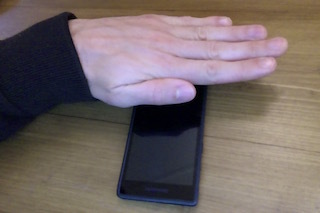
- step 2/3 as instructed by the tool
Using the app Sensors as recommended by fairphone support here I verified that the point at which the proximity readout switches from 5cm to 0cm was further away (at about 2-3 cm and not like before at about 0-1cm).
Now the display is switching off when I hold the phone close to my ear (without even touching my ear/face at all) and switching back on when I take the phone away from my face. Before I had to press the phone against my face in a very certain angle which I now luckily don’t have to worry about anymore.