Fairphone 4 no signal

Hello,

I have seen similar issues to mine but not the exact same, hopefully someone can help.

My fp4 (android 13) is extremely unreliable getting signal. (maybe connected twice in the last month). It used to work fine. I’m with Three in the UK.

If I have the wifi on and wifi calling enabled - it will show I have good signal. As soon as i turn it off it disappears. Without wifi I cannot make or receive calls/access internet etc. The signal icon will have an exclamation mark over it and it will say “(temporarily unavailable)” in the network and internet settings page, and “no connection” in the internet page. For context I live 20 meters from a mobile phone mast.

Things I’ve tried:

check for software update

switching to esim

factory reset phone

wifi calling off, 4g calling off

restarting phone

mess with apn settings

restart internet button

messing with off/on mobile network switch

messing with off/on sim switch

every combination of the above in different orders

trying different carrier sim in my phone (worked)

trying my old sim in old phone (shows signal but sim has been deactivated)

cleaning antenna contacts with a q-tip

putting a piece of tape under the antenna contacts so it protrudes out a bit more ( I don’t think this was the issue now)

troubleshooting with Three - I don’t think its an issue on their end it seems like the phone to me.

When I turn off and on the sim, It shows there being signal briefly but I think this is just a ui thing being a bit optimistic.

when I turn off “automaticly select network” I can see a host of carriers listed, including “3” and “3 UK” but neither will connect - I will get repeated notifications saying “network unavailable”, which is what it will say under the sim in settings.

Occasionally while resetting/restarting etc. I can suddenly get it to work. But its very rare, and only temporary.

Any advice would be much appreciated.

Thanks.
Hi

How old is your current SIM? Now that 3 UK has merged with Vodafone have you thought of getting a new SIM to see if makes any difference?

I downloaded a new esim a few days ago, after I factory reset my phone

Is the e-SIM activated in your providers account?

Did you check APNs are correct?

I scanned the qr code and entered a pin and received a text to say the sim was active.

I made my own profile using the settings here. It’s almost the same as the default one though. One time when I pressed “reset to default” in the APN settings it started working again but I haven’t been able to replicate it.

Based on that

I would check settings directly with Three not any third party web page

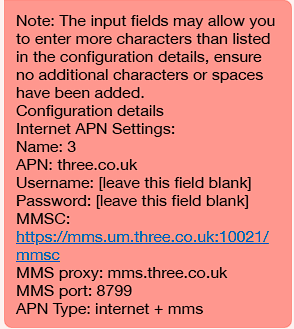
This is what the lady gave me:

Made no odds. She told me to take it to the shop first, now she’s sending me a new physical SIM, because I can’t get to the store till next week.

It must be a coincidence, but on two occasions now - as soon as I hang up the live text chat with the Three representative the phone suddenly starts working? I’ve not pressed anything and emails start coming through? I’m scared to press anything in case it stops working again. I cannot make sense of it.

Im not sure but I had a similar problem last year.

For me, signal always came back after I had restarted my phone. Then it would drop very soon or when trying to make a call. Similarly, an exclamation mark would appear in the signal icon.

I sent my phone once and they couldn’t reproduce my problem. I also couldn’t reproduce my problem with a SIM from another network company. In the end the only solution was replacing the motherboard. Haven’t had problems since.

I can’t see the motherboard listed in the parts shop which is a shame. I’m starting to wonder if it is a hardware issue. I cant find a test in the self test menu, but the esim one passes.

I have the same issue, I tried all of the above mentioned (new physical sim - new eSim) and wandering, new motherboard is not an option, so I should buy new Fairphone? The thing is, that I bought Fairphone with the idea that if anything break I can replace it for a less money than with other phones and don’t need to toss it somewhere and buy new phone, as with the most other companies. shame :sleepy_face:

Frankly, this, taken with some other indicators in your quite detailed description, such as:

… would make me suspect either a APN setting error (already discussed), or a configuration error in you carrier’s systems.

Merging with VF may not have helped.

The very fact that

indicates to my mind that the problem does not come from the phone hardware.

The difficulty, in a case like this, might be getting the carrier to recognize there’s a problem, and then correct it.

You might find it quicker and easier to switch to the carrier whose SIM functioned correctly. Would that be EE by any chance?

Pretty weird, but I suppose if it can happen once, it can happen again …

Did they replace your motherboard under the terms of guarantee?

So not exactly the same problem as fozzie52.

I tried an 02 sim. I’m quite tempted to leave Three, I have such a good deal with them though. Maybe they’re trying to get rid of me…

My inclination is to wait for the new sim and at least try it. Then when that doesn’t work at least I can compare the APN settings and see if it maches the profile for the esim.

Would you like to tell in which country you live and which provider you use?
Did this problem suddenly occur, just after an update for example?

I’m on EE and my sister is on O2. Neither of us have any issue with signal loss. Maybe you’re just unlucky to live in an area where 3 isn’t the best signal?

Hi,

I’ve had the same problem with an Spanish provider (Lowi that has the same network as Vodafone).

After trying different things provided from Fairphone support (after 6 months waiting for a response) finally they told me to change the network provider. Here it is the response:

“Based on the information available, and the fact that the phone works on a different network, it does suggest that the issue is specific to the compatibility between the Fairphone and the Vodafone network, or more specifically, the Lowi network which uses the Vodafone infrastructure.

Unfortunately, if you have already tried all the troubleshooting steps and confirmed that a different SIM card from another provider works properly in your Fairphone, switching providers will be the only solution.”

It’s a pity but given the lack of updates (still on android 13) and those “solutions” they provide, I’m done with Fairphone.

I’m in the UK on the Three network. It’s been an intermittent issue which seems to have gotten worse over time.