You should suggest to buy a Fairphone indeed, but just never buy a Fritzbox!
FRITZ!Box isn’t even a choice with some providers. And the router discussion is off-topic here, I guess.
None of my guests without a Fairphone ever had any problem with my FRITZ!Box router.
PS: I’ve never had a problem with the FRITZ!Box myself expect the fairphone.
PS2: The only reason I mentioned the router — and my mother as a normal user — is that some issues are so important that end users shouldn’t have to be aware of anything technical at all.
The same issue has been reported by users that don’t own a Fritz!Box…
Let’s not play the shaming game. The router might behave unexpected, however, most other devices are affected. So FP6 could step up and fix their software as it looks it’s their fault.
This bug is becoming more and more annoying. At home I have to switch off Wi-Fi on my Fairphone regularly when I want to have a good experience without interruptions. But every now and then I have to activate Wi-Fi to use my Sonos Audio System. Recently I had to buy extra traffic from Vodafone because i used too much Mobile data at home (and sometimes forget to switch back to Wi-Fi).
Let’s be honest: As apparently not all phones are affected by this bug, FP has some serious responsibility to fix it. And we should assume that they know exactly. Even if this forum is not meant to be for official communication, they of course observe it. And developers of course read threads when they are told by management: “Fix this bug!”. Because they are not stupid.
So why isn’t it fixed yet? Maybe their data shows that too few people are affected, so it’s low priority. Or they just couldn’t fix it yet, although they tried.
What after all remains: Their communication is really bad. I am sure that they of course profit from what we write here. But at the same time they can say “We don’t need to respond because it’s a user forum, not our official channel”. Very convenient for them.
My 2 cents:
Everyone and their mother has a Fritz!Box in europe, it shouldn’t be that hard to reproduce & diagnose the bug by Fairphone. If they really struggle for whatever reason, they have tons of feedback here to help them out. Also they could reach out to gather information or make a statement. For me this company isn’t trustworthy anymore.
This is my third Fairphone and it will be last one, definetly. All of them were riddled with bugs but this right here is another level of broken. Also, it is not sustainable if I have to get rid of a phone that is fine hardware-wise but can’t operate properly because its software is broken. Sustainability is one of the main reasons I bought this phone in the first place.
In Germany, if core features are broken, you are entitled to a refund (or a fix in a reasonable timeframe). My personal limit is 6 months, we are at month 4 now. The only reason I am that patient is because I don’t want this phone to go to waste, it could serve me many more years to come.
No not everyone and their mother have a Fritzbox.
However assuming you have.
Is it up to date and did it change something?
when I remember correctly you have LOS installed, so another option for you
I completely understand the frustration. But can we try to keep this thread focused on technical findings?
The bug is already well established. What’s needed now are new packet captures, adb dumps, reproducible observations and feedback from Fairphone. Repeated “it’s still broken” posts only make it harder to find the information that might actually help solve the issue.
Latest FritzOS update (8.25) installed. Issue persists…
This is just a English phrase not to be taken literal, meaning it is pretty common. At least common enough that fairphone should be able to find a fritzbox for debugging.
I am on 8.24 beta still but I will update and test it asap. However, the changelog doesn’t look promising.
I get that! Maybe a new, curated, seperate thread for just debugging is a good idea? Since I think there should be room for more than just findings, as long as it is still on topic (like workarounds, warranty experience, etc.) and as we all know now, it is not user-error anyway. I will make a report to LineageOS’ github (if there isn’t already), I think that could be a good place to discuss technical findings too, even if you’re on FairphoneOS, we could compare the results.
That’s what fairphone needs in order to fix the bug, not we. I don’t wanna spent a lot of time narrowing down the issue, if I don’t even know if Fairphone listens/cares. But I don’t mean to discourage anyone, this is just how I feel about it.
However, if they make a honest statement about the state and ask for dumps/logs or whatever they need, I wouldn’t hesitate to help out with that! 
By the way, does anyone have experience with 6GHz? Because as I mentioned a while ago, reanabling WLAN breaks IPv6 instead of fixing it like on 5GHz. It occasionally works again and restarting my router fixes it too (until it breaks again).
I think we haveto take into account that now there is the hollyday season. So things might get slower. So here I want to give the developers the advantage.
Hopefully this issue will be fixed quickly.
I had e/OS 4 installed on my fp6 and that is still under android 15.
I did go back to android because some stuff was not working well and the FRP was still active.
Loaded 16 again and hoped this reset would remove the wifi issue, but not.
I think first I go back to 15 and see how things go, and maybe later try e/OS again.
By the way, I don’t have a Fritz box but have the same issues so not really related to the modem.
They had six months before holiday season to fix the bug. These excuses are getting more and more unhinged.
Dear Forum Community,
Thanks for bringing this to our attention!
We’re aware of the DNS over TLS and IPv6 issues causing data loading troubles over Wi-Fi, and we’re working on a resolution.
We are actively monitoring this thread and want to thank everyone for their contributions!
As always, once a fix is ready and thoroughly tested, we will mention it in the release notes of the software update that includes it.
The Fairphone Team
Same here:
- No Fritzbox
- 2 FP6
- 1 with e/OS (android 15) → no issues
- 1 with default android → issues
- In contact with support
I am on 8.24 beta still but I will update and test it asap. However, the changelog doesn’t look promising.
My Fritz!-Hardware (Box 5690 Pro, Repeater 1700, Repeater 2400) are all on the latest Lab-Version 8.24-134xxx BETA. (The official 8.25 should be largely the same as the last 8.24 BETA)
The last repeater updates seem to have mitigated the problem. It is still not fully solved, but loss if IPv6 connection does not happen as often as before. Caveat: the basis is mere incidental observation, not serious testing.
Hi
I’ve found a solution for home networks using Fritzbox and IPV6, at least in Germany with Deutsche Telekom
In Fritzbox configuration activate IPV6
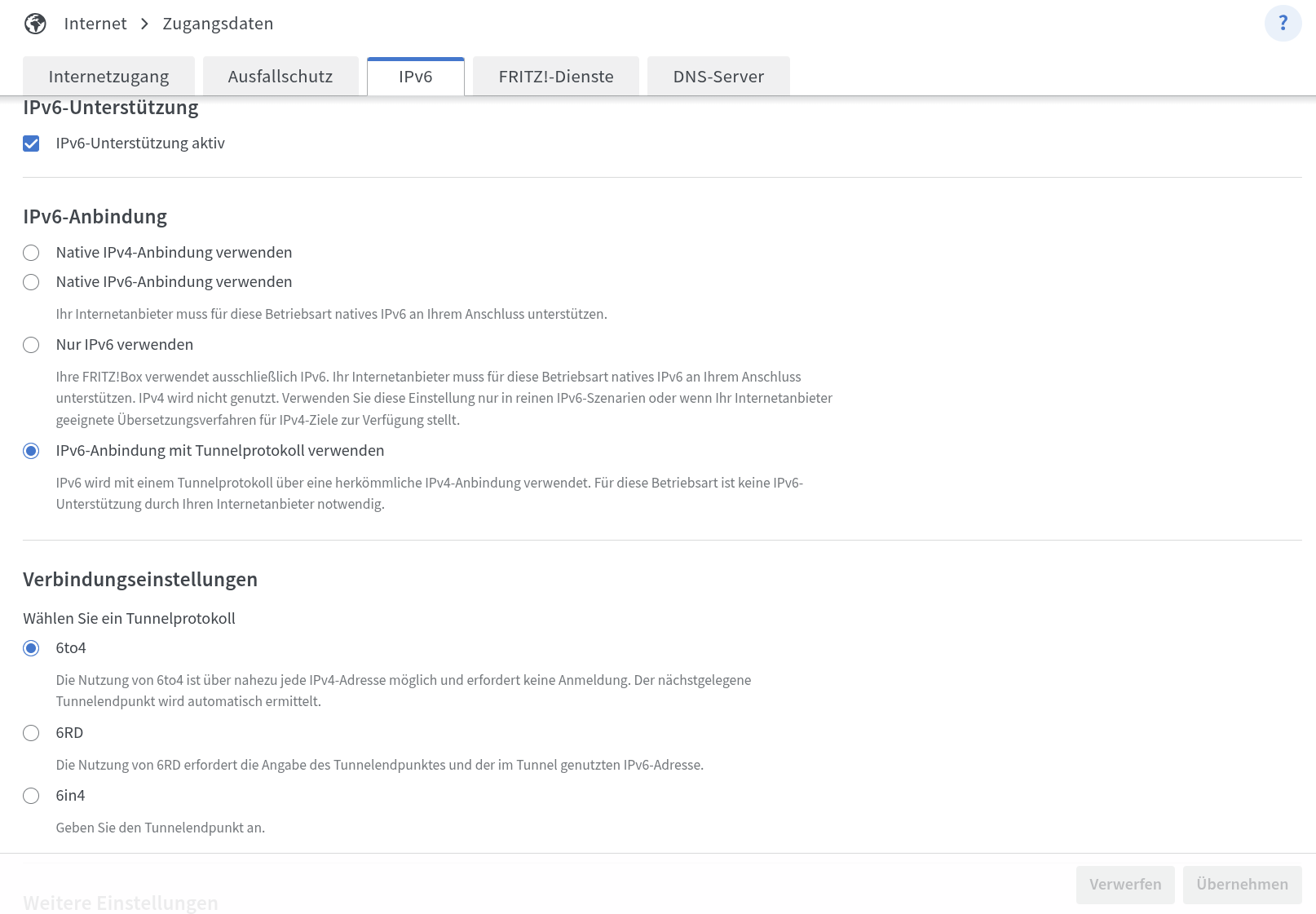
Activate IPV6 with tunnel
Then select 6to4
After this change I do not experience problems with Apps that don’t load over WiFi.
Maybe other Router and Networks can be adapted
HTH
Glad to hear from you guys! Even though it’s a little late. Let us know if we can provide anything to help tackle this issue.
That seems to be a good workaround if it really works. But keep in mind that the traffic gets routed through a relay server if the service/website doesn’t support 6to4 (which is to be expected because 6to4 was deprecated in 2015 ). This is bad for privacy and connection-speed.
Also the IPv6 prefix depends on the IPv4, which is usually changing on reconnect. That means all your devices get new IPv6 addresses on reconnect, this can cause (temporary) connection-issues for them.
I am a little worried now. It’s not just “DNS over TLS and IPv6”.
- I have been using a locally enforced a “DNS ove TLS” on the FP6 which only returns IPv4 addresses - this works, no issues (3 weeks straight now), even communication on IPv6 works when using fixed IPv6 addresses.
- When not using “DNS over TLS” at all, I had major issues on WiFi Networks that had IPv6-enabled, my own network, family, various WiFi-Hotspots. WiFi Networks with only IPv4 had no issues. Apps known to use just IPv4 also had no issues. Other Apps did a fallback from IPv6 to IPv4 eventually, after minutes++ of waiting, and the next menu item might hit the same issue again. Totally unworkable, hence my workaround above: No changes to the WiFi Networks, just use a DNS Provider which filters out all IPv6 and only returns IPv4.
So, I am a little worried that @Fairphone_CM is now focusing on “DNS over TLS” - while this might also be a symptom, it is absolutely not the core issue.
Just confirming, I use a similar workaround with the same result. Week 3 now, various IPv6 WiFi Networks at home, family and WiFi-HotSpots, no issues anymore. Locally, the IPv6 Addresses on the WiFi are still working, so no modification to the network needed, just to the FairPhone6.
What I did:
They are def. not doing this.