Since I updated to Android 16, the battery usage is much higher in general.
I am quite consistent with my phone use which made this new issue stand out. It stands out even more for me because before the update, one full charge would last me two full days while now I have to charge every day.
Before, I would take the phone from the charger in the morning at 100% and make it to bed in the evening at around 60-55%. Put the phone on flight mode for the night, wake up with about 2-3% battery less, so I would start the second day with more than 50%, making it to the end without charging, with around 10% left.
Since I updated, at the end of the first day I am at 45-40% battery left, and during the night in airplane mode the battery goes down another 10-15%!! I wake up to the phone at around 30% which I know won’t make it to the end of the second day.
Has anybody else notice this? Is there a solution?
I tried to check what the issue could be. After one night on flight mode, I saw that the 10-15% of battery that was lost was mostly due to Network Usage (about 80%, I don’t have a screenshot and last night I charged the phone, but I will add one screenshot tomorrow morning). I guess this didn’t happen before, but I have no way of checking. In any case I find it very weird that Network Usage would be so active while the phone is on airplane mode. It looks like a bug that the phone would activate the network services while the phone is specifically set on flight mode.
Thanks @Lidwien ! I guess I will give it a couple of days more. Is it maybe related to the battery optimization? Android needs to learn when you, on average, use certain apps?
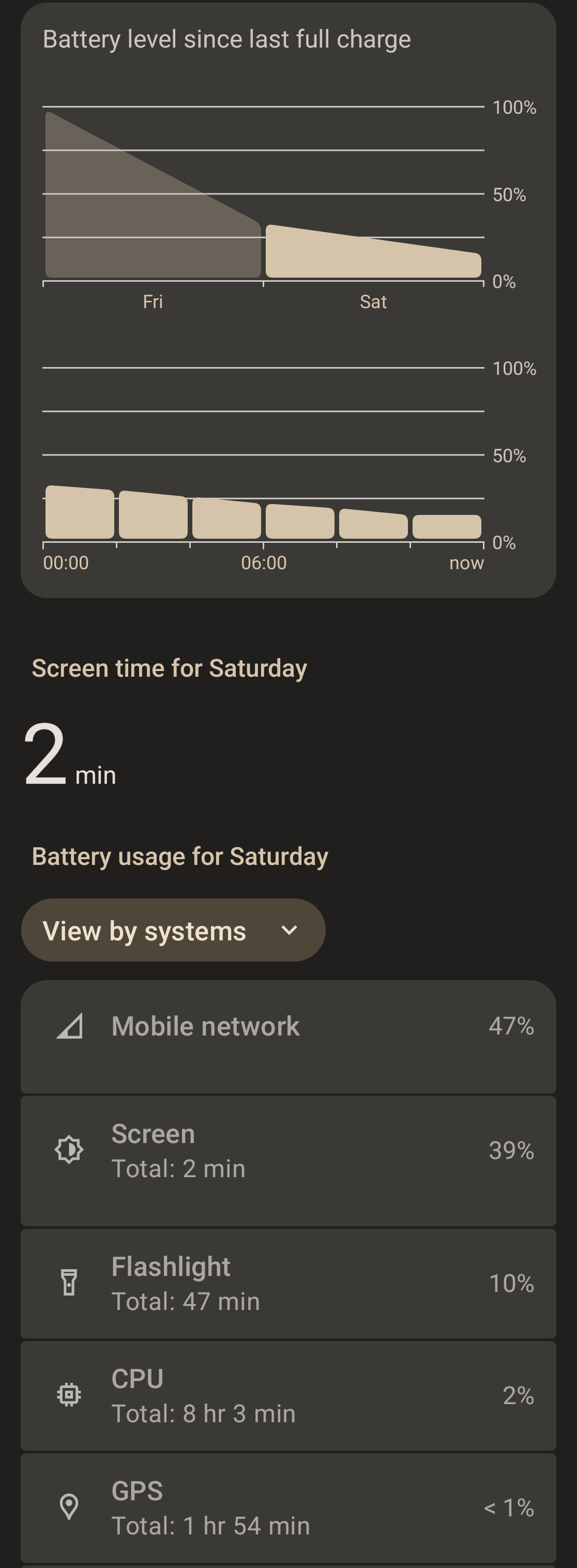
In any case, I took some screenshots from last night. I lost 20% (!!!) battery with the phone on airplane mode.
I found quite funny that one of those processes that took a relatively big part of the battery was the flashlight. Why on earth would the flashlight service turn on and use the battery while my phone is resting on my night table? For 47 minutes??
That’s a good point. I mean, do I really need 4G/3G/2G when my phone is on airplane mode at night? That’s what I find frustrating, that the phone activates processes while it is out of use and in airplane mode!
Sounds like might be related to wifi issues with a16 update, Id guess the failing network requests keep phone from idling and cause battery drain. Its all related DNS over TLS issues - Apps don't load data
Hi @mikaelvz, welcome to the forum. Have you tried restarting the phone? There is a bug that I also experience sometimes, where the phone fails to go into deep sleep when not in use (deep sleep is a state of very low battery use, around 1%/h compared to ~5%/h in normal sleep).
Rebooting the phone fixes the issue and makes it correctly go into deep sleep again. You can use AccuBattery if you want to observe that more closely. Normally, my FP6 goes into deep sleep after ~15 minutes of inactivity.
Edit: I seem to have missed something when reading your post the first time. The drain you experienced seems to be 7%/4:15h if I calculate correctly, which seems to be reasonable deep sleep battery usage - a bit on the higher end, but nothing out of the ordinary. You may get better results when using the phone without a charge limiter.
If you always have charge limiter on, try turning it off and letting the battery go down to 20-25% and then up to 100%. If the battery never goes close to 0 and 100, the phone doesn’t get a chance to recalibrate the battery sensor and may display the wrong charge level (and the limiter may stop the charge at the wrong level). Yes, full cycles do wear the battery, but one every 2 months is probably tolerable.
I sleep with do-not-disturb, not airplane, and it this night it used ~8% charge in 6h. So, while your drain isn’t outstandingly high, the phone should be able to do better.
Also, don’t get too focused on battery usage stats, because they’re not that meaningful with low drains. Firefox using 35% of a 3% drain means it used 1% of your battery over 2 hours. That’s not unreasonable, if it had some background tasks, such as sync or extension updates.
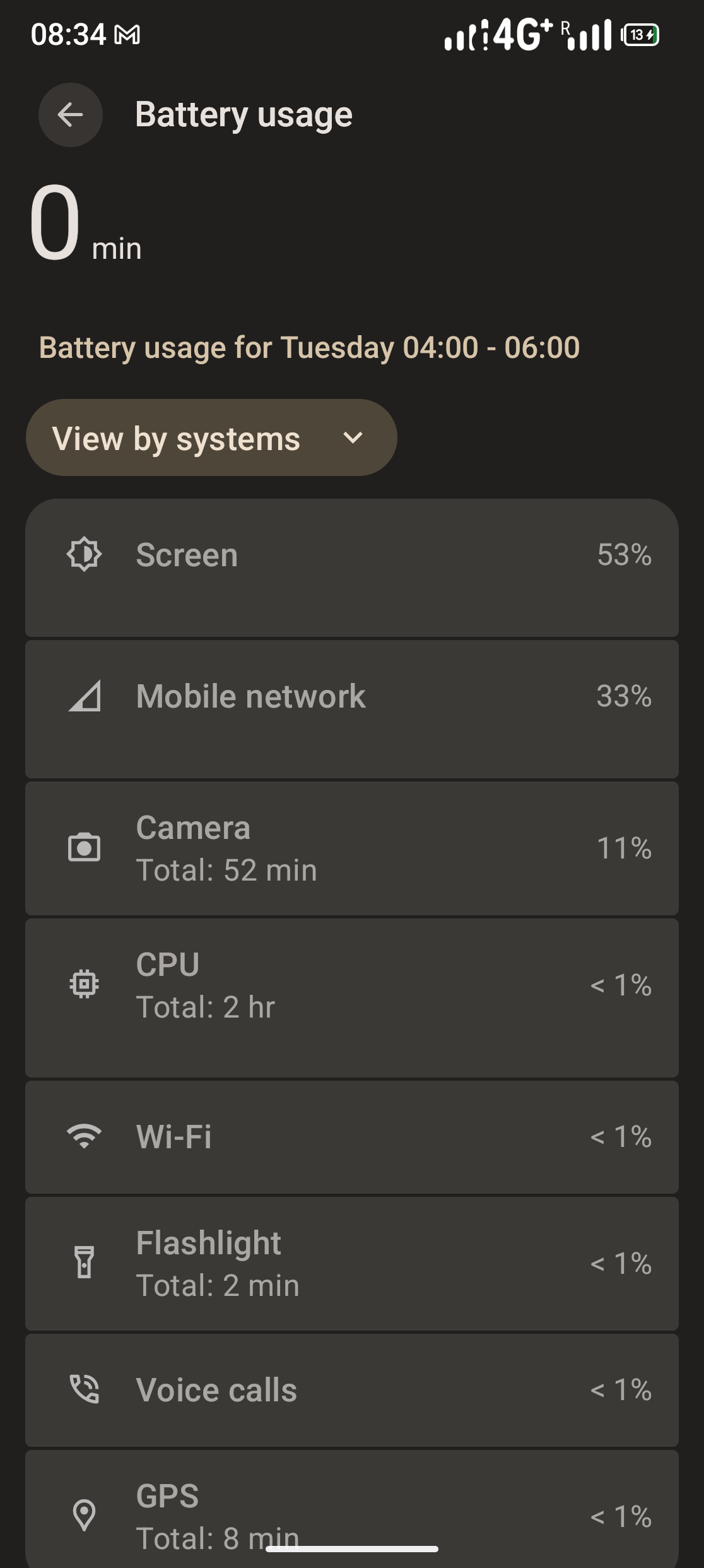
More than two weeks have passed and I have seen no improvement at all. Last night, the phone spent almost 20% battery being on flight mode. This time it was the screen that took most of the battery with 0 mins of screen time. I am guessing this is not normal.
I also turned 5G off and battery drain is the same: I cannot go two full days without charging anymore.
I would usually not be so demanding and settle for this. But I have seen that this phone actually can perform much better when it had Android 15. It just seems silly.
Btw why does the camera show 52 mins of use within 2 hours?
I have the same question. The phone was on my nightdesk on airplane mode while I slept. Several apps are draining the battery at night on airplane mode. See my previous screenshot where the flashlight was 47 min active also at night.
And how much did the battery drain during those 2 hours?
It’s usually about 20% for the whole night, very constant in time, so around 5% every 2h.
Same here. Phone drains superfast since the 16 upgrade. Also just got a battery warm warning so something is defenitley drawing alot of power. Even when not in use.
The very first thing to do is rebooting. After that safemode is a good way to futher trouble shoot, as it disables all third party Apps. Should it change in safemode its most likely a thirs party app.
Disable 5G was mentioned above.
Disabling Always on Display.
Maybe check with AccuBattery App if the phone goes into DeepSleep.
@jlovesfair see here reg battery calibration
and I would let it drain till it turns off and recharge to 100% without using it
I will check doing the full battery drain and see if that helps. I will also try the AccuBattery app to check the deep sleep.
In any case, any other solutions, like disabling 5G or always on display are not really solving the core issue, which is that using the phone in the same way drains the battery abnormally fast with A16 compared to A15. Everything points to a software issue coming from the latest update.