The Fairphone 5 is detected on the computer, but when I connect to USB the file transfer doesn’t work and it doesn’t appear as a drive in Explorer
Hello and welcome.
I have just tested that on my FP and it is working so perhaps there is another reason apart from the update?
For instance, I have had some issues on my desktop PC with Usb ports for years and I need to sort that out sooner or later.
Please tell us more about your user case. Can you activate the system USB settings but the option of file transfer is greyed out?
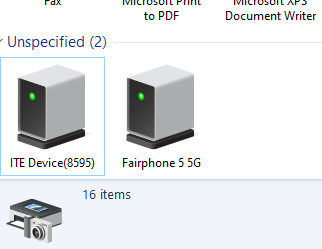
I have a similar issue. After the Android 15 update, my FP 5 doesn’t connect to my PC, and doesn’t recognize my IR camera when I plug it into the USB connector.
In USB options, it doesn’t let me select who controls the USB.
See the topic has been closed, but unable to find the duplicate!
Well you posted here saying its the issue, so your seperate topic was the duplicate. If you are not facing this issue here I can reopen and delete your post here.
Edit: it was not you @PeterJ with the extra topic so I dont understand your comment.
I am facing the issue in the topic here, but as part of a possibly more general problem.
Ok so you want your topic open and delete here? I would rather think we could keep it here together, as overall it does not seem to be a widespread issue.
This is not needed for file transfer and normal that it doesnt work, what you need is the lower part.
My concern is that this topic is from August, and it looks like there hasn’t been any progress in resolving it.
What lower part are you referring to? The file transfer options?
Yes.
Well a new topic doesnt change anything, the topic here now is alive again and pushed up in the list over and over again with each reply.
The file transfer options setting also doesn’t work.
It can be the port in the FP, read here: No data transfer possible via USB-A on the Fairphone 5
Hmm, possibly. I also have the problem with an IR camera with a built-in USB-C connector, so not related to USB-A, but could still be the USB-C connector.
Rather frustrated with FP customer non-support. They have now twice just told me to use the web self-diagnosis (that doesn’t have anything about USB) and closed my ticket…
Yes, the USB port doesn’t exist in this … system. My plug in IR camera didn’t work too, because it uses only the USB2 mode with the same data pins like the USB-A connector. Try a thick USB-C to C cable at a real USB3 port on a computer.
Bummer. I guess I’d better return the IR camera then. 
Just to reiterate: its likely the USB port is broken, because it def should work with USB-A cables in general and it does for me.
Following on that to get some more opinion
- my USB-C transfer has become unreliable
First it stopped working at all with my docking station, then my headphones, e-reader, PC transfer. I did some basic troubleshooting, opened the phone, checked the connectors, cleaned it. Run the internal testing - for USB-C got NOK. But just today I managed to get the PC transfer working on my laptop (no dock though - will keep on testing)
Contacted the Support and very fast (!) I got the option to send in the phone. I could also chose that via the portal but declined.
Now I really really do not want to send my phone. I offered to purchase a USB C port on my own , test it and ask for reimbursement. Is it the most reasonable option? Are there any other internal tests I could do? Can it be the software issue that could be solved by the factory reset?
I have the same issue, except that I changed the USB port and that didn’t help. I really don’t want to send my phone away.
Hello,
When I connect my Fairphone 15 to my computer - either a PC running Fedora Linux or my laptop running Ubuntu Linux then I expect a pop-up to appear on the phone asking if I wish to share the phone or something similar. From my previous experience of Android then I expect to see a extra drive or device in the file browser for the phone, and I can open it and access the files. Specifically, I want to open the DCIM folder to download photos.
But I am not asked to connect and the phone, and its files are not visible in the file browser on the PC or laptop. The cable is charging the phone via the USB. But no data or device visibility! It’s odd as it happens with both the PC and the laptop.
I checked the usual online forums but no joy. Incidentally, there is no notification about the connected device via the USB.
Any suggestions before I contact Fairphone support?
Thank-you for your help and assistance,
Andrew