Since updating to Android 15, I have been experiencing issues with data transfer via USB. Additionally, USB devices are no longer functioning. However, charging and screen mirroring are working. Can anyone confirm this issue?
hello,
it might be that your USB-C port is faulty (that happened to me).
could you run some internal troubleshooting?
Do you mean the internal service menu? *#*#2886#*#* That no longer opens either, probably since the update.
yes, I was afraid you will say that.
As far as I know, that issue has been reported to CS by @urs_lesse.
Can you access any troubleshooting via the MyFairphone app?
or perhaps - I admit that would be harder - swap the USB-C port with someone?
As long as I can charge, it’s fine. I also opened a ticket and am still waiting for a response. I thought maybe someone else was having the same problem. It’s strange to me that screen sharing via USB-C on the docking station works, but the laptop doesn’t recognise it. But if none of you are having this problem, then maybe it really is a broken port.
It was mentioned in other threads that USB data transfer isn’t working with A15, at least with FP4.QREL.15.15.2. I have this problem too. After restart (which often hangs and requires pressing the start button for a long time), USB data transfer often works for some time and than stops. The Phone is no longer recognized by the PC and shows no USB options.
That’s exactly the software version I installed. I just tried it and it works after restarting.
I have the same problem, the laptop does not recognize my FP4. Have installed 15.15.2. Also not working directly after restart. I have opened a ticket but waiting still for response.
Go into Settings, then System, Developer Options, Default USB Configuration. Is File Transfer turned on?
Hello,
I am facing exactly the same problems. The software version of my FairPhone 4 is:
FP4.QREL.15.17.2
I am using a USB keyboard (FairBerry) that used to work fine. Sometimes (mostly on hot days, not so often on cool days) the connection between the keyboard and the FP4 fails. Unplugging and replugging the keyboard does not help. The only solution is a reboot. If I choose reboot the situation is often the same as @KleinerAdmin, the device does not reboot properly. I have to press power for a longer time until the FP4 starts again. After the complete restart the USB port works and the keyboard is working fine until the problem occurs again.
Regarding the problems especially on hot days Gemini provided the inormation that the frequency of the chip from the keyboard (ATmega32U4-MU) rises when its getting hot. This causes problems with the USB transfer between FP4 and the keyboard. Due to the problems the USB port is switched off and it can only be reactived by restarting the FP4. Is Gemini right with that answer?
Kind regards
Flat Erik
I’m running FP4.QREL.15.16.1 and have a similar problem. When I try and transfer files I just get an error message ‘libmtp error: Could not get file from device.’ and the process locks up.
I don’t know exactly which release started the problem, but it’s definitely fairly recent and possibly associated with the extra security of having to confirm (Verify that it’s you) my phone access code to proceed.
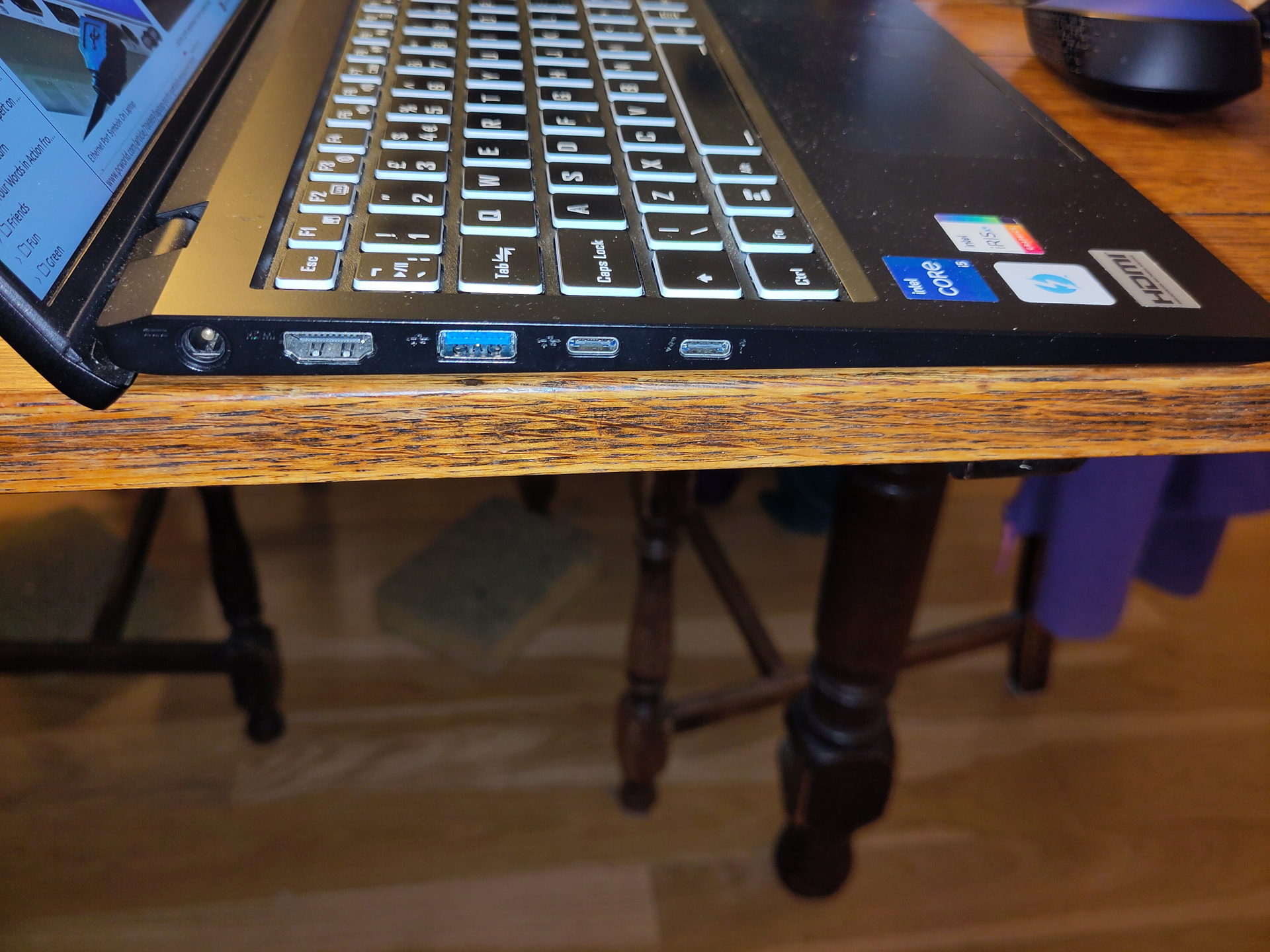
I’ve now solved this by connecting my phone to the other USB-C port on my laptop. If I understand the symbols correctly (which I may not) data transfer should work on either port, but it now only works on the Thunderbird port. To be honest I’ve no idea which of the USB-C ports I’ve plugged my phone into before, but highly likely I’ve used both.
As an aside, does anyone know what the key symbol on the Thunderbird port means? I’ve been unable to find an acceptable answer from searches. Thanks.
The problem is the same on FP4.QREL.15.19.2 as well. At the moment the workaround is to diconnect the keyboard from the phone most of the time. I only connect the keyboard when the phone is active in use. Perhaps I will install a switch into the power supply of the keyboard…
I’m on FP4.SREL.15.19.2 and still having the same issue. No USB data transfer regardless of cable type and it hangs up while restarting as well.
Any fix for this yet? It’s been months
It’s been working for me again for a while now. I don’t know why.
After a restart (which mostly requires a long press of the start button), USB-Data works for a while (hours until some days), then USB-Data doesn’t work any more.
My usual procedure to do when wanting to connect via USB-C. I’m on e/OS/, but since quite some time I have to go this way to get USB-C data transfer enabled for some limited time. I don’t know why this is and if it is an intentional behavior. But I’m sure there’s no fault at all related to the connector.i
I have the same issue with my Fairphone 4 since Android 15. The USB data works sometimes if i unplug and replug the USB cable a hundered times. When it has connected succefully, it works reliable and does not brake up, so the issues seems to be with the initial handshake of the USB connection. I also did a factory reset, which did not resolve the problem.
It just occurred to me that I cleaned the USB port. Maybe that solved the problem.