I bought a second hand Fairphone 4 because I want to try to make the switch from the Apple eco system to Fairphone without Google.
I just started the device and downloaded the newest Android version, as the e/OS-installer guide said.
I am following the steps but now I need to unlock the OEM function, but that does not work. When I do that, first I need to give my passcode (no problem), but then it gives the screen as in the installer but without “enable” as a possibility. I can only select “Cancel”.
Does anybody know what to do? Hopefully in a simple way, because I’m not super technical.
While folks are probably not going to be happy about me suggesting this but could you follow the steps to unlock the device from here Bootloader Unlocking Code for Fairphone - Fairphone and then go back to the /e/ os installer. If the unlocking steps from the Fairphone website fail could you please report back with what error is reported.
Thanks! I’m not stressed (yet) even not with this code-thing in between :~)
I just found out my IMEI code and serial number of the phone, but when I type it in the browser it says: “An error occured, please try again later”. But it does not look like that’s going to change?
Ok, a new problem appeared, so I changed the title of this topic.
I connected the phone to my laptop and downloaded e/OS and everything seemed to be going ok. The rebooting started which looked impressive to a non-techie :~)
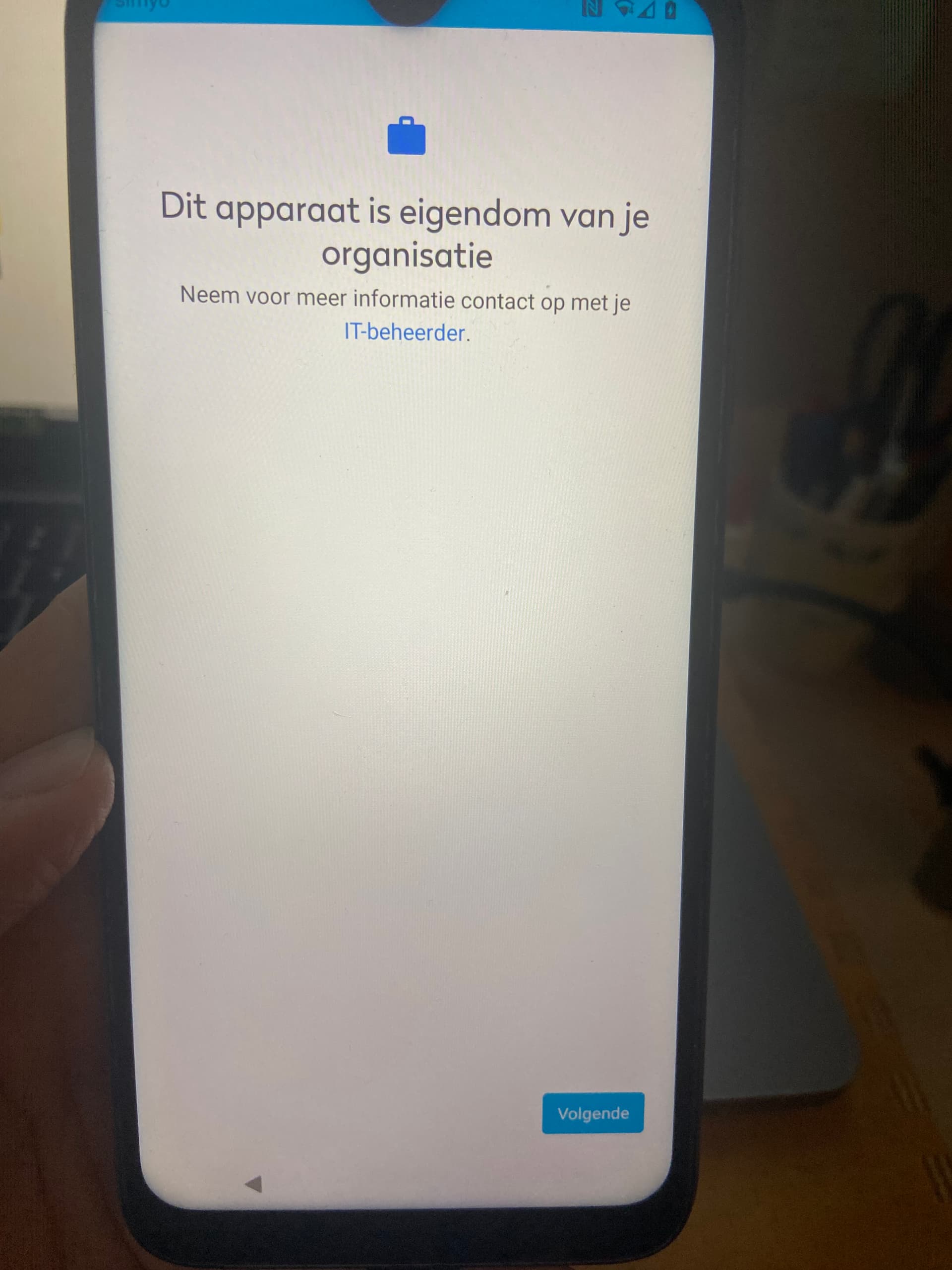
But then there was something which looked as a set-up for Google? It said that my device belonged to an organisation and that my IT-manager was arraning things (or something like that).
And now I have a screen which says “can’t set up the device. To finish setup, sign in to your work account.”
And I can choose between “sign in”, “help” and “factory reset”.
But it looks like I went a wrong direction somewhere during / after the reboot?
In the e/OS instruction it says in Step 11 “Pass the setup on the phone”. I’m no native english speaker, but does that mean I had to skip a setup-process? But how should I have been doing that?
And how can I go back now and start over or go back a stepp in the proces?
Sorry for the picture in mirroring, I made it with my laptop, because I’m without a working phone during the installation proces.
Frankly, one possibility is that the previous user had a Google account and did not properly un-register it from the device. Maybe someone else more knowledgeable about Google accounts can contribute more certainty here.
That was the problem I think. You set up your device for MDM (mobile device management) what companies usually use to roll out policies and restrictions to the employees business phones. Now the devicce expeccts a config file or something like that from a MDM server, which you obviously don’t have and want as private person.
At this point you’re no longer the complete “master” over your device.
I have no idea if this can be fixed by resetting the device. If possible, I would factory reset the device and start the setup again. And before you do this step that lead you to this point share a screenshot and the community hay help you with the instruction.
The buzzwords were “organisation” and “IT-manager”.
Thanks! When the screen appeared with the text that the device was from an organisation and the IT-manager was doing thats, that thought also crossed my mind - that it was about old things from a previous owner.
But when I started the phone, to make sure I had the newest Android version, everything looked new and fresh? (but I’m an Apple user, and now idea how things work at Android and / or Google)
To me it also looks as if the MDM ist still active on your FP4. Obviously it was in use as a work phone before you bought it. You should do a factory reset to get rid of the MDM App. If it still remains after factory reset I would send it back to the store and ask them to remove the MDM App.
@community:
As I’m new to Fairphone in general and not experienced with the specific FP4 at all, so has this device maybe a recovery mode that can reached by @sandradejong easily and gives the posibilty for factory reset?
That sounds bad a quick search in Google reveals that it is really hard to get this MDM off the device without the Help of the IT department that installed it. If there is a chance to give it back to the seller I would recommend to do so.
My question is that if e /os/ get flashed, why is that screen showing up? If the bootloader is/was successfully unlocked and e /os/ was installed, should / would that not make that MDM gate-keeping null/void?


 Maybe someone else more knowledgeable about Google accounts can contribute more certainty here.

 a quick search in Google reveals that it is really hard to get this MDM off the device without the Help of the IT department that installed it. If there is a chance to give it back to the seller I would recommend to do so.