Remote NDIS INF template for NDIS 5.1 and changing
; Decoration for x86 architecture
[RndisDevices.NTx86]
%RndisDevice%    = RNDIS.NT.5.1, USB\VID_xxxx&PID_yyyy
to my Hardware ID 
; Decoration for x86 architecture
[RndisDevices.NTx86]
%RndisDevice%    = RNDIS.NT.5.1, USB\VID_0BB4&PID_0004
worked out.
The only problem is, that the network adapter remote NDIS based Device shows up only, when USB Debugging is on.
When I switch debugging off and tethering on, the hardware manager shows a new piece of unknown hardware: Mt65xx Android Phone Driver. So I downloaded the MTK USB driver as linked by google on Android Developers.
Once again I had to edit the .inf, in this case android_winusb.inf. I added the following line (4 of 5)
[Google.NTx86]
...
;MTK device
%CompositeAdbInterface% = USB_Install, USB\VID_0BB4&PID_0003
%CompositeAdbInterface%     = USB_Install, USB\VID_0BB4&PID_0004&MI_02
due to
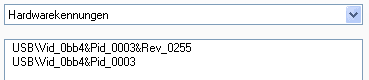
But no new network adapter at all.
So the final question, what do I miss to get tethering to work (or NDIS to show up) when debugging is off?
Here comes the solution:
I added
%RndisDevice% = RNDIS.NT.5.1, USB\VID_0BB4&PID_0003
just above (or below, as you like) my initial modification of the Remote NDIS INF template and updated the driver of the android phone by this file and voilà 