After the first Android 16 update was extremely delayed to my device, I was very pleasantly surprised to see that this one came to my phone just the day after the rollout started. I don’t know if this was because Fairphone themselves chose a more aggressive rollout strategy (would make sense for a smaller bug fix update) or if it was me yelling at my carrier to not block updates. Regardless, I’m happy  everything seems to work fine so far
They Fixed the Size of 4G and 5G Symbol, but the 4G plus Symbol is almost bigger than.
I’ve just done the update. Everything seems to be working just fine. I didn’t experience any issues during the update, and the described fixes appear to be working correctly. Thanks, and keep up the good work, Fairphone!
Battery icon was stuck on 100%, but restarting the phone fixed the problem. 4G+ icon is still very big. When using button navigation, changing the volume level on the home screen creates a buggy shadow under the buttons.
Good catch…I will log an issue in the beta Group.
Thats known generally and I assume they will improve this at some point, maybe currently they focus on rather real issues
Update was succesfull.
Calling via wifi was disabled after update. Before the update it was enabled.
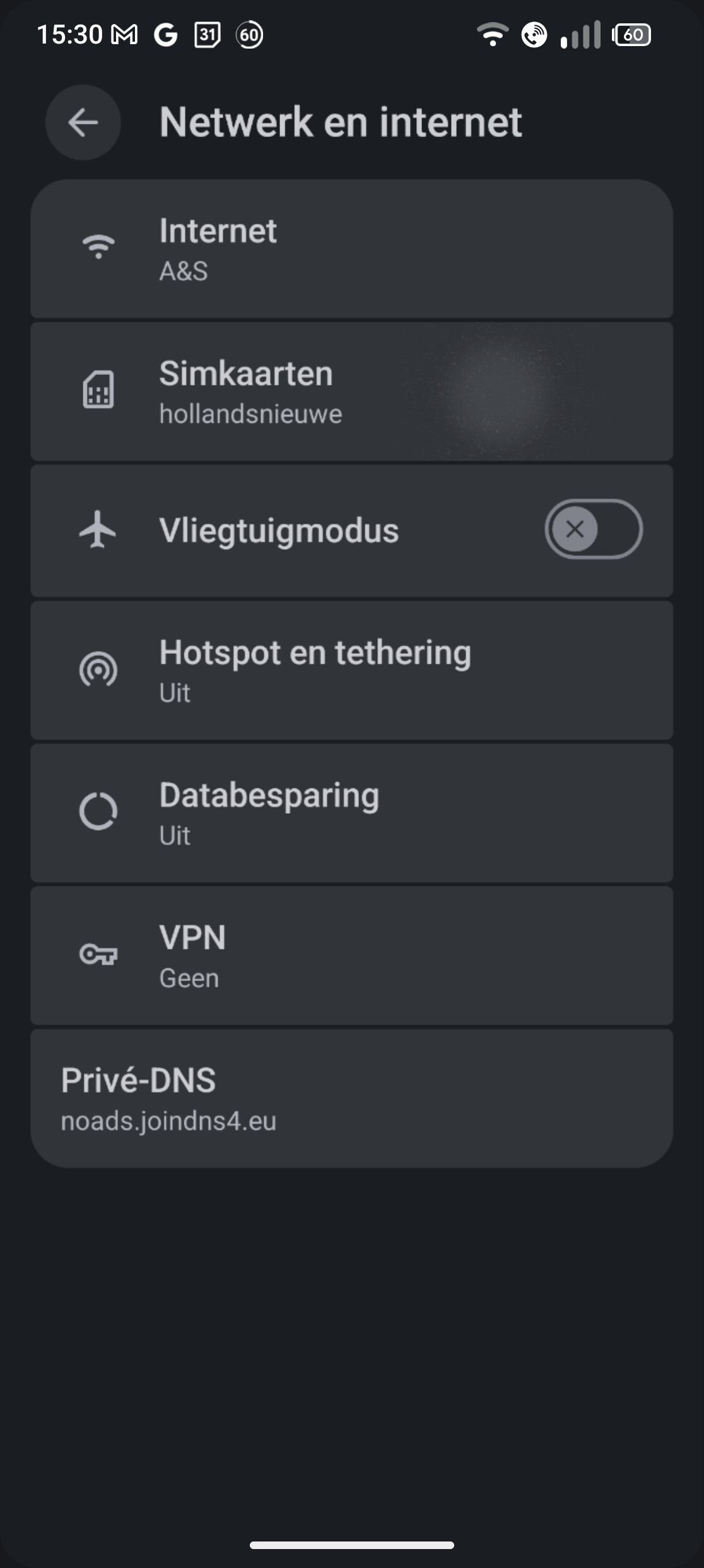
In the settings after going back a step, there is shortly a highlight where i touched the screen. In the screenshot i went back from ‘simkaarten’. The mark right from the text is where i touched the screen to open ‘simkaarten’. It happens sometimes and last a a second before disappearing. It does not matter how long i stay before going back a step. It is like the highlighting animation from opening that setting is finished after returning.
Update was successful and I thought everything was not fine but at least just as before… but I’ve just noticed that I’m now having this same issue: WLAN shows "Low quality" and switches to/uses Cellular Data, instead of disconnecting or Roaming to better AP
With the already known WiFi issue, that means you must disconnect data, otherwise it switches to data a few minutes after enabling WiFi saying “low signal” even if WiFi router is working properly.
I updated yesterday, thankful that the back button swap was now working (note that I have skipped the last two updates because of this so the problems I’m seeing might not have been in this release, specifically).
Unfortunately, now Android Auto is extremely laggy to the point that it eventually disconnects from my car.
As well, the adaptive brightness has become essentially useless. When I’m in the dark, it dims so much that I can’t really see the screen very well, and when I try to increase the brightness, it eventually just goes back to the way it was. The trigger to turn off the adaptive brightness is also buried in the settings, so temporarily disabling it is more of a problem than it used to be.
What type of car did you try Android Auto with? After the update I’ve used Android Auto of my FP6 on several cars (Ford Kuga, VW ID3, Suzuki Vitara) and didn’t have any issues.
Did you check
Settings > Display > Extra dim
Yes unfortunately this is not really working and while rather subjective, for me its also too dark.
We raised this in the beta group and they might bring the setting in the quick tiles back.
It happens with a Subaru (which has a terrible infotainment system) where it never really worked very well, and a Hyundai (which has an amazing infotainment system) where it was working flawlessly.
It appears to be a regression to this pre-existing issue. I did test it, and if I keep the screen on, then it works just fine.
Yup. It’s turned off. Thx tho!
Yeah it’s always been too dark, but in the past, a manual adjustment fixed it – sure I had to do it every time the room got dark, but it stayed fixed for that session – but now it only fixes it for a moment and gradually goes back to the lowest setting. This behaviour is, unfortunately, new and it’s gone in the wrong direction.
Keen! Thank you!
Yes absolutely, please report to support
Done. Request #1438231
I have filed a number of issues in the last couple of days; the list of problems is getting pretty big now. Obviously, I don’t know about everyone else, but I’m far less interested in new features for the next release and would love to see it be a pure bug fix release. Here’s the basic list:
New issues (and regressions):
- Android Auto frame rate issues unless the screen is on
- Adaptive brightness switch is buried in settings
- Adaptive brightness continually pushes itself to the lowest brightness in dark situations, which is new behaviour and requires turning off the adaptive brightness, whereby it used to just be fixed by manually adjusting the brightness.
- AOD turns on overtop of apps that are running the screen – I have a clock that I put on at night, and when the screen locks, both the clock and the AOD are displayed and the brightness changes because of the AOD
- The AOD no longer shows the media being played.
- Swiftkey loses its ability to do auto prediction and auto capitalization once in a while. Killing the app, and restarting it (Signal in this case) fixes the problem (I did not file an issue for this because I’m getting a bit weary of filing issues… I’m not Fairphone QA… but I probably should)
Long standing issues:
- Location Accuracy causes reboots. A serious pain because some apps demand that it be turned on, making those apps somewhat useless. Not specifically in this release, obviously, but a massive on-going problem.
- Audiobooks have audio that drop out at seemingly random times. I’ve been dealing with this one for a year, assumed it was the app, but found that it actually happens in multiple audio book apps. It does not happen in spotify or rocket player.
I think that’s it, but I might be losing track a bit.
This growing list of issues is making it harder and harder to use this phone on a regular basis. I wanted to get a phone that I wouldn’t have to replace for at least 8 years for all the good reasons to do that, but at this rate I might have to replace it far quicker than any phone I’ve ever had.
So can we just get the team to focus on actually fixing all of these issues (and whatever other ones don’t affect me, but are affecting others) before trying to add more features?
Thanks for reporting all these issues. Overall please refrain from writing such issue summaries, to avoid duplication, kindly rather (as you also did) add your voice to existing topics.
We addressed this in the beta group and have been informed that this in no AOSP feature. So they are looking into it, however its no bug actually, so might not be no. 1 priority.
This issue related to north america only is discussed here and it seems after the released fix, the issue is not fixed completely but no longer as wide spread as before.
Thats for me a rather low priotiry one, as it affects 2 third party apps. I dont think I noticed this using Heliboard.
That might be very specific with this third party app, thus rather not high priority.
Thats discussed here
Thats discussed here
Using headphones, speakerphone, Bluetooth and which app?
please see here for a tip to use an app to bring it back to quick settings
I appreciate what you do @yvmuell, being on the front line of the forums like this.
The Location Accuracy might seem not as wide spread, but it was fixed for me and now it’s broken so it seems to be spreading again. Android Auto was fixed for me but now it’s broken again. From this user’s perspective, things are trending in the wrong direction, as regressions are pretty serious.
Every single software release just introduces more problems. I get that they may seem like “low priority” but I experience them dozens of times per day and there are 4 new problems that I experience constantly just in this latest release alone. I’ve reported half of the issues I’ve experienced and literally, none of them have been fixed, more keep showing up, and if they’re all going to be shoved aside as low priority then, well… that’s just a shame.
I’m afraid this just isn’t worth it anymore. I’ll stick around for another update or two really hoping to see some improvement but the experience just gets worse and worse with every release, and it’s been a very long year with this phone.
Thanks again though! I know it’s not you, it’s seems like a systemic problem with software development at Fairphone. Anyone who’s been a developer for more than a decade has seen code bases that result in issues like this; it’s clearly not something that is an easy fix.
I hope to remain a user, but I need a stable experience. If I can’t get it from Fairphone, I’m going to have to get it from some more “corporate” phone. Yuck.
Cheers