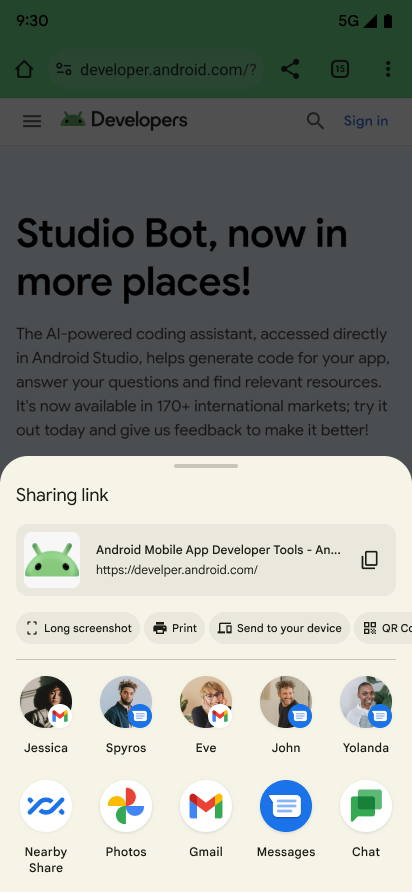
When pressing a share button in most applications, some overlay pops up on the bottom half of the screen, as can be seen in this documentation by Android (Source):
The bottom row shows a list of apps, the next row above is meant to show a few commonly used contacts, e.g. from messenger/mail apps, something like a “fast access”. On my Fairphone 4 (latest updates installed), the contacts are not commonly used at all. Quite the contrary: For all the 4 options displayed, I have used them at most once or twice, for some of them already months or years ago. In contrast, there are other contacts I share content with on a daily base, but they are never displayed in this “fast access” bar. None of the contacts I’m seeing there are pinned and they sporadically change from time to time. I fear that I might accidentally share an image with some random people I haven’t talked to in months or years.
Is someone seeing the same problem? Is this related to Fairphone (4)'s version of Android?
Does anyone know whether this is caused by some privacy settings? It would be plausible if only Google apps (or other low-privacy apps) contributed to the list of most recently used contacts, but I don’t know whether that is the case.
Also, I don’t understand how I could pin contacts which are not shown. In my messenger app, if I click on it from the bottom row, the app immediately opens, but I can’t find an option to add the contact to Android’s sharing dialog.
The top rows show nothing usefull. Old contacts i never chat with and Apps i never use (sms for example)
I have to scroll allways to the bottom to pick Sinal, Telegram or WhatsApp to send somthing.
My fp4 is the same, useless contacts selected and can’t scroll to others. The apps can sometimes be random ones, but it’s possible to long press and pin specific ones to the top at least
I’ve only found a closed thread on the same problem for Fairphone 4, but my F5 does the same thing: Whenever I want to share a file, the phone automatically suggests a number or entirely irrelevant contacts, whom I generally do not share files with. My partner, whom I share files with daily via WhatsApp, only and consistently (and unwantedly) shows up as a Garmin Messenger contact (because I once sent her a message via my phone’s Garmin Messenger app half a year ago). All the other contacts are not people I ever share things with, including “Commie” (my combox).
While I can pin and unpin the contacts that show up, there is absolutely no way to scroll to a contact that is not being suggested, so I cannot in any way find my most commonly contacted friends and family in order to pin them. Is there a way around this nonsense?
I have the same problem, it mainly suggest groupchats which have not been in use for years. I can neither add or remove recommendations of my choosing. Sure I can pin contacts, but not the ones i want.
The FP4 runs Android version 15, so it cannot be said with certainty that Fairphone is to blame for the problem. On Android 13, at any rate, the suggestions on the FP4 were still useful. It could be that Google has fixed the problem in the subsequent version 16.
I also had the problem on 13 and 15 and I could solve it (i.e. removing the random entries) by deactivating and activating again several messaging apps.
Unfortunately, this can often only be done with adb. I found in my shell history the following for signal:
# connect via adb and disable the app
adb shell pm disable-user --user 0 org.thoughtcrime.securesms
# restart phone and then connect again and enable it again
adb shell pm enable org.thoughtcrime.securesms
I think, that I have also / initially done this for the android sms app: com.google.android.apps.messaging
(But I cannot find it in the shell history. And maybe I have also removed caches of some apps but I think that this was not the relevant point.)
General disclaimer: Be careful working with adb and know what you are doing.
You are right, maybe this has changed with Android 15. I could also not see a way to disable an app via gui. But I remember that I have seen an option once, maybe on another android flavor or version.
Nevertheless, you will likely have to use adb. For this, you have to activate the developer options and enable usb-debugging there.
Then attach the phone via usb and and connect to it with adb connect. If that worked, you should be able to disable your messaging apps, like for example
(This would be for google, signal and telegram, respectively. Feel free to add others or adjust to your needs.)
After this, the apps shouldn’t be visible anymore (but their data is still there).
Next, restart the phone, connect via adb again and re-enable the apps
 . It gives me so many random results.