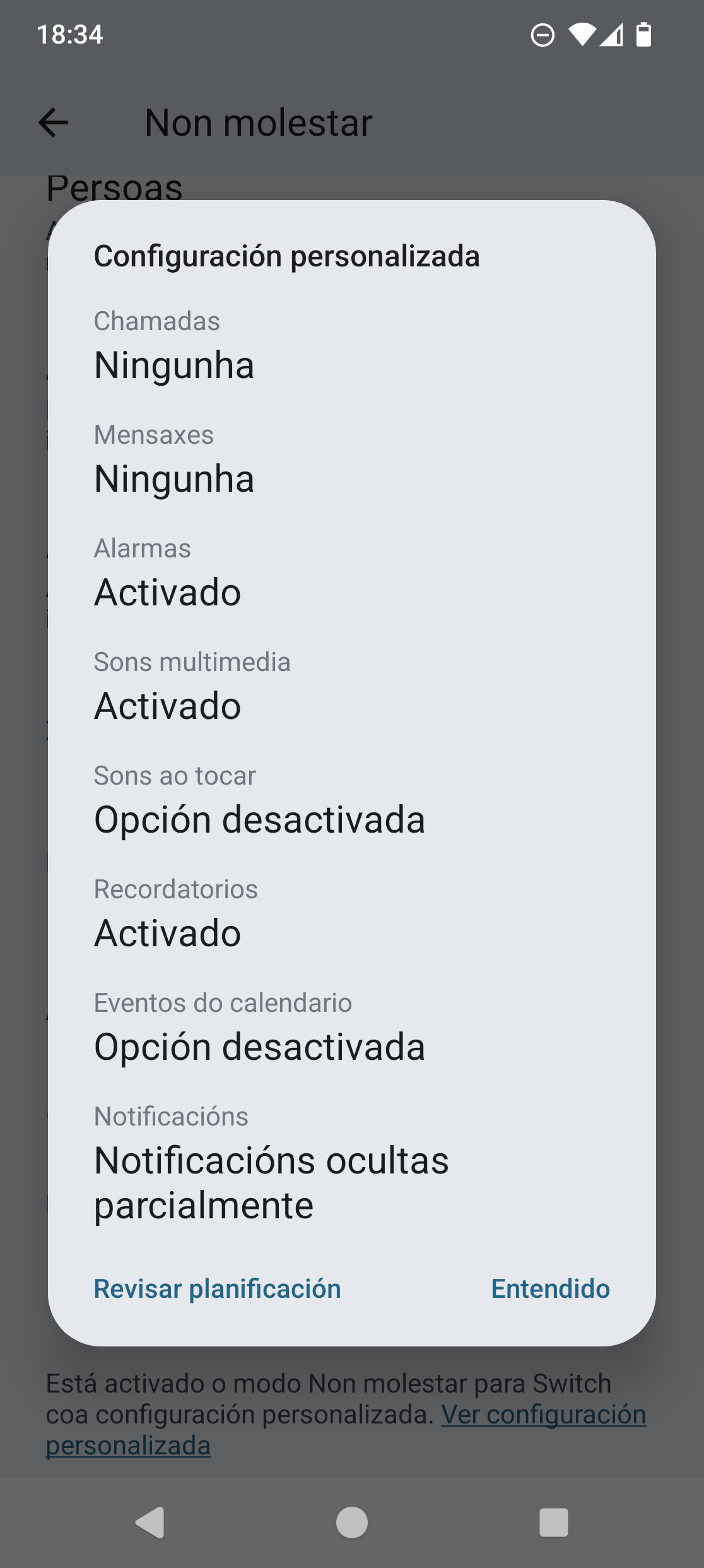
I’m hoping to get a bit of clarity about something I’ve noticed with the Fairphone 6. I’ve set up some exceptions in the Do Not Disturb mode so that when my parents or my partner call, the phone still rings even if DND is on.
Now, this works perfectly when I activate the mode directly from the phone’s interface. However, it doesn’t seem to work the same way when I use the physical switch on the Fairphone 6 to turn on DND. I’m just wondering if this is expected behavior, a configuration issue on my end, or something else entirely.
Any insights from the community or the technical team would be really appreciated!
Speculation only but I have similar settings. When I use the switch and DND is on, at the bottom of the DND settings it’ll say that a custom schedule is on. The custom schedule will say that repeat callers and priority messages will get through but says nothing about priority callers. No connection to fairphone so can’t say whether that’s intentional or an oversight.
In the image in the first two options (calls and messages) indicates none. If I click in review schedule and then in “Switch” I can only change the behaviour of the FP switch. But I have just check that Essentials custom schedules allows to modify the calls exceptions.
Maybe there is some not obvious place where we can change that custom schedule or maybe it can be added in a future version.
I have noticed that it uses different settings depending on how you enable the DND mode. With the physical button, things like media sound goes through. However. If I enable the DND mode via the quick toggle, it enables the expected stock Android DND mode, which mutes any media sound.
Similar for me. When I use the switch, DND seems to follow whatever was decided in a fairphone meeting DND should be, when I use a quick toggle it follows the customization I’ve set for DND.