New FP6 installing /e/

Hi, I got my FP6 today and i wanted the /e/ but it was not available in green the day I wanted to order it. So now this is a project.

This is going to be messy, but assume that the terminal method is the main way for me that I see most hope of completing this with.

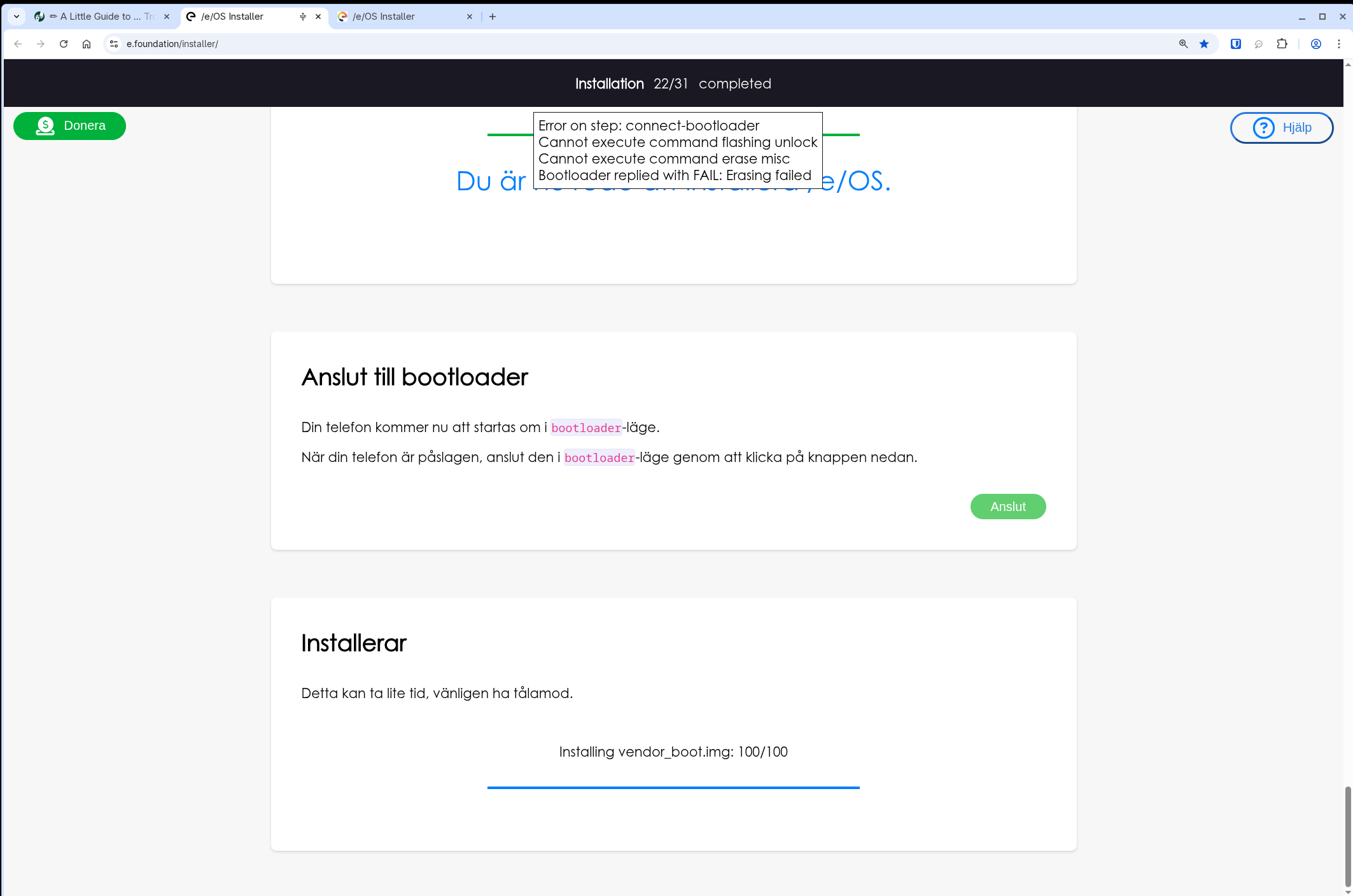
I started the /e/OS Installer but it is unclear if the instructions are wrong in swedish or what is going on after i choose the step after the files are downloaded (again). Maybee do some kind of sha256 on the downloaded file so we don’t drane all your data plan, because I have downloaded step 8 several times now. Step 22/31 or before is wrongly translated it should say fastboot but it says bootloader. This is the error i get in chormium Installation 22/31 completed:

Error on step: connect-bootloader
Cannot execute command flashing unlock
Cannot execute command erase misc
Bootloader replied with FAIL: Erasing failed

There is no way to retry from here, it does not have a green button like previous steps.

That aside I’m comfortable with the terminal solution and have done things like this ten years ago. I like that the script is basic and working but I can’t really figure out.

So the script gets an error when coming to deleting mounts. I don’t know if it does matter that it fails because cleaning up is a factory reset away anyway. So I’ve tried running the script with sudo without any change of outcome. Restarting the computer and phone does nothing.

I have pondered on commenting out the line of the deleting part.

So the system starts fine and works fine. I haven’t started to treat it with full love because I don’t want to mess around with putting my digital ID on the phone yet until I know it is complete. So the system runs but because the install stopped I’m unsure of what to do.

Also I was trying to lock the bootloader but the commands were not recognised. That tells me something isn’t what it should be.

Actually I did this to the script and it finished, i changed the erase line with misc:

# ERASE_IMGS=“misc userdata metadata”
ERASE_IMGS=“userdata metadata”

Results:

INFO: Done. The device will reboot now.Rebooting                                          OKAY [  0.000s]Finished. Total time: 0.050s
INFO: You can unplug the USB cable now.

So do we have to erase misc during install?

did you unlock both fastboot flashing unlock and fastboot flashing unlock_critical
before running the install script ?

also,

currently latest /e/OS is 4 days older than latest FairphoneOS
so if you are uptodate with Fairphone, RELOCKING IS NOT POSSIBLE

could be the cause for you to not be abble to relock the bootloader now…

could you check those commands :

.

you are talking about :
flash_FP6_factory.sh

#!/usr/bin/env bash

# Target device info
PRODUCT="Fairphone 6"
PRODUCT_ID="FP6"

# Target Flashing Images info
FLASH_AB_FW_IMGS="bluetooth devcfg dsp modem xbl tz hyp keymaster abl aop featenabler imagefv multiimgoem qupfw uefisecapp xbl_config aop_config cpucp_dtb uefi vm-bootsys xbl_ramdump cpucp shrm studybk"
FLASH_AB_IMGS="boot dtbo vbmeta_system vbmeta init_boot pvmfw recovery vendor_boot"
FLASH_A_IMGS="super"
ERASE_IMGS="misc userdata metadata"

# Target flash process behavior
CLEAN_FLASH=true
VIRTUAL_AB=true

source factory.common

# Common flashing function
flash_factory

The script look simple, but there’s another one behind it :
factory.common

#!/usr/bin/env bash

set -e

# Paths/files
ROOT_DIR="$( cd -- "$( dirname -- "${BASH_SOURCE[0]}" )" &> /dev/null && pwd )"
IMAGES_DIR="${ROOT_DIR}"

# Abort the script (and wait for a key to be pressed).
abort_now() {
  echo ""
  read -rp "ERROR: Aborting now (press Enter to terminate)." a
  exit 1
}

# Check if the device is properly unlocked
check_unlock_status() {
  local PHONE_IS_READY=true
  if ("${FASTBOOT_BIN}" getvar is-userspace 2>&1 | grep -q yes); then
    echo "Info: Your phone is in fastbootD mode."
    if ("${FASTBOOT_BIN}" getvar unlocked 2>&1 | grep -q no); then
      echo "Error: Your device's bootloader is still locked."
      echo "Please follow the instructions to unlock the bootloader!"
      PHONE_IS_READY=false
    fi
  else
    echo "Info: Your phone is in regular bootloader mode."
    if ("${FASTBOOT_BIN}" getvar unlocked 2>&1 | grep -q no); then
      echo "Error: Your device's bootloader is still locked."
      echo "Please follow the instructions to unlock the bootloader!"
      PHONE_IS_READY=false
    fi
    if ("${FASTBOOT_BIN}" oem device-info 2>&1 | grep -q "critical unlocked: false"); then
      echo "Error: Critical partitions are still locked."
      echo "Did you execute 'fastboot flashing unlock_critical'?"
      PHONE_IS_READY=false
    fi
  fi

  if [ "$PHONE_IS_READY" = "false" ]; then
    echo "Error: Your phone is not ready for flashing yet (see above), aborting..."
    exit 1
  fi
}

# Erase a list of partitions. Abort on failure.
# Arguments: <device serial number> <partition_name1 partition_name2>
erase_images_or_abort() {
if [ -n "${2}" ]
then
  for PARTITION in $2;
  do
    local retval=0
    "${FASTBOOT_BIN}" -s "${1}" erase "${PARTITION}" || retval=$?
    if [ "${retval}" -ne 0 ]
    then
      echo ""
      echo "ERROR: Could not erase the ${PARTITION} partition on device ${1}."
      echo ""
      echo "ERROR: Please unplug the phone, take the battery out, boot the device into"
      echo "ERROR: fastboot mode, and start this script again."
      echo "ERROR: (To get to fastboot mode, press Volume-Down and plug in the USB-C)"
      echo "ERROR: (cable until the fastboot menu appears.)"
      abort_now
    fi
  done
fi
}

# Check for connected phone
find_device() {
  echo "INFO: Looking for connected device(s)..."
  DEVICE_FOUND="false"
  while [ ${DEVICE_FOUND} = "false" ]
  do
    serial_numbers=

    for sn in $("${FASTBOOT_BIN}" devices | grep fastboot | grep -oE '^[[:alnum:]]+')
    do
      # Checking the product ID
      PRODUCT_STRING=$("${FASTBOOT_BIN}" -s "${sn}" getvar product 2>&1)
      # Add serial, if product matches
      if [[ ${PRODUCT_STRING} == *"${PRODUCT_ID}"* ]] || [[ ${PRODUCT_STRING} == *"${PRODUCT_ID_OLD}"* ]]
      then
        serial_numbers="${serial_numbers} $sn"
      fi
    done

    case $(echo "${serial_numbers}" | wc -w | grep -oE '[0-9]+') in
      0)
        echo ""
        echo "WARNING: No ${PRODUCT} found in fastboot mode."
        echo "WARNING: Make sure that a ${PRODUCT} is connected."
        ;;
      1)
          echo "INFO: One ${PRODUCT} in fastboot mode found (serial number: ${sn})."

        DEVICE_FOUND="true"
        break
        ;;
      *)
        echo ""
        echo "WARNING: Several ${PRODUCT}'s in fastboot mode connected."
        echo "WARNING: Please connect only one ${PRODUCT}."
        ;;
    esac

    echo ""
    while true
    do
      read -rp "Do you want to look for a ${PRODUCT} again? [(Y)es/(n)o]: " a
      if [ -z "${a}" ] || [ "${a}" = 'y' ] || [ "${a}" = 'Y' ]
      then
        break
      elif [ "${a}" = 'n' ] || [ "${a}" = 'N' ]
      then
        exit 0
      fi
    done
  done
}

# Switch to fastbootd
switch_to_fastbootd() {
  echo "INFO: Switching device to fastbootd mode..."
  "${FASTBOOT_BIN}" -s "${sn}" reboot fastboot || {
    echo "ERROR: Unable to switch to fastbootd mode."
    abort_now
  }
  sleep 5 # Wait for the device to reboot into fastbootd
  echo "INFO: Device is now in fastbootd mode."
}


# Flash (or manipulate) relevant partitions
flash_device() {
  flash_images_ab_or_abort "${sn}" "${FLASH_AB_FW_IMGS}"
  flash_images_a_or_abort "${sn}" "${FLASH_A_FW_IMGS}"

if [ "${FW_BL_RESTART}" = "true" ]
then
  echo "INFO: Firmware images flashed. The device will reboot to bootloader again to continue."
  "${FASTBOOT_BIN}" -s "${sn}" reboot bootloader
fi

  flash_images_ab_or_abort "${sn}" "${FLASH_AB_IMGS}"
  flash_images_a_or_abort  "${sn}" "${FLASH_A_IMGS}"

if [ "${CLEAN_FLASH}" = "true" ]
then
  erase_images_or_abort "${sn}" "${ERASE_IMGS}"
  format_images_or_abort "${sn}" "${FORMAT_IMGS}"
fi

if [ "${VIRTUAL_AB}" = "true" ]
then
  "${FASTBOOT_BIN}" -s "${sn}" --set-active=a
fi
}

# Common flash function to be called from device flash script
flash_factory() {
  # Begin with some OS checks and variable definition
  os_checks

  # Call function to look for device(s)
  # If only one device is found $sn will store its serial number
  find_device

  if [ "${USE_FASTBOOTD}" = "true" ]; then
    switch_to_fastbootd
  fi

  # Check if the device is properly unlocked
  check_unlock_status

  # Flash the device
  flash_device

  # Reboot device
  reboot_device
}

# Flash an image to a partition. Abort on failure.
# Arguments: <device serial number> <partition name> <image file>
flash_image_or_abort() {
  local retval=0
  "$FASTBOOT_BIN" -s "${1}" flash "${2}" "${3}" || retval=$?

  if [ "${retval}" -ne 0 ]
  then
    echo ""
    echo "ERROR: Could not flash the ${2} partition on device ${1}."
    echo ""
    echo "ERROR: Please unplug the phone, take the battery out, boot the device into"
    echo "ERROR: fastboot mode, and start this script again."
    echo "ERROR: (To get to fastboot mode, press Volume-Down and plug in the USB-C)"
    echo "ERROR: (cable until the fastboot menu appears.)"
    abort_now
  fi
}

# Flash an image to both A and B slot of partition. Abort on failure.
# Arguments: <device serial number> <partition name without slot> <image file>
flash_image_ab_or_abort() {
  flash_image_or_abort "${1}" "${2}_a" "${3}"
  flash_image_or_abort "${1}" "${2}_b" "${3}"
}

# Flash a list of images to partitions. Abort on failure.
# Arguments: <device serial number> <partition_name1 partition_name2>
flash_images_a_or_abort() {
if [ -n "${2}" ]
then
    for BLOB in $2;
    do
      PARTITION="${BLOB%%:*}"
      IMAGE=$(echo $BLOB | cut -s -d : -f 2)

      if [[ "$PARTITION" = "userdata" && "${CLEAN_FLASH}" != "true" ]]
      then
        continue
      fi
      flash_image_or_abort "${1}" "${PARTITION}" "${IMAGES_DIR}/${IMAGE:-$PARTITION.img}"
    done
fi
}

# Flash a list of images to A and B slot of partitions. Abort on failure.
# Arguments: <device serial number> <partition_name1 partition_name2>
flash_images_ab_or_abort() {
if [ -n "${2}" ]
then
    for BLOB in $2;
    do
      PARTITION="${BLOB%%:*}"
      IMAGE=$(echo $BLOB | cut -s -d : -f 2)

      flash_image_ab_or_abort "${1}" "${PARTITION}" "${IMAGES_DIR}/${IMAGE:-$PARTITION.img}"
    done
fi
}

# Erase a list of partitions. Abort on failure.
# Arguments: <device serial number> <partition_name1 partition_name2>
format_images_or_abort() {
if [ -n "${2}" ]
then
  for PARTITION in $2;
  do
    local retval=0
    "${FASTBOOT_BIN}" -s "${1}" format "${PARTITION}" || retval=$?
    if [ "${retval}" -ne 0 ]
    then
      echo ""
      echo "ERROR: Could not format the ${PARTITION} partition on device ${1}."
      echo ""
      echo "ERROR: Please unplug the phone, take the battery out, boot the device into"
      echo "ERROR: fastboot mode, and start this script again."
      echo "ERROR: (To get to fastboot mode, press Volume-Down and plug in the USB-C)"
      echo "ERROR: (cable until the fastboot menu appears.)"
      abort_now
    fi
  done
fi
}

# Operating system checks and variable definition
os_checks() {
  case "$(uname -s 2> /dev/null)" in
    Linux|GNU/Linux)
      echo "INFO: You are using a Linux distribution."
      FASTBOOT_BIN="${ROOT_DIR}/bin-linux-x86/fastboot"
      ;;
    msys|MINGW*)
      echo "INFO: You are using MinGW on Windows."
      FASTBOOT_BIN="${ROOT_DIR}/bin-msys/fastboot.exe"
      ;;
    Darwin)
      echo "INFO: You are using MacOS."
      FASTBOOT_BIN="${ROOT_DIR}/bin-darwin/fastboot"
      ;;
    *)
      echo "ERROR: Unsupported operating system (${OSTYPE})."
      echo "ERROR: Only GNU/Linux, MacOS and MinGW on Windows are currently supported."
      abort_now
      ;;
  esac
}

# Control the reboot sequence
reboot_device() {
  echo "-----------"
  echo ""
  echo "INFO: Done. The device will reboot now."
  "${FASTBOOT_BIN}" -s "${sn}" reboot
  echo ""
  echo "INFO: You can unplug the USB cable now."
  echo ""
}

Thank you for at great response.

So the version I started with was safetyupdate 5 july 2025, systemversion 1 january 2025.

Seems like I did not run “fastboot flashing unlock_critical” previously because I could run it now.

I’ll run the script unmodified to see if that helps.

“fastboot oem device-info” does not work

“fastboot flashing get_unlock_ability” returns 1 so that looks good, but I want to run the script unmodified.

I’ll come back with results from running the script again.

1 Like

It turns out that I did not read the instructions correctly.

The new fastboot mode confused me. So the install i did was in the mode that you do by navigating to fastboot. The scripts points it out:

Info: Your phone is in fastbootD mode

So I’m now running the script after holding down “Volume Down + Power” and I get:
Info: Your phone is in regular bootloader mode
Sending 'bluetooth_a' (812 KB)

Now when I start the script it starts but it is stuck at the first file. There is no progress like when I was running it in fastbootD witch was lightning fast but ultimately not the right way.
What am I missing now that is hindering it from progress?

Hi again,

I left it at 3 times for 30min-180min:

INFO: You are using a Linux distribution.
INFO: Looking for connected device(s)...
INFO: One Fairphone 6 in fastboot mode found (serial number: xxxxxxxx).
Info: Your phone is in regular bootloader mode.
Sending 'bluetooth_a' (812 KB)

I’v found that this has happen someone else.
With the FP5: Fairphone 5 install script stuck at "Sending 'bluetooth_a'" - #7 by piero - Setup - /e/OS community

The solution they did was to use fastbootD, but fastbootD can not erase misc. So that is not the solution for me.

So what can I try next?
thank you

Hi again,
I rebooted my computer, formated the device from fastbootD and just tried the script several times.
I did the webinstaller again and you know what? It worked!
Everything is fine, I don’t know what made the web-script run all the way this time.
Thank you for the support.

1 Like

grafik

Where are you stuck?

There were so many small details that I missed along the way.
I think my biggest mistakes where two things.

  1. Unlocking the phone is a two step thing. So my mount was protected from erase. So I unlocked a second time for it to work from shell after doing it from the deweloper settings.

  2. in web tutorial was that there is a looong delay before fastboot starts in bootloader mode. FastbootD does not have the same level of trust as bootloader.

Try those things
