I use an eSIM in my phone
Ok so you should have calls over 4G and no drop to GSM during calls. Unfortunately when the setting is missing you cant test without VoLTE…you might want to contact your provider
I have now tested it again with my wife’s SIM card (no eSIM). The problem remains.
I don’t think it’s a provider problem. She uses a different provider to me.
Which problem, no VoLTE setting and/or call mic issues?
Can your try with 5G disabled?
Hello,
I spoke to my provider’s support team . VoLTE is active. It is also set correctly in the cell phone (2G/3G/4G/5G).
The problem also occurs with LTE switched off.
Phone calls with a headset are possible without any problems.
I therefore think that it is not due to the provider settings.
What is the outcome?
The problem also occurs when LTE is deactivated.
LTE is 4G, he asked for disabling 5G
Yes same Problem with 5G disabeld.
Hello,
an update on the microphone problem. I received the update to version 15.105.0 over the weekend.
I have run tests with various options.
VoLTE enabled and disabled, 5G enabled and disabled etc.
The problem no longer occurred in various test calls.
The point I don’t like is that it took almost a week for me to receive the update. But this point is already discussed in the forum article…
That may be down to your network operator as much as Fairphone.
Glad the mic problem is sorted 
Hello,
Unfortunately, the problem has reappeared.
I don’t think the update solved the problem.
The flashing effect is back. Sometimes it works, sometimes it doesn’t.
I have already carried out the tests as described above.
The problem reappears in all configurations.
Can we just be clear about activation of VoLTE on your phone?
That option is about data. It’s not about voice calls.
The setting for voice calls is here:
Settings > Network and Internet > SIMs > [your operator] > 4G Calling
(it’s possible you may see “VoLTE” instead of “4G Calling”). Can you please visit that setting and confirm whether enabled or disabled?
You have already demonstrated in post #21 and #25 that your network operator has provisioned “Voice-over-LTE” but it needs to be enabled on your phone too.
Hello,
yes, VoLTE is enabled.
I spoke to my provider about this. The feature is called WLAN Call. According to Telekom, enabling WLAN Call also enables VoLTE.
According to Telekom, the VoLTE service is also activated in my contract.
There is no separate VoLTE option displayed in my phone
That is “Wi-Fi Calling” or “VoWIFI”. Requires a Wi-Fi connection to function.
It’s not the same as 4G Calling / VoLTE.
Yes, we have seen that in post #21.
I suggest you do the following:
- Reboot the phone.
- Connect the phone to Wi-Fi.
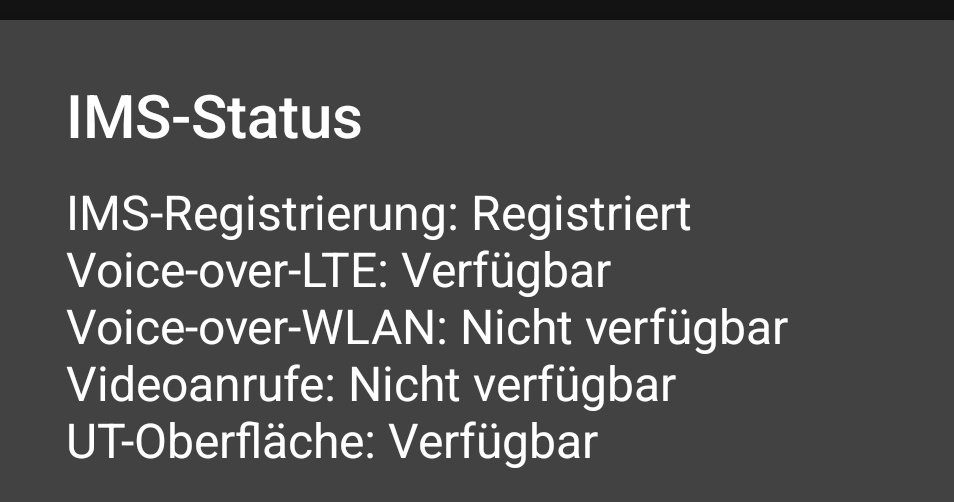
- Check the IMS information (method as outlined in post #20) to see if
“Voice-over-WLAN” is “Verfügbar”. It wasn’t in your post#21. - If it is, then make some test calls.
- If “Voice-over-WLAN” is not “Verfügbar”, then I can only suggest speaking with your provider again. Ask them if the phone is supposed to switch automatically from WLAN Call to VoLTE, according to which is available, which would explain why there’s no setting for 4G Calling.
There seems to be a bit of confusion somewhere.
Hello,
VoLTE is available.
It is also displayed with the phone code.
The problem is not with the provider.
As I described at the beginning, phone calls with a headset are possible without any problems. No matter in which constellation. VoLTE, 2G WLAN Call etc.
I think it’s a problem with the Fairphone.
I will try to send the phone back for repair. If that doesn’t solve the problem, I think it’s a software problem.
I’m in the United States and I purchased my fairphone4 through Murena. There is no myfairphone app available in my app lounge. There is a myMurena app that I have installed, but it only takes me to the Murena sales pages. I have also purchased the Fairphone6 from them (yet to come.) can anyone tell me if the myfairphone app will be available on the Murena version of the Fairphone6? I am also having microphone problems with the fairphone4 when using speakerphone.
I’m pretty sure that it won’t. The MyFairphone app is distributed as a system app with Fairphone Android (often called “FPOS”).
I got the exact same issue with fp6. It appeared today after almost 3 weeks without it.
Microphone NOT working:
- when using phone app or signal.
- Neither with phone microphone nor hands free microphone.
Microphone working when recording vidéos.
bluetooth microphone is working fine.
I can reproduce the issue at will using the recorder app provided with the fp6:
→ When recording with default sound quality I have almost no sound (only some noise).
→When checking “high quality recording”, it is perfect.
Hopefully a fix will be provided as it is definitely a software issue.
Hello,
After a long wait, Fairphone Support sent me a new phone. I’ve been testing it for two weeks now, and the problem hasn’t occurred again. I hope it stays that way and that the problem has been solved.