When getting the Fairbuds XL out of my backpack, or sometimes during usage, just when moving my head, the audio stops working in the left speaker. Pushing on the USB cable usually works immediately. After disassembling and reassembling, the problem disappears for a while.
So there’s a bad connection somewhere, and I know if it starts to annoy me too much, I could buy a replacement part. But which part? It could be a faulty connection on the left speaker, or on the cable (and unlikely, but it could conceivably even be a bad connection on the right side).
Does anyone have any tips to track down the fault? I’ve considered trying another USB-C cable I have, but a normal cable wouldn’t fit in the headband, and just holding the cups up to my ears won’t work either because the problem takes a while to reappear after reassembly.
This is a problem that – I think – Fairphone meetups in three different places all experienced at one point, and it was always fixed by pushing the USB plug back into place (I vaguely think it tended to be the one on the left speaker, too).
Now as to what might cause it – just a thought: Perhaps it’s adjusting the whole set to various “head diameters”? When extending the whole set to the biggest “diameter”, we might unwantedly come to move the plug out of the socket. The cable already bends to the inside bordering on touching the head (especially with small diameters), so Fairphone might have calculated and designed it a bit too short.
I have this issue too. I already reconnected the USB cable on both sides and cleaned it with a dust remover (pressured air). But the problem persists.
Can people also reproduce this with the 2025 version?
Hello- since the other thread about this issue is already closed, but I prefer information about it to be where you can already find it, I’m gonna add to the left speaker issues of the 2023 model here.
For context I got these in the fairphone bundle last year for someone notoriously churning through headphones via constant use (I figured frequent repairs are better than frequent rebuys). A bit disappointed it wasn’t the latest model yet (I thought it should’ve been), but here we are. The 2 week estimation for a free warranty repair (no functioning alternative, they really need these) with a potentially astronomical price if they decide it’s not covered and even more UPS delivery trouble than my heart can handle (a <50% success rate here) I instead ordered replacement parts and swapped them out myself.
I was now armed with two broken spare parts to investigate.
One of them a hinge, which I could easily fix and strengthen myself. So I have a backup now once the new one fails as well. (although I have yet to check if the new one has the same flaw to begin with - I can post about this issue as well if anyone is interested)
And the speaker - with no non destructive full disassembly of it to be found online.
(here is a video for a better view of the insides, but they are destroying several parts and tools https://www.youtube.com/watch?v=MRSe9uTfeGM)
So this is for whomever wants to fix a lose connection inside a left speaker module and dares to attempt a pretty difficult tear down.
To get at the cable from the pcb to the driver you need to disassemble the whole thing from both sides. (optionally also the middle, unsure about that)
Starting with the outside, after following the official battery replacement steps taking off the cap and hinge, you can go further and remove the layer that held the battery. Just 3 screws and a rubber gasket around the outside. Nice!
From that point onward it gets less nice.
You’ll see a rubber pad in the middle.
(already removed in picture 1, I recommend getting under the glue with something very thin, then roll below it with a precision screwdriver to keep all of the glue on the pad itself)
Plus the battery and usb board with the outside microphone on the top ribbon cable.
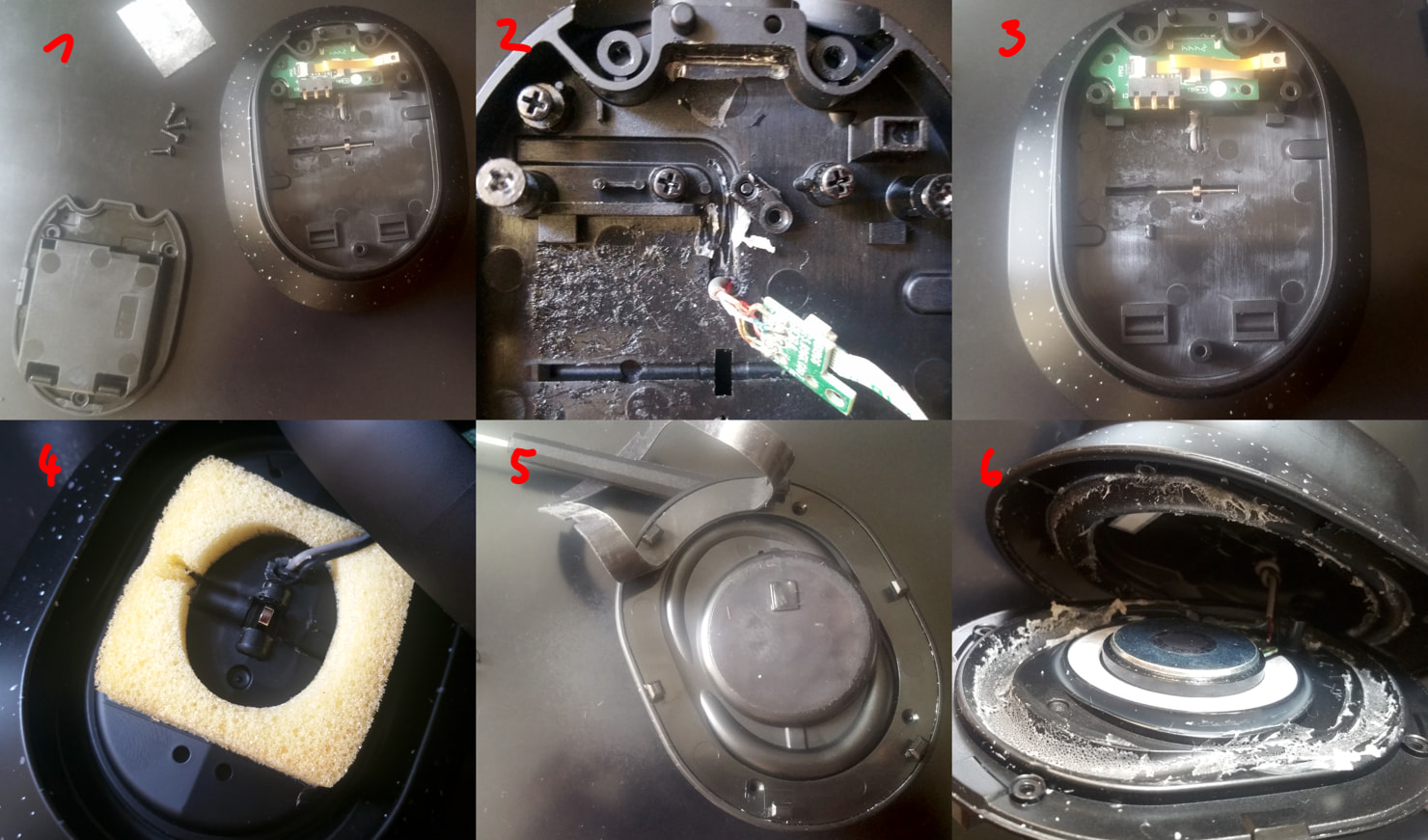
(apologies for the collage instead of in line pictures - new users can only post one)
The outside microphone is only slotted in, you can carefully lift that out.
The board is attached with two screws, but also goo to make the usb port water resistant.
Below it you will find a second board with just one screw that finally has the cable to the driver (and feedback microphone I believe?).
The cables don’t just go under the rubber pad, but also a little plastic bracket. You can carefully remove that with some pliers. (I have it attached to just one side in this already disassembled speaker)
[picture 2]
The bigger cable with only two wires is the one going to the driver.
Next step is optional, if you can manage to thread a cable replacement through two holes either side of the hinge.
The hinge pin is held in place by a little plastic stopper. I’ve found pliers to be too weak to pull it out. Careful upward pressure from both sides with precision screwdrivers or similar tools can get it out. You can see it in the first picture, here it is removed and sitting below the spot it was in. The hinge pin can now slide left and be taken out.
[picture 3]
In between the parts you will find a sponge cushion and what is the most likely point of failure. In my case the cable having a very pointy discoloured bend. (not very visible here on the grey driver cable and the black one actually looks even worse for wear)
[picture 4]
Turning around to the other side to get access to the driver itself. The plate holding it is attached with 4 screws below the ear cushion rubber seal (again get under it with something very thin and then roll a precision screwdriver so that the glue stays on the pad).
[picture 5]
And unfortunately also an ungodly amount of glue on the inside (I can only hope this is necessary for good sound/minimising vibrations):
[picture 6]
This is the hardest part, where you may seriously damage whatever is left of this speaker. I got under there with two old credit cards and a lot of patience.
And there you have it, access to both ends of the driver cable. Most of this should slot back together fairly well if you were careful with the rubber pads. Only the usb seal possibly deserves some fresh goo before you slot that back in to close it all up.
(the feedback microphone is of course also right there, but that looks even more flimsy to deal with than everything else)
Fingers crossed the 2025 version is either more robust or easier to actually fix. I cannot justify a yearly UPS delivery headache to replace it.
edit: now that it’s in the correct thread, some additional thoughts on other causes
I can only imagine the usb cable not being seated properly from the factory
I’ve had a lot of trouble plugging and unplugging that - once it’s in the tolerances I have here are so tight that I cannot see them coming lose under any circumstances
I can imagine that usb cable breaking from rough handling and frequent adjustments due to the exposed loops around the hinges
but that wasn’t the case here - the cable works fine
and the actual driver cable at the ear cup hinge I dug out is a lot flimsier and getting a much more focused bend (even if small) in the same spot all the time
not going to open up the new version any time soon, but I hope either the through hole has more play to spread out the forces or the cable is much thicker
moved it for you to get it at the right place 