@rachels42 yes, for ADB you need to have your phone plugged to your computer with USB.
Then you install ADB software on the computer side, and enable USB debugging on the phone.
You can do a logcat to display the system log, which is the journal where we could look for hints about what caused the crash.
It might work if you logcat right after the crash, if the crash is not too much severe, but it would be more accurate if you were already logging while the crash happens.
@jaymanu I’ll see what I can do. Hopefully will have some time this weekend to work out hot to install ADB and display the system log. Then hopefully will have a crash when I’m by my laptop. Do you have any idea of the maximum time window I would have after a crash to do the log?
Well if you remove your battery, unfortunately it will reset the phone and delete its internal log.
You might anyway try to use ADB on your phone while its in the frozen state. There’s a (small) possibility that the underlying system could still respond while the user interface is crashed.
We can’t know without trying. But if the power button responds, there’s some hope that you might be able to talk to the phone via ADB while it’s frozen, without even having to reset it.
I had the same issue without another phone (not fairphone). Some module crashed everytime i connected to an unknown wifi network. The faulty module tried to analyze captive portals. I could disable the module and fix it.
Sounds promising. I’ll try and set things up soon. Might just take a while as I’m very much an amateur at this type of thing, so working out how to set these kind of things up requires a lot of googling for me and rather a lot of trial and error!
I have this too sometimes, usually when scrolling. But the other day, something very unusual happened.
We were in the car (on the way from Vienna to Schladming), with two FP2’s sitting in our pockets, doing nothing in particular. At some point on the way, we tried looking at our phones and realized that they were both frozen and needed their battery to be removed. So, something (not user-triggered, we had the phones in our pockets, of course screen lock was on) made them both freeze.
[quote=“vivia, post:28, topic:12049”]
…were both frozen…
[/quote]Funny story.
I think you both passed an NSA surveilled cell mast, and the FP2s defended themself from beeing spied
Just another disappointed user that has random freezes. I haven’t actually discovered reboots, but the phone just goes black. Doesn’t turn on anymore, even when pressing 10 sec on power button. It just vibrates and the red LED lights up. I am able to restart it after 10 minutes or so, it then re-optimizes all apps.
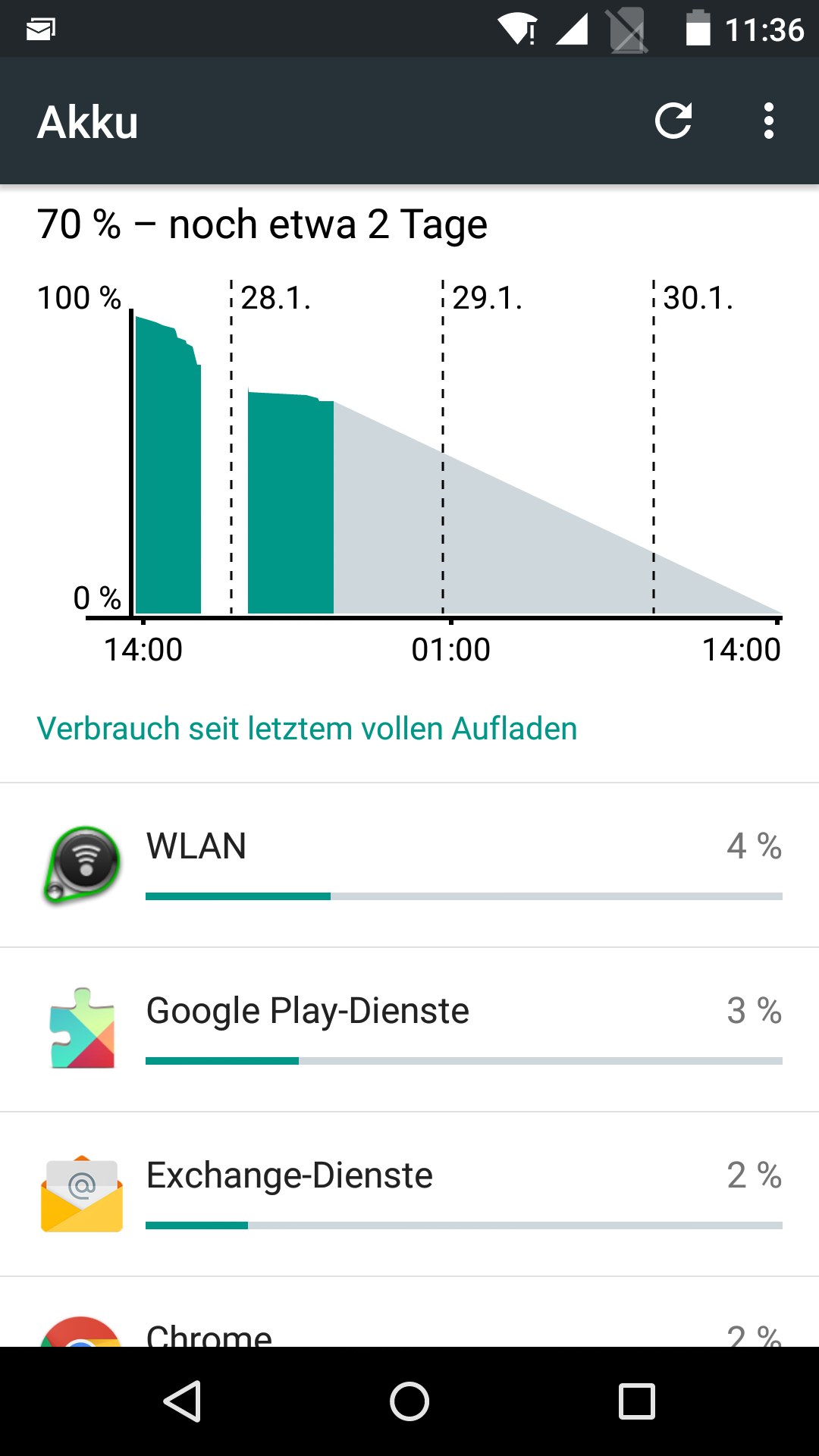
To me this seems like a hardware problem. I have experienced blackscreens at full battery charges and at low ones, however, when I’m able to turn on the phone again and look at the battery usage, there is a time-period that where no battery usage is not shown at all, like in this picture:
I moved your post here as you don’t have reboots. Even though the topic title says “requiring removal of battery to restart” I guess it’s the same issue, because the others probably didn’t wait ten minutes like you.
Hmmm, my FP2 has the same problem. But this morning it is getting worse. After putting the battery back it’s works for a few seconds. After I enter my password. Then the screen is frozen.
Now it’s wants to reboot. With this error: E:can’t open /dev/block/platform/msm_sdcc.1/by-name/misc (permission denied). Maybe someone knows what this means and hopefully this is the error for freezing my screen. I’m gonna try ADB when I’m home.
Can somebody help me? But a phone that doesn’t work at all is very disappointing.
Today my FP2 crashed about 5 times. So far there’s one consistency: it happens when the screen is off. There’s no way to switch the device back on, other than removing and reinserting the battery, or pressing the power button for more than 10 seconds.
The phone just lies on my desk, so no (heavy) movement that might affect the battery position. The battery or device itself don’t appear to be getting hot. The phone does not have any apps installed that have ads, or any other out of the ordinary apps that I had not installed on my FP1.
I’ve cold reset the device twice already (about two months ago), no change. I’ve tried different batteries, no help there either. Switching off G4 didn’t work, meaning it didn’t fix it.
It happens both while charging or unplugged.
At one instance, the LED was flashing, indicating the phone received a message (that I later could confirm). Yet, there was no way to switch the phone on. I therefore conclude the phone still works, but just isn’t responsive to the power button. I have no indication the power button is malfunctioning in ‘normal’ operations.
Upon every restart the phone language is set back to the SIM’s country, which is also quite annoying.
I’m very curious about when to expect a new firmware that could fix this. I found myself thinking it’s a bit weird, to put it mildly, to charge more than 500 Euros for a device that doesn’t work.
edit: Sometimes I’m lucky and the phone works like a charm for a day. While typing this post, the phone froze again, which brings us to a score of 6 for today.
It has happened to me twice: finding FP2 with black screen and not being able to do anything, just taking the battery out to be able to restart again the phone.
Today I upgraded the OS version, and 30 minutes after, while I was using wifi, I opened Google Maps and turned on the GPS. I left the wifi and started to walk using maps without internet. When I’ve taken the phone again (after 5 minutes) it has the black screen and without any evidence of live. I removed the battery and then I could restart it.
I’m using 2 sim cards with 2 Android users and both are running in roaming mode.
Is there any easy tool to have a log running in the background?
I also have to restart my FP2 about 1-3 times a day. I’ve never had it freeze during use, rather I’ve always picked it up with a blank screen and it won’t unlock. Sometimes there is LED activity still. It always restarts with a long (10s) press of the power button. I can’t see any pattern to it. I’ve tried uninstalling some apps that I though might cause it but it hasn’t helped. Hoped the update would help, but I think if anything it’s worse now.
I’m also experiencing the same issues with the black screen and unresponsive FP2. The notification led flashes so the phone is still working. Have to hold down power button for approx 10 seconds for it to reboot. Happens around 1-2 times a day.
I’m using the FP2 as a test for my company to see if we should purchase more of them. So far it’s the buggiest phone I’ve had. At this price point I expect more. In this state it feels like a “take 3, pay for 2 product” at a gas station or something…
Happens to me probably once every 2-3 days. Worse after the update. Usually I’ve just pressed the power button to standby the phone, then I realise I needed to check something, press the power button and it doesn’t respond.
Leaving it does nothing. If I long press the power button for 10-15 secs it buzzes and I see the Fairphone white on black screen and it reboots (fairly quickly) as if it had just been turned on.
Occasionally I see it locking up with the screen on when I’m not interacting with hit. Exactly the same, but the screen is on and it doesn’t power save off. It’s as if it’s the same bug, except sometimes it’s randomly happening vs happening when I power off the scree with the power button