FP2 Change splash Image (splash.img)

Hello all!

I want to change the splash screen (splash image) which is inside splash.img of the FP2.

Al i know is, that the splash image is packed in the img.file

I could extract the image on Linux with this command:

ffmpeg -hide_banner -f rawvideo -vcodec rawvideo -pix_fmt bgr24 -skip_initial_bytes 512 -s 1080x1920 -i splash.img -vframes 1 -y output_splash.png

Output:

[rawvideo @ 0x55d73845f000] Estimating duration from bitrate, this may be inaccurate
Input #0, rawvideo, from ‘splash.img’:
Duration: 00:00:00.04, start: 0.000000, bitrate: 1244262 kb/s
Stream #0:0: Video: rawvideo (BGR[24] / 0x18524742), bgr24, 1080x1920, 1244160 kb/s, 25 tbr, 25 tbn, 25 tbc
Output #0, image2, to ‘output_splash.png’:
Metadata:
encoder : Lavf57.56.101
Stream #0:0: Video: png, rgb24, 1080x1920, q=2-31, 200 kb/s, 25 fps, 25 tbn, 25 tbc
Metadata:
encoder : Lavc57.64.101 png
Stream mapping:
Stream #0:0#0:0 (rawvideo (native) → png (native))
Press [q] to stop, [?] for help
frame= 1 fps=0.0 q=-0.0 Lsize=N/A time=00:00:00.04 bitrate=N/A speed=0.555x
video:56kB audio:0kB subtitle:0kB other streams:0kB global headers:0kB muxing overhead: unknown

But i have no idea how to change the image and create a new splash.img

Maybe someone could help me?

I upload here the Sailfish splash screen. It would be nice to have…

XDA seems to have huge discussions about this topic: https://forum.xda-developers.com/android/software-hacking/guide-how-to-create-custom-boot-logo-t3470473

The above thread links to other threads for device-specific solutions. FP2 is a Snapdragon device. Splash format seems to be RAW RGB24 from your ffmpeg output, 1080x1920 pixels resolution.

BTW, splash.img is located inside the firmware-update folder on (every?) OTA update ZIP. For example, it resides in fp2-sibon-17.06.4-ota-userdebug/firmware-update for the latest FP Open update.

Thanks, Roboe, i know this Thread at XDA.
But i didn’t find the exact command how to make and splash.img from my PNG-Image.

Extracting is now problem. I could extract the splash.png from the fairphone-open splash.img

I know, but I explained poorly. That was useful info for other readers, :slight_smile:

I’ve been researching a bit, and there was a Python script in the Codeaurora Android sources (which is the basis for FP Open): https://source.codeaurora.org/quic/la/device/qcom/common/tree/display/logo?h=LA.BR.1.2.7_rb1.1 (python logo_gen.py newsplashimage.png should make a splash.img somewhere)

We can maybe look for the actual script used for FP2 in the https://code.fairphone.com sources
Edit: I couldn’t find anything, logo_gen.py script doesn’t exist in device/qcom/common, and splash.img is included as a binary on the device tree already, :confused:

I’ve generated a new splash image with the neat charging image @Douwe shared in this other thread. It’s working, :wink:

I’m setting a GitHub repo with the changes needed right now.

Edit: here it is

Edit:

Oh, I forgot… here’s your splash screen, @explit, :slight_smile:

You made my day Mate!

No problem! You made me remind old times when I used to mod my ZTE Skate, which had a self-made, unique and cool Gameboy Droid splash screen, :slight_smile:

Don't judge me, those were times when I loved Gobble... obviously I didn't know anything

…but, in fact, that was the first device I successfully ungoogled, :wink:

The only thing that was missing for really promoting the SailfishOS port…
Good job @explit & @Roboe :wink:

All credits go to @Roboe, i only pushed the stone rollin’
But indeed. @Roboe’s python script is one step forward to the “real” open community phone…

True ! Thanks again @Roboe :wink:

I must say that Halium project (with @z3ntu being a part of them) is doing more for an “open community phone” than me with my little hack in python, but thank you anyway, :slight_smile:

Booting a Sailfish OS phone with a “powered by Android” splash sounds terrible, :joy:
Glad I was able to help you, :blush:

Couldn’t resist :wink: .

Well…we are real gourmets :smiley:

Sailfish OS was the first thing I ran on my Fairphone 2 after the stock OS, but I didn’t even once notice this detail, so :+1:

Ooooh, that would be a great addition to

…if it wasn’t closed, :frowning:

fixed that.

Hello, I’m desperately trying but it doesn’t work… The problem must be me. What I have done :

  • Installed python (which is version 2.7.12 according to python -V) and installed python-imaging
  • python-pil is already installed (version 3.1.2)
  • Downloaded lp-splash.png to get the official image
  • Customised it to put the Lineage logo for the first one, and a Tyrannosaurus image plus the Lineage logo for the second one
  • Converted them into splash images with the python2 logo_gen.py "my_splash_screen".png command
  • Flashed them with the fastboot command.

What did I do wrong ?

Regards,

Daniel

The one with the dinosaur is 1077x1920. Try expanding it to 1080x1920.
But that doesn’t answer the question why the one without doesn’t work…

From my own tries, image needs to be exactly 1080x1920, so follow @Johannes’s advice.

The setup (Python 2.7.* and PIL) is fine. I need to know more to help you further. What error are you getting to know that it doesn’t work?

Thanks for your asnwers and your help @Johannes and @Roboe ! What happens is this : I flash the image (the one which is 1080x1920). Nothing says there was an error :

fastboot flash splash lineage_fairphone.img 
target reported max download size of 536870912 bytes
sending 'splash' (6075 KB)...
OKAY [  0.193s]
writing 'splash'...
OKAY [  0.161s]
finished. total time: 0.354s

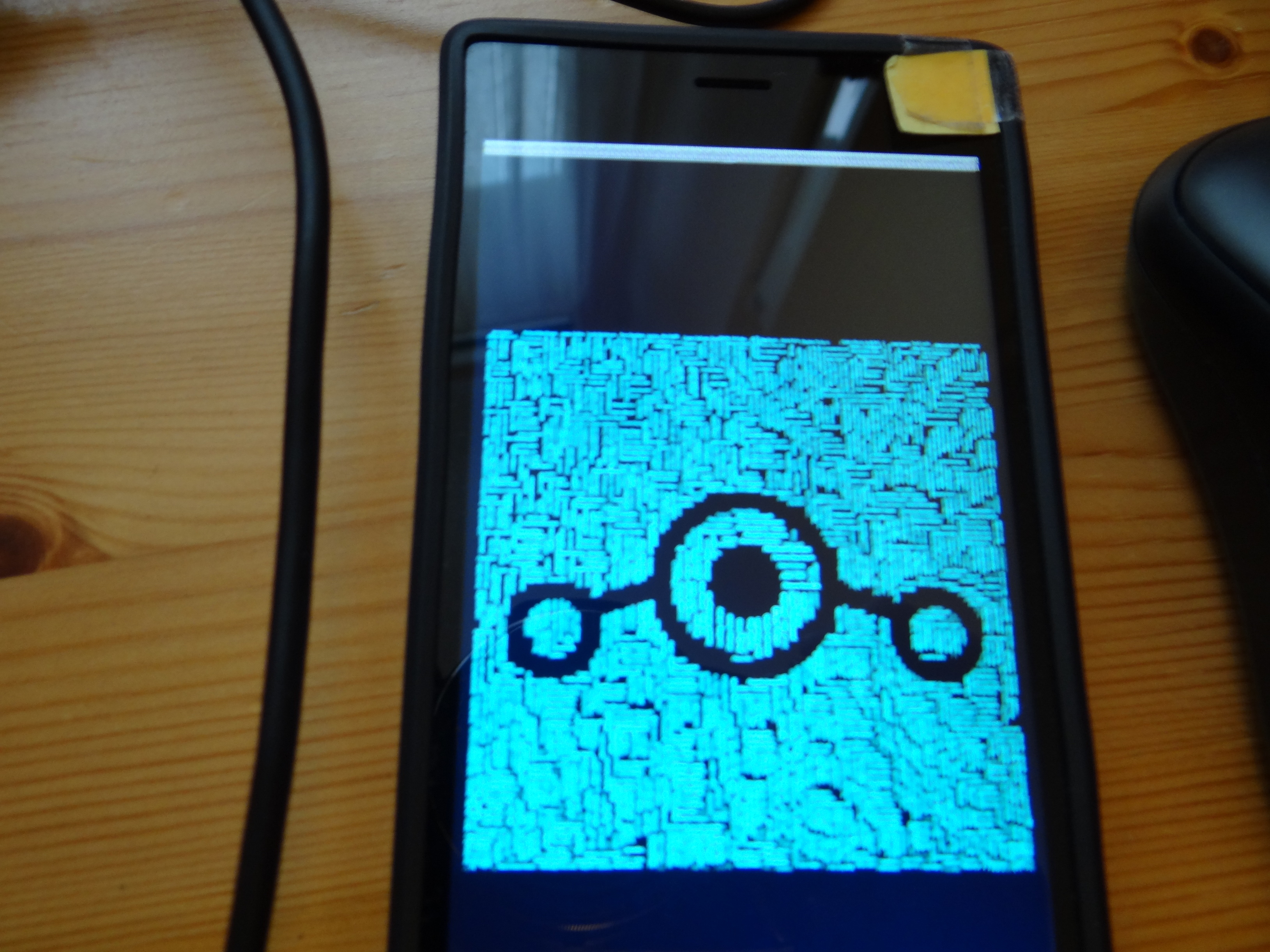
But then, when I type fastboot reboot and it reboots, the image doesn’t show up, instead it looks like :

So it shows your working splash screen, with a little grey bar at the top (as if it was telling “I am trying to show spartid’s image here, but I can’t”), and then boot normally. I reflash your image afterwards, and it boots showing your working image. I thought I could ask you to transform my PNG files into splash screens, and I think they would have worked then, but it’s a little frustrating not being able to make them myself :wink: