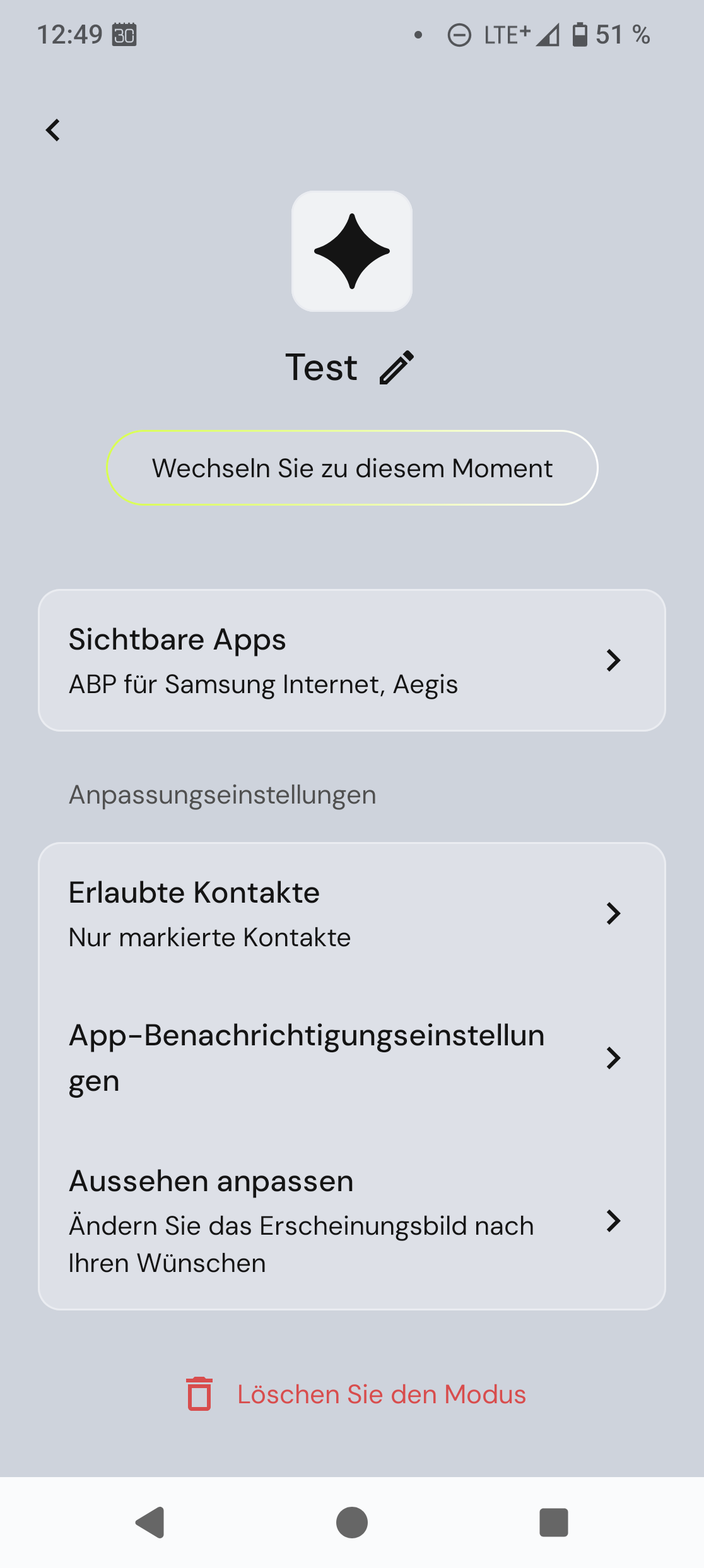
I’ve been playing around with FP Moments, setting the yellow switch to various setting and adding Moments for different usecases/environments. Then came the moment where I thought “I want to get rid of this Moment”. But I can’t, it seems. No delete button/action/swipe . In the end I reset the app to factory settings and started over.
Am I just blind or is there indeed no way to get rid of unwanted Moments?
No, I don’t mean choosing between Flashlight, Energy Saving or other functions with the yellow switch.
If you choose Moments for your switch, it will open a simplified GUI, when you switch “on”. It is named “Basic” or something like that (I use German). When you click on the name, you can add more of those Moments and choose which apps are allowed for each Moment. Then you can choose the Moment that is appropriate for your situation.
The problem I have is that you can add new, customized Moments, but you cannot delete them, except if you do a “factory reset” on the Moments app (delete cache and data).
I have added one right now and could delete it, however I see one called test and I guess I set it up and this cant be deleted (so the delete button isnt doing anything). Maybe report to support, I dont know if FP already knows this, havent seen it reported in the beta group.
So you can see a delete button? I couldn’t :-(. But I haven’t added new Moments after resetting the app, there is only the original basic Moment, which can’t be deleted. I’ll check out tomorrow, whether the customized, self-made Moments can be deleted. If so, this might be something that was fixed after I created my personal Moments.
I think we should clarify that if what you’re trying to delete its your single only moments , you won’t be able to do that. To users may say this : “This is your only mode. It can be delete it”. But , if you added several others moments, then just follow the proceed which has been shown in the video by @Furdiburd .
With the help of your video I found that I have a bug in the Moments app.
When I look at the page where you had the “Delete mode” button, there is nothing at the bottom. If I swipe my finger over the area at the bottom, a grey line appears. That line is clickable (it’s the missing button!) and the moment/mode can then be deleted.
I’ll play with font size (see the bug in the installation, that blocked non-english people from agreeing with the data protection settings). If that doesn’t help, I’ll report a bug - or maybe I should report anyway that a button vanishes at certain font sizes.
Edited to add: It is a bug, a problem with font size: If I reduce font size to 1 (smallest) or 2, I can see the button. From size 3 on the button is gone.
I’d be interested if others can reproduce this bug, by changing the font size in the Android settings to level 3 or bigger. If you could report your results here I’d add that to the bug report.