Quickstep is the Problem. clear Cache from App Quickstep and load Lawinchair App and changed Layout. And is Fixed. You still have to clear the Quickstep cache every 7 days, but Lawnchair runs significantly better for me. 90%. Is stupid. Bug.
I don’t think it is quickstep. I don’t use it as launcher, I deleted cache yesterday and today screen froze again while typing.
I noticed also that the bar showing the spell checker disappears when that happens so maybe also the keyboard app is giving me issues. Will keep checking and deleting cache still.
Simply clearing the cache isn’t enough. You have to do it for Quickstep and then switch to Lawnchair. If you stick with Quickstep, the cache will fill up quickly and cause lag again. With Quickstep, it only takes a few hours; with Lawnchair, it takes about a week. I can’t tell you the exact cause, but this fixes the issue about 80% to 90% of the time. If it happens again, just clear the cache for both. That should give you another seven days of smooth performance—but only if you are actually using Lawnchair as your launcher.
Hi, I don’t use neither quickstep nor lawnchair, but the issue is there. I’ll keep trying still. Hope the official fix comes soon.
Same for me, when battery is low it seems that the problem occur more
But sometimes the screen do not respond to touch event ay a normal battery level
Also having the same since a week or 2. Ive had it for nearly a year now and user Niagara Launcher until a month ago. Coincidence or launcher related?
Im using the Standard Launcher and have the Same Problem. Niagara is Not the Problem
I have the same issue, everything works as expected, but from time to time there is a screen freeze for a couple of secs. No idea wtf …
I am using IodéOS and having the same problem.
Also, a lot of times I try to scroll but it registers a tap instead. Or mid-scroll the scroll turns into a tap.
My launcher is the Fossify Launcher
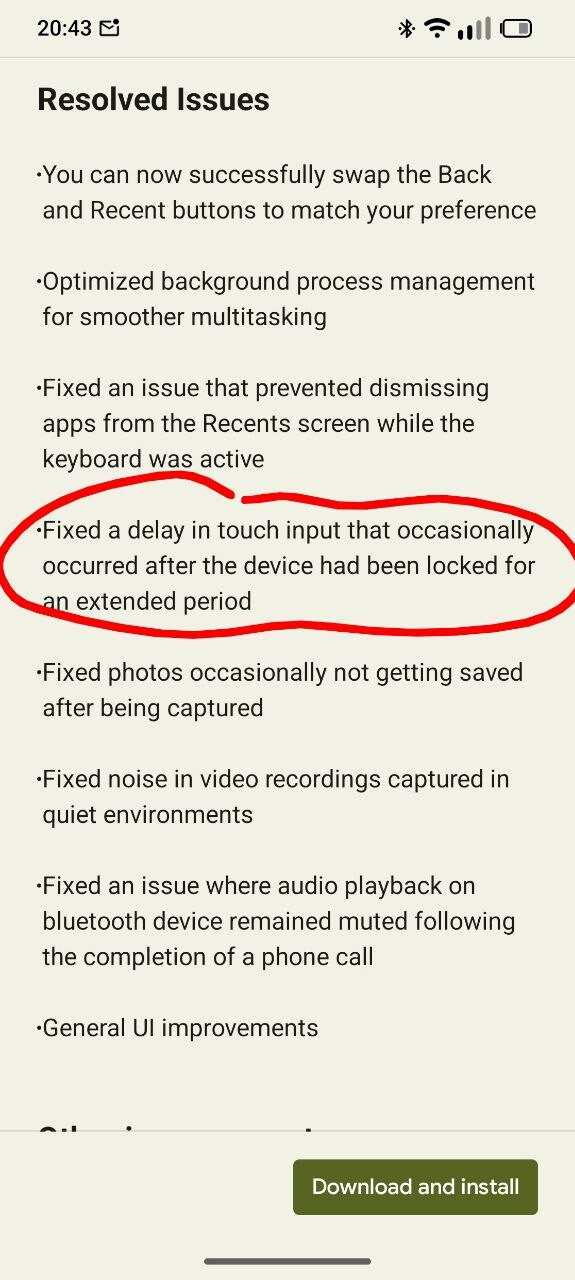

Nope. I’m on FP6.QREL.16.69.0 and had the issue at least twice since the update last week.
I’ve started suspecting that this issue might be broader than FP6 + Android 16 and could be happening to (most? some?) devices on Android 16, as I’ve heard reports of the same issue from users on Pixel devices on Android 16 too.
Same here. Latest version and no screen protector. I’ve had my phone for 6 months and have started noticing the non-responsive screen a few weeks ago.
I notice it too after the latest update, with less frequency. And it always happens with keyboard open. The sequence is:
- I’m typing, just starts working weirdly,
- I lock the screen and unlock, it is responsive again but the bar with the predicted word is missing
- Hide keyboard and show it again, and it’s back to normal.
Anyone seeing the same pattern? I’m using Microsoft SwiftKey.
Afaik there are two separate touch issues:
- Screen unresponsive immediately after unlocking the device
- Screen unresponsive randomly when using the device.
The 16.69 update addressed the first case, but the second one is very much still present.
Same pattern here too with Microsoft SwiftKey Keyboard.
I have the latest update but I still have both issues…
Same for me here, using Microsoft SwiftKey. I’ll want to have a word autocorrect or to swipe across the keyboard and it’ll do neither, then I notice it’s using a different keyboard. Putting the keyboard away and bringing it back fixes it but it’s quite annoying.
I am also facing both issues. The last update did not fix these bugs.