I just bought a Fairphone 6. Beautifull machine, but there are some catches (if you are used to iPhones). I can live with the fact that Google junk is not accesible and that it not possible to use Google’s wallet (though I was kind of surpised that nowhere in the adds for this phone it is mentioned, and the Curve alternative is available when using CC’s).
…But in my new BMW i4 my Fairpohone does not want to connect to Android car. Connection through bluetooth works so I can call, but other apps on my phone are not visible, as, again, Android car cannot be installed… Any suggestions?
1 Like
So this was actually one of the reasons for me switching back from /e/OS to the stock OS, since I was unable to get Android Auto working.
I am unsure as to what the current compatibility is between /e/OS and Android Auto, but you might be better off inquiring further on their forums.
In the meanwhile, have a look at the documentation for setting up Android Auto with /e/OS.
3 Likes
Dear Extarion, Thanks for the tip. Pondering over the same issue. In addiction Google Wallet does not work… Then again, I would love to get rid of all the Google junk. This is one of the reasons, I choose a Fairphone…
Your advice in doc.e.foundation does not work, alas… Can download Google and Google maps, Voice recognition is in the background, and so the Androis auto app. Cannot open them on my phone. In my car I can get a bluetooth link to my phone (and call), but even when connencting thorugh a cable Android Auto is not accepted…
1 Like
How unfortunate that the documentation could not solve your issue either. 
In that case, I’d strongly recommend you seek further help on the /e/OS forums, as this is a problem that relates to that operating system, and you’ll be more likely to find useful help and updates over on their forums.
I would love to mostly detach from Google as well, but for now, I’ve come to accept that I don’t want to miss out on some of the features they offer.
Luckily, when it comes to becoming less dependent on some big companies, there are plenty of other things you can do outside of your phone setup. And most importantly, remember: Perfect is the enemy of good. 
Thanx for your warm & supporting mail. I will try to solve this via /e/OS forums. I wanted to be this new phone to be PERFECT but you may be right, good may be good enough…
Like I mentioned here:
/e/OS is missing the Android-Auto stub, those are needed to use AA on any device. I don’t know why it is missing, since /e/OS claims they are part of /e/OS.
However, with a rooted device, you can add the stubs and get it to work. That’s how I did it and it works nicely. More infos are in my linked post above.
BTW, AA doesn’t have an app icon, to access the settings go to: Settings → Connected devices → Connection preferences → Android Auto
1 Like
Dear Switch, As a somewhat spoiled Mac/iphone user I have no idea what “stubs” and “rooted devices" are. Apatch or aa4mg, to me is something from another planet… 
Clickable Apple stuff nearly always worked swiftly and intuitively, and I never had to rely on forums to get problems fixed. But as a Fairphone newby I will study your recommendations (next week) and see how I can proceed! Best
Tom
Let me give you a breakdown:
Stub
- In this case basically means Android Auto (AA) is preinstalled on /e/OS’ system in form of a non-functional dummy (sort of).
- This stub/dummy can be updated (to the real AA) via App Lounge or other “appstores”. This way you also have the choice to not install the full AA app in case you don’t want it.
- Since the stub would be installed on the /e/OS system (not as a user-app) it has elevated permissions and those are required for AA to work (probably for direct hardware access or something, I don’t know)
APatch
- Allows you to root your device so you can modify the Android-System.
- You need a PC for the installation and the procedure is bit involved, depending on experience
aa4mg
- Is the module that adds the missing AA stub
- Installation is just a matter of downloading the aa4mg-zip with a browser and installing it using the APatch-Manager-app (tap
install module& pick the downloaded zip-file)
Some important notes
- Being able to modify an otherwise locked down system opens a door for malicious software to be placed there. I root all my devices for over 10 years and never had anything happen but it is important to know before deciding to root.
- If you root your device, some apps might refuse to work (mainly some banking-apps, mine works btw.). The reason for that is that some banks/developers don’t wanna deal with the risk of a rooted device and implement root-detection-methods. APatch is pretty good at hiding it, personally I didn’t had an app yet that didn’t work.
- As mentioned /e/OS is supposed to have this stub (afaict), so there is a chance that a future update will have it included and you don’t even need to deal with rooting your device
- FairphoneOS would work rather “swiftly and intuitively” as you call it. But degoogled ROMs (aka OS’) are not quite on this level yet, especially because there is not a lot of money to be made. And Money makes the world go round as we know (sadly).
 I guess that’s the price one has to pay if (s)he decides to go the non-tech-oligarchy-route.
3 Likes
Dear Switch,Thanx for your detailed discussion of OS basics and suggestions to get AA working. Last week I sent the same Q to the Fairphone desk and they send my Q to the Murena developpers. Waiting fot their reply before I do something as radical as rooting my phone. BTW, is there a way to un-root a phone if problems arise, with, for example my banking systen? Best. Tom
Yes, that’s possible.
Have a look here:
This was written to remove rooting with Apatch, but also applies if you’re on root with Magisk.
1 Like
Hi TomB,
I was just experiencing the same issue and stumbled across this thread.
Did you get any further or reply from murena?
Thanks a lot and habe a great day!
Dear drylemon,
Just received the message underneath from FP and Murena:
"Can the user confirm that they have the latest /e/ OS version (3.1), then they follow these instructions:
[1] https://doc.e.foundation/support-topics/android-auto and then they restart their phone and start android auto?If it still does not work, our developers need to investigate.
”Please confirm:
Was developer mode enabled or is the device rooted?”
”We require our users to update to the latest /e/ OS version, before investigating an issue, as most bugs are solved with an update. Please make sure to update to the latest /e/ OS version in settings> updater and test if the issue is still there.”
After having read this : I am not sure what the “developer mode enabled” implies. Will try to fix this this weekend. Please keep us posted on your prgres!
Best Tom
Dear Tom,
thanks a lot for your reply.
I also have the latest /e/ OS installed 3.1.4-a15 and followed the guide. I tried both bluetooth only and using a USB cable that should also allow data transfer, but I will try a different one as well. I was never able to proceed to the next step.
I have no issues connecting with my iPhone and my Fairphone 6 is fresh out of the box and I am completely new to android but I think that enabling developer mode or rooting your does not happen by accident. At least I did not see any option to turn developer mode on when I was making my way through the settings.
I keep my fingers crossed and hope that your connection will work.
Best regards!
Dear Drylemon and other interested Community members,
Back from Italy…
Actually FP sent me the same manual about two months ago. I followed their recommendations again.
On my FP:
- tried to install the Google app from the App lounge - and it worked
- installed Google maps
- downloaded Google Speech Recognition (but it does not seem to open!)
- downloaded Android Auto (but it does not seem to open)
- Rebooted my device
- Went to my car and connected the FP with a newly bought FP cable,
….Then nothing. My new BMW i4 Android Car program cannot connect to this phone, while, as in your case, connecting an iphone is a piece of cake. (Must say that my FP connects through Bluetooth, so I can, for example, use Spotify… )
Will make a clall at the FP helpdesk who will send it to Murena, but this feels now like an uphill battle.
Best
Tom
2 Likes
in v3.3 of E/OS they will be fixed the Android Auto Problem.
2 Likes
its scheduled 3rd November week:
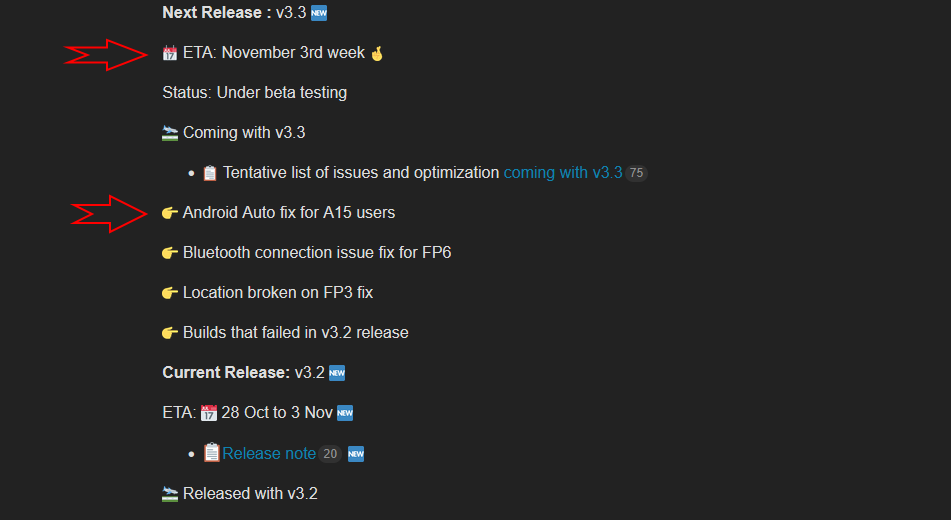
Source: Week 45, 2025: Development and Testing Updates - Development Updates - /e/OS community
4 Likes
OK, fine! Hope this will now fix the problem.