Hello,
perhaps it was not clear but my reply was directed at @Birk whose post I have moved.
I do not have FP6 so I was not able to follow and double check all the suggestions, possible workarounds and interpretations mentioned here.
Hi! Yes, I know your post was in response to @Birk. Still, I think that over 180 posts since March 20 should be enough by now for Fairphone to respond. If every single person affected contacts support separately with their issues, as is always suggested here in the forum, the message will certainly get through directly, but it ultimately creates more work, since every request leads to the same follow-up questions. Describing the issues in the support forum makes more sense, but only if someone at Fairphone actually reads through them. There’s also no official response, even though the support forum is supposed to be an official channel. A brief acknowledgment that they’ve recognized the problem as such would already be a step in the right direction.
I am afraid you are mistaken. This is not an official channel and the presence of the FP employees here and their responsiveness cannot be taken for granted.
I have this problem too. Apps like Hive slow to open and can’t connect to hub once opened. Petsure pet flap app similar issues along with others. Forcing stop, clearing cache and restarting phone sometimes helps but not always and just shouldn’t be needed every time opening the apps is required. Is this a Fairphone 6 or Android 16 issue? When will it be resolved :.(
I think there are two different bugs. Right after the update, I believe that I had to clear all caches from most apps so that they load correctly. This was independent of wifi/5g/ipv6.
But at least it’s investigated. Let’s hope for a fix in next month’s update.
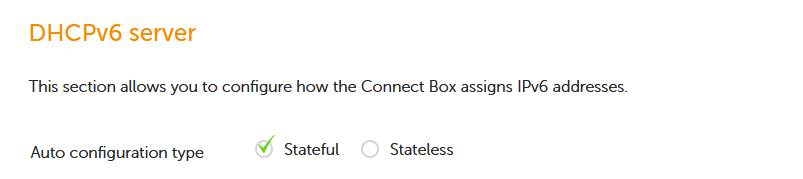
Until this is solved I found a solution in my home network that seems to work. I have internet from Ziggo (Dutch provider) and switched the DHCPv6 configuration from Stateless to Stateful in their modem (see image below). So far so good. No complaints from family members with other phones.
If it works, which is not the case, it adds even more issues. You don’t want to reset that many times a day and be bothered with the fallout each time. People would get even more frustrated. We could also add a reboot to the list. Anything that would trigger a soft or hard reset to get a new IPv6 RA could be added. But the fact is, in a short amount of time, the bug will be back. Disabling WiFi is the best “solution”.
My mobile data provider does not offer IPv6, I wonder how that would behave if it did. Because let’s say it does, then the WiFi workaround might not work work either.
My workaround: Switch to Flight-Mode and back. After that, some, but not all, Apps are working as they should. Some I have to close (wipe to the top in the overwiev), then they get actual data.
Can someone tell me if there has been any official aknowledgement of this bug? Is this a WIP?
As an alternative, can I roll back to the latest working 15 version without data loss?
Right now I’m deeply regretting switching from iOS. My phone is bordering on unuseable at home on WLAN. Battery consumption is now on par with every iPhone I’ve ever had.
As far as I know, android doesn’t support stateful IPv6 (dhcpv6) and only supports stateless (slaac), so by changing this you are disabling ipv6 for your phone. You can confirm this by trying to go to test-ipv6.com or other test sites to see if you still have ipv6 connectivity.