would it be possible to give us a short howto for this fix in easer? what needs to be done where in this app? thanks!
Time to call it. It’s a hardware problem that we could mitigate in software by artificially reducing the volume of the top speaker. We believe that a blanket volume reduction will be perceived negatively by the majority of users, so we opted to leave it as it is.
The workaround described above (Accessibility Settings > Mono > balance all the way to the left) works in most cases. As yvmuell noticed here, some audio sources might sound ok or even better in stereo, without the workaround. That’s because stereo is more immersive in general, and since the distortion is heavily dependent on the output frequencies, no two recordings are affected the same amount.
We’ve learned a lot from this investigation and we’ll use these lessons when designing future products. Thanks to everyone who troubleshot in their own time and posted their findings here, it was great help!
7 Likes
Create two profiles with the following settings:
-
Stereo output:
- Run commands:
settings put system master_balance 0.0 && settings put system master_mono 0
- Run commands:
-
Mono output:
- Run commands:
settings put system master_balance 1.0 && settings put system master_mono 1
- Run commands:
Create two conditions:
-
Bluetooth audio device connected:
- Connected Bluetooth device: Select all your BT audio gear
- Bluetooth enabled: Self explanatory
Create three scripts:
-
Bluetooth enabled:
- No profile
- Condition: Bluetooth enabled
-
Bluetooth audio device connected:
- Predecessors: Bluetooth enabled
- Profile: Stereo output
- Condition: Bluetooth audio device connected
-
No Bluetooth audio device connected:
- Predecessors: Bluetooth enabled
- Profile: Mono output
- Condition: Reverse Scenario: Bluetooth audio device connected
Here’s what it should look like:
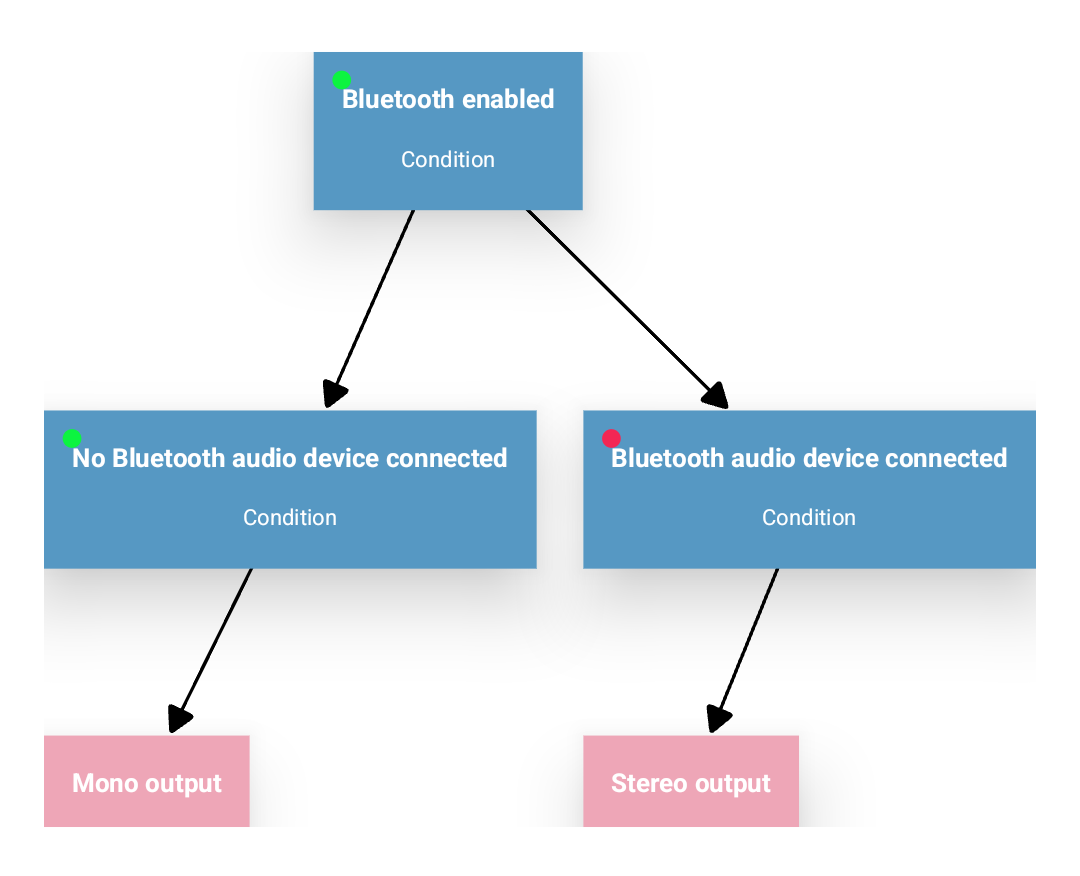
You could do all of that without the Bluetooth enabled part, but I personally like scripts that are only active when actually needed.
3 Likes
hey, thanks for the reply and the manual. i did set it up as you mentioned, and in the log it also appears to run the profiles when connecting to bluetooth headphones. although, it doesn’t change the settings as it should. everything keeps the same.
do i need to have my device rooted?
or is there any other way of testing, if setting commands work?
Run commands will need root, yes.
Is there any DiY hackery you could see being useful? Alternatively, what exactly creates the rattling noise? Is it the speaker not being properly secured or, as others have theorized, the airflow creating the distortion?
This topic was automatically closed 90 days after the last reply. New replies are no longer allowed.
Just got my fp4 today and was really excited to get it… until i heard how poor the sound quality when playing a youtube video. It legitimately sounds like it’s being played through a brass tube - no low end frequency, it’s all mid and high frequency tones. It sounds identical to what you would hear from a walkie talkie
I have the same issue with phone calls. The persons voice sounds equally butchered.
I’m working on updating it right now, but i couldn’t find anything in the updates related to audio aside from bluetooth related fixes so that probably wont change much. Also, I tried the troubleshooting menu but it can’t really distinguish poor quality coming out of the speaker.
Has anyone else experienced this? I would greatly appreciate any help in figuring this out, if this is how the speaker is then it would be nice to get confirmation on that as well
Thanks
Edit: On the product page for the loudspeaker replacement, the description reads “So when your music or gaming sounds like it’s from the 1920s, it’s time to replace your loudspeaker.” What Im hearing could also be described like that, despite my phone being brand new. I bought it from ebay, and the seal to get to the phone didnt appear tampered with in any way.
I’m not very sensitive to audio quality, but I’m interested in knowing methods that can improve it. 
Welcome to the community forum!
While the perception of sound quality might be somewhat subjective, what you’re describing sounds like it’s worse than it should be. I’d certainly not describe my FP4 as sounding like a walkie talkie.
Do you have a chance of recording something played by the speakers for comparison?
It could always be a manufacturing defect. As this is a new device, I suggest you contact FP support about it (contactsupport).
I moved your posts to this existing topic, the TL;DR is known problem and it sadly won’t get fixed:
I got rid of it, the only way really possible, by setting the output to mono and the balance all the way to the bottom speaker.
Oh and welcome to the community 
2 Likes
Due to the modular nature of fairphones, it would be so cool if they released hardware updates for situations like these! I would happily buy a higher quality speaker at the price they list the current speakers.
I noticed the crackling noise of the Fairphone 4 speaker from the get-go, but never started an investigation as I switched to Bluetooth earbuds very quickly.
As I now accidentally came across this thread and listened to the above linked piano piece, I noticed that when I put my thumb above the left part of the speaker’s outlet slit on the display, the crackling is reduced noticeably. I could even feel the vibration of the case and display unit. As this reduced the crackling without reducing audio volume much, I was wondering if a piece of tape could provide the same slight pressure that the thumb did?!
So, I used a piece of climbing tape, which I gently stuffed into the left part of the slit with a pointy tool. This reduces the crackling noise but, on the other hand, looks pretty ugly…
But if audio quality goes above anything else, this trick might help you, too.
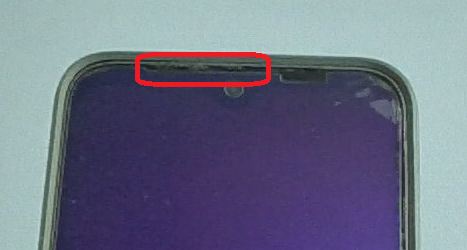
Maybe the same effect can be achieved, if a bit of damping material is stuffed from the inside of the slit when the phone is taken apart. As I did not take the phone apart yet, this is just an assumption! Maybe putting a thin layer of audio foam onto the speaker’s membrane has the same dampening effect?
2 Likes
I placed some foam there and left it there until I replaced the display some time ago. At least for me, it didn’t work. I gave up in the FP4 due to all the issues I had with the phone.
Fun fact: On the FP5, it seems like they ‘solved’ the same issue by restricting the output frequencies, using the same solution they do not want to offer for the FP4.
1 Like
The “solution” of disabling the top speaker seems to be the best we have available. I quickly tired of manually changing the mono setting and tried out @hirnsushi’s suggestion of automating this using Easer (installed via F-Droid).
On Android 13 I had to modify the commands a bit. You need root to change the audio settings, which are now included in the cmd binary. After struggling with debugging I settled on the following profiles:
- Stereo output
su -c 'cmd settings put system master_balance 0.0 && cmd settings put system master_mono 0' >> /data/data/ryey.easer/files/run.log 2>&1
- mono output
su -c 'cmd settings put system master_balance 1.0 && cmd settings put system master_mono 1' >> /data/data/ryey.easer/files/run.log 2>&1
You can test that the commands work in a Terminal app like Termux. You should also run it once directly from within Easer (long press on the profile > “trigger this profile”) to trigger the root permission check.
2 Likes