I have a number of POP3 emails working fine, but i just can’t search through them, obviously I use the search bar but never get a single result, tried a few phone shops but no joy. Help for a tech illiterate person.
Sorry, but I don’t get it yet. How do you manage your emails? POP3 means locally in a mail app?
Duck Duck go is a search engine, or do you mean the browser? How is it supposed to find local mails on your phone?
Sorry I have them all in my GMail, I open Gmail go to all inbox, there are all my mail messages, on the top is a search bar, i put a word in, it can be either one within a known message or a name from an address, no results are brought up.
Hello, if you don’t mind, perhaps you could share a screenshot after blurring any personal data?
I am not sure I understood what you meant but let me improvise. The search bar you mention is on the top of the screen and it is the duck duck search, right?
And below you have your email - Gmail, opened and you wish to search?
These two are not, could not and will not be connected. Your emails can be searched only within the email app not using any external search.
It’s a big M icon on my home screen where all of my emails are displayed when it’s opened. It’s Googles email service into which I entered my POP3 email addresses. It has a list of all inbox, sent, draft ect. But it also has a search bar at the top, which says search in mail, but it doesn’t work for me,
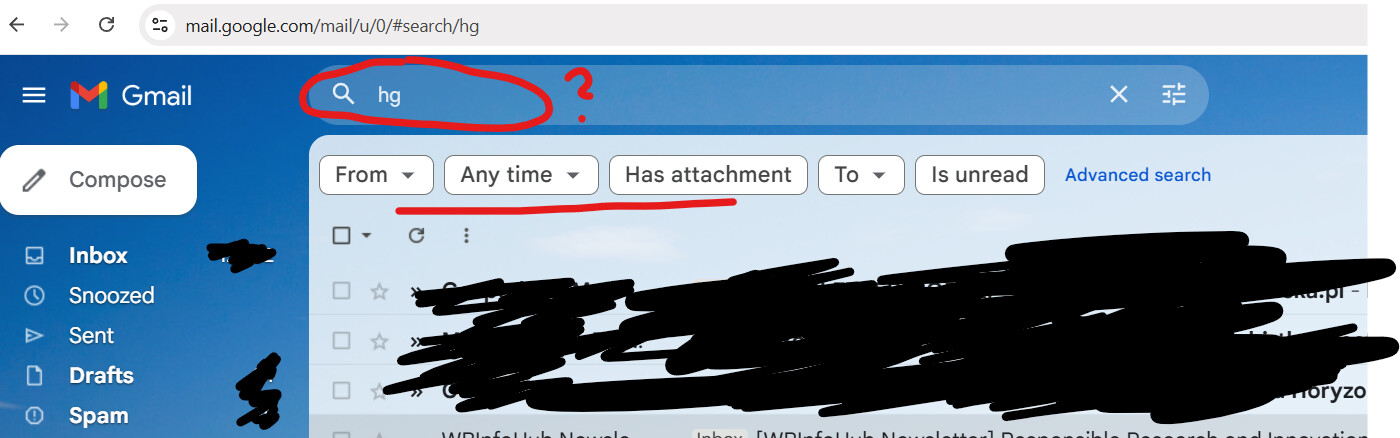
does it look familiar? what happens when you put any letters in the search box? do you then get these filter options as displayed in my image - from/any time/ etc?
So you are using the Gmail app on your phone. Be aware that Google stops supporting POP3 in the next few weeks. So you need to find a different solution anyway.
I just checked my account in the Gmail app, search function works as expected. So maybe it‘s the dawn of POP3 that’s inhibits the search already now.