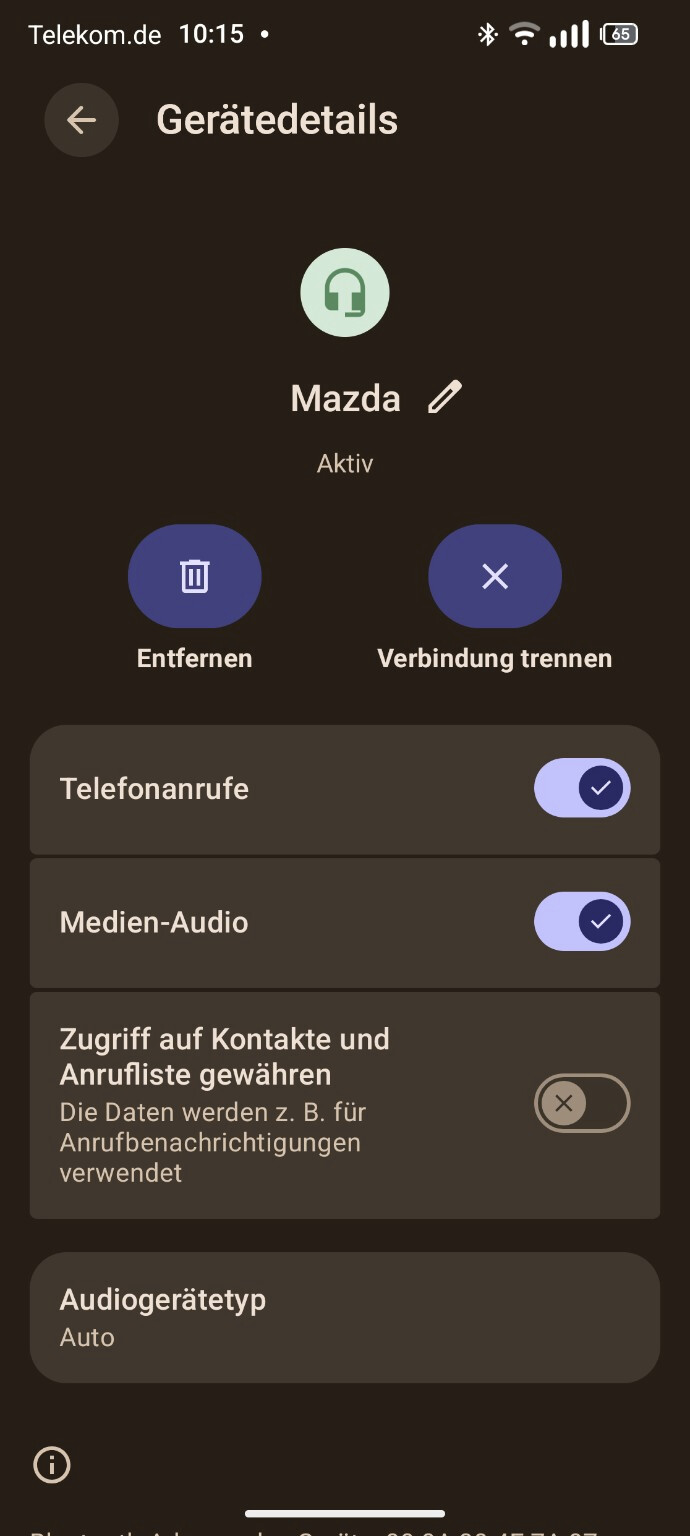
This happens on every connection (also after disconnect/reconnect)
Re-pairing the device on both phone and car → no change
Rebooting the phone → no change
What I already tried:
Removed and re-paired Bluetooth device
Developer options:
AVRCP set to 1.4
Disabled A2DP hardware offload
Bluetooth off/on → no permanent fix
Workaround:
Manually toggling “Media audio” off and on fixes it until the next reconnect
Assumption:
This looks like an A2DP initialization issue in Android 16 (connection is established, but audio routing is not triggered until re-initialized).
Is anyone else experiencing this or found a permanent fix?
Given that the same behavior has now been observed on different Android-based systems (e.g. Fairphone OS and iodeOS), this does not seem to be vendor-specific.
At this point, it looks like a potential Android 16 Bluetooth / A2DP regression, especially in combination with older car head units.
I’ll update here if there’s any official feedback or progress.
Would be helpful if others experiencing the same issue could confirm it there as well
On second thought, my issue is not really the same as yours, but close-ish. What happens on my car is that HFP doesn’t route sound. I used other android phones in the past and iphones and never had this sort of issues with bt.
Not sure what’s going on, or if related to A16,but it’s a very annoying issue.
The response there points towards a software-level issue in Android 16, where Bluetooth audio routing is not properly initialized, especially with older car head units.
In my case, this affects A2DP (media audio):
connection is established
but no sound until “Media audio” is toggled off/on
Interestingly, another report here indicates a similar issue with HFP (call audio) not routing correctly.
So while the exact symptoms differ, both cases point in the same direction:
Bluetooth connection works, but audio routing fails to initialize properly
Given that:
the issue is reproducible
occurs across different Android-based OS (e.g. Fairphone OS, iodeOS)
and now affects different Bluetooth profiles (A2DP and HFP)
this strongly suggests a broader Android 16 Bluetooth / audio routing regression, rather than a Fairphone-specific issue.
I’ll keep this thread updated if there’s any official feedback from Google or Fairphone.
If others are seeing similar behavior (either media or call audio), it would be great to collect more confirmations.
quick update after some deeper analysis:
I captured a full bugreport with Bluetooth HCI logging enabled and reproduced the issue directly before generating it.
From the logs, the behavior looks like this:
On initial connection, the Bluetooth device is connected (HFP works), but A2DP (media audio) is not properly initialized
The system explicitly marks the A2DP device as unavailable and removes the corresponding audio Route.
Only after manually toggling “Media audio” off and on, Android disconnects and reconnects the Bluetooth profiles, after which A2DP works normally.
So this is not a pairing or configuration issue — it’s more like the A2DP audio path is not correctly initialized on connect.
Combined with:
reproducible behavior on every connection
confirmation from other Android-based OS (e.g. iodeOS)
and now log evidence
this strongly points towards a broader Android 16 Bluetooth / audio routing regression, especially with older car head units.
I’ve also updated the issue in the official Android forum accordingly.
I’ll keep this thread updated if there are any findings from Fairphone or Google
The issue has been picked up by Google and assigned to an engineer.
More interestingly, it is now linked to another (internal) issue on Google’s side.
This suggests that the behavior is not an isolated case, but part of a broader problem currently being investigated.
Given that:
the issue is reproducible
logs show A2DP not being properly initialized on connection
and similar behavior has been reported on other Android-based systems
this further strengthens the assumption that this is likely not Fairphone-specific, but related to the Android 16 Bluetooth stack.
I’ve also opened a support case with Fairphone, 1407835, so both sides are aware.
Will keep you posted as soon as there are updates.
There are very similar problems with Android Auto for quite some time now, in my personal experience at least since Android 10. To me these are signs that we’re getting caught up in a growing web of complexity. Security (and some other) considerations are being addressed independently in several different places at once which inevitably leads to compatibility issues. Hardly anyone has a complete overview anymore and even if you manage to get a system running smoothly things can look completely different again after the next update …
Google has picked up the issue and an engineer is now actively investigating it.
They reviewed the initial logs and asked for a more detailed bugreport with full Bluetooth logging enabled (HCI snoop + verbose stack logs). I’ve provided that, including a reproduction exactly at the moment the issue occurs.
The case is still linked to another (internal) issue on Google’s side, which suggests this might be part of a broader Android 16 problem rather than something device-specific.
I’ll share updates as soon as I hear back from them.
I’ve same problem with my bluetooth connection in my car.
DACIA (renault). Product year: 2016
(Instability connection with my wireless sound system Harman Kardon Onyx Studio 8 ,too, at home.)
Like the first post here, I’ve desactivate some features but no result.
For my car DACIA, bluetooth connect at the “media nav evolution” and disconnect a few seconds later.
Interesting that you’re seeing similar behavior not only in your car (Dacia), but also with a separate Bluetooth speaker (Harman Kardon). That really points away from a car-specific issue.
In my case, the Bluetooth connection itself is stable, but A2DP (media audio) is not properly initialized on connect – I only get audio after toggling “Media audio” OFF → ON.
Your disconnect after a few seconds sounds slightly different, but it might still be related to the same underlying Bluetooth issue in Android 16.
Just to compare:
Does media audio work immediately after connecting for you?
Or do you also need to reconnect / toggle something?
I’ve reported this to Google and provided detailed logs – they are currently investigating it as a potential Android 16 issue.
Hello,
I followed your instructions above regarding pairing the Fairphone 6 with my Dacia Duster.
As of now, it’s working again—not perfectly, but it works:
I deleted the old pairings with the vehicle and restarted the pairing process three or four times, and now it’s stable.
The only issue: the songs don’t play automatically; I have to unlock my smartphone for the music site (SoundCloud) to skip to the next track. I haven’t tested the vehicle’s phone system yet.
It behaves similarly on my portable speaker.
I’m guessing we’re still waiting on this one to trickle through? I have the exact same symptoms with my Mitsubishi Outlander 2016 and it really is annoying, having to do the workaround.
Cheers for actually raising the bug report on this one and getting it fixed at the android end, I appreciate your efforts.
unfortunately Google hasn’t released the appropriate update for this problem yet. Unfortunately, the still valid workaround is to turn off and turn on Media Audio.