Ten days ago (Friday, August 1st) I received my Fairphone 6 (Android 15) and I’m having problems with battery consumption.
From the start I felt the battery didn’t last very long, but I thought it might just be because it was the first few days. However, not only did it not improve, but it actually got worse. On Saturday (August 9th), with the battery at 98%, it was already showing only 2 hours of battery left. The day before, Friday (August 8th), it had lasted barely 5 hours.
Seeing the battery situation, on Saturday I went to the “Find & fix an issue yourself” section of the Fairphone website and, initially, by updating Google apps (Google, Google Meet, and Google Photos) in Play Store, the problem seemed to be solved. Suddenly, the battery started lasting more than one day. In fact, the phone worked perfectly without recharging it both on Saturday and yesterday, Sunday.
However, today (Monday 11th), after charging it overnight and without having changed anything, it’s once again showing a battery life of less than 2 hours. I’ve been checking out this Fairphone 3 post by Michael Jahme (https://forum.fairphone.com/t/sudden-battery-drain-out-of-nowhere/118143/35), where the problem was precisely caused by Google Play Services. However, I’ve tried clearing cache and storage for Google Play Services (and also for Play Store), and it hasn’t worked.
Also, there are no new updates available in the Play Store for any app.
I’ve also started the phone in Safe Mode and it’s still showing the same low battery reading, so the problem must be with Google’s core services.
Has this happened to anyone else, and have you been able to fix it? I also have a trip in two days, and I’m worried I might have to take my old phone as a backup just in case.
I’ve been monitoring things these days, and nothing out of the ordinary from the apps I was using. The percentage always seemed correct for each app and system.
Overall, I’d say it feels a little warmer, but I wouldn’t say much warmer. So it’s probably around the same temperature.
The issue is indeed with the battery time/percentage and that, once that time/percentage is reached, it does turn off.
PS. I just fully recharged it to 100% after clearing the cache and storage of Google Play Services, and now, instead of the 2 hours it showed this morning, it shows 6:45 hours. Really strange, to be honest.
Can you take a screenshot of the battery consumption of the apps shortly before your phone’s battery is about to get empty the next time, in a few hours. Then we can have a deeper look at the behaviour of your device!
The battery, after carrying out this morning the steps I mentioned in the first post, seems to have improved on its own without me doing absolutely anything else. Half an hour ago, at 85%, it was showing 15 hours of battery life. It had been progressively increasing over these hours. And now it hasn’t gone up any further, it has started to drop and is currently at 83% and 14 hours 15 minutes of battery life.
Still far from the 1 day and several hours I had on Saturday and Sunday after updating the apps in the Play Store, but definitely much better than this morning when it didn’t even reach 2 hours at 100%.
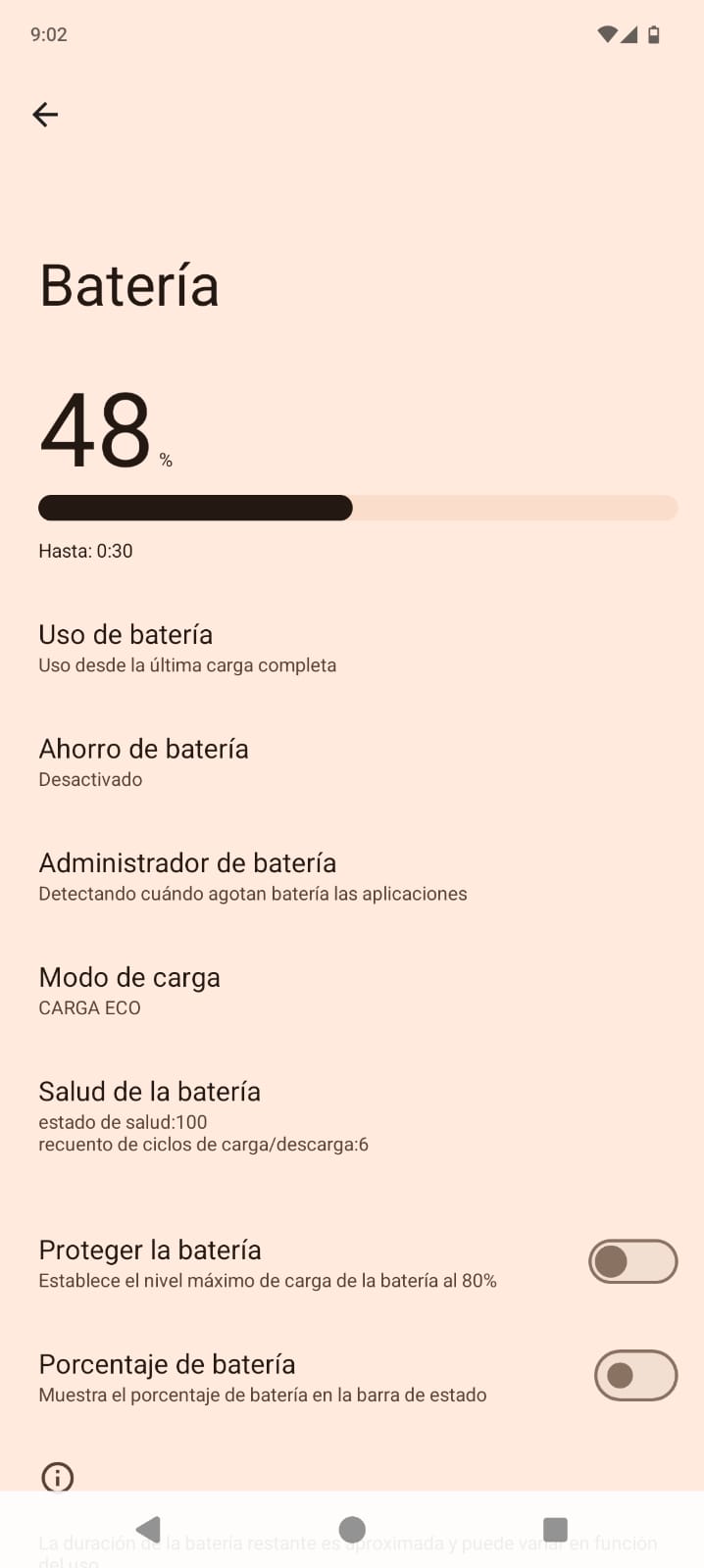
1. After ending last night with several hours left in both battery percentage and battery life, this morning I woke up to find (Image 1) that I had 49% battery left, but only 45 minutes of battery time remaining…
2. I went straight to the Play Store (Image 2) and noticed that several apps had been updated during the night, including several Google apps, which I believe is where the problem lies. This morning I visited a trusted local tech store, and they told me that sometimes these battery issues occur with Google on certain alternative phones, and that in principle they should get fixed with subsequent updates. However, I have now disabled automatic app updates in the Play Store. I’ll do it manually.
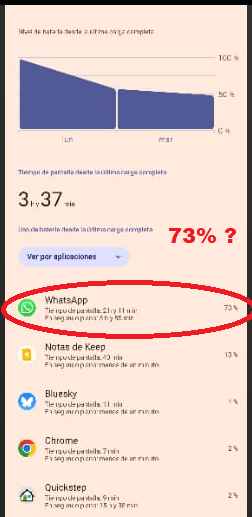
3. Taking this morning’s battery time into account, and before recharging the phone just in case: I rolled back the updates again, cleared cache and storage, restarted the phone, installed the updates, and also took screenshots of the battery usage (Image 3 – sorry for the terrible quality – and Image 4). As you can see, there’s nothing surprising there and it matches my actual usage of the phone.
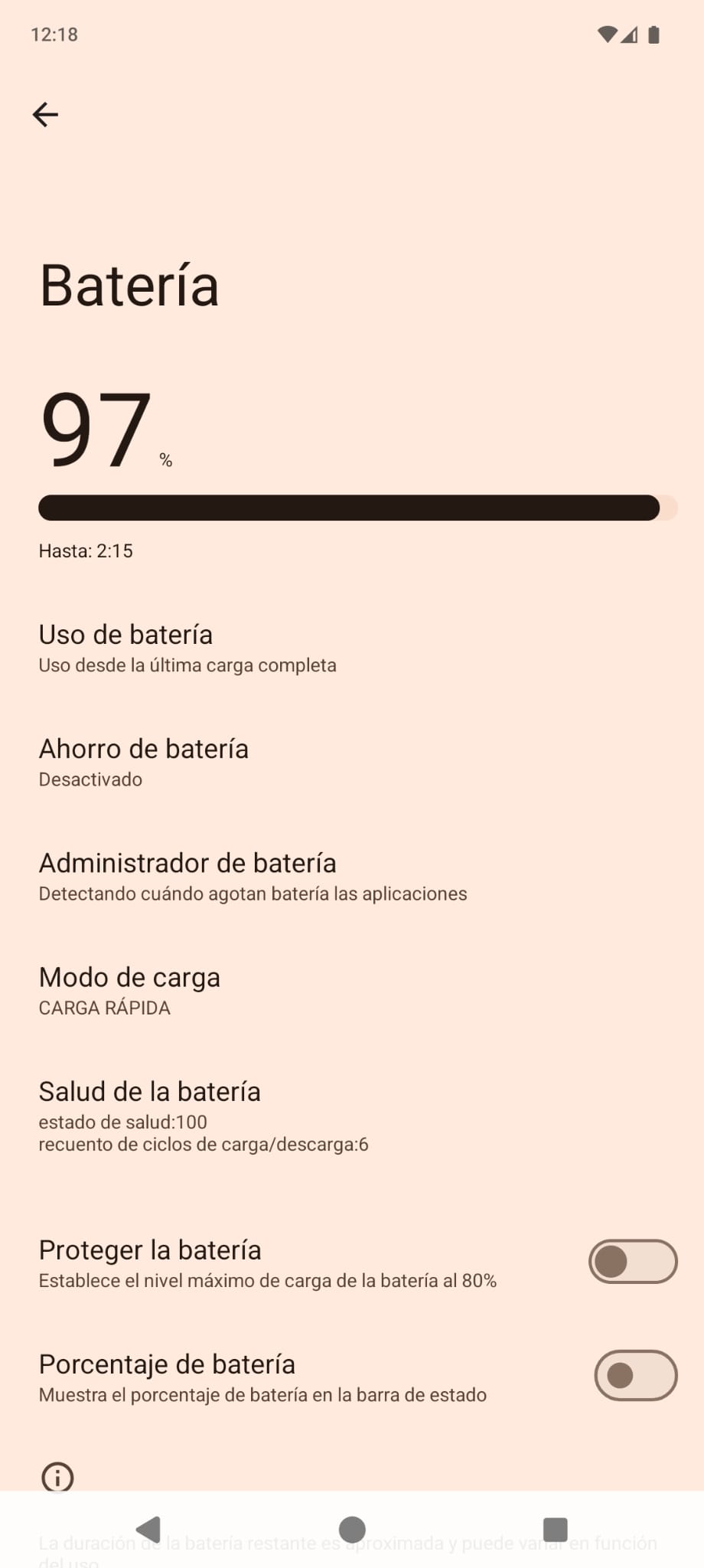
4. After fully charging the phone to 100%, it is now at 97% with 2 hours and 15 minutes of battery life. Hopefully it will increase like it did yesterday.
Where could the problem be? To fix it as much as possible before the next Fairphone updates. The next one is not expected until the end of August and I don’t know if this issue will be directly resolved in that update.
Yes, it seems that WhatsApp is consuming too much. Sometimes I’ve had problems with WhatsApp’s “backup” feature, which keeps running in the background and doesn’t finish completing backups to my Google Drive account. Could that be related? Maybe not, but it might be worth checking that setting.
Another option that comes to mind is to uninstall the apps that consume the most power one by one and see if there is a noticeable change in the battery consumption pattern… I also think it’s excessive that Keep Notes consumes 13% of the battery. But I understand that WhatsApp, for example, is a basic app that you probably can’t do without for a single day. Have you tried clearing the WhatsApp cache? (Be careful when deleting data if you don’t have a backup set up, as I think you could delete your conversations).
First of all, thank you very much for your comments.
Regarding WhatsApp, yes, everything is correct because I had a somewhat long video call.
And about Keep Notes, I was working for quite a while on the app.
After sending the last message in this Forum (about 2 hours ago), I disabled Google, Drive, and Maps on my phone, and the battery life started to improve. I currently have 1 day and 17 hours left with 93% charge! These are the same figures I had on Saturday and Sunday. I do need Maps, and I’ll be testing (I don’t know which of the three might be causing the issue), but I can manage without Google (I use Firefox) and Drive on my phone until everything gets properly updated.
In short, for now, if anyone else is experiencing this, I recommend:
(a) clearing the cache and storage of Play Store and Google Play Services, then restarting the phone
(b) disabling automatic app updates in Play Store
(c) disabling Google, Drive, and Maps (*I still don’t know which one might be causing it, or if it’s something global related to Google apps and updates).
FYI: If you use your phone heavily right after unplugging the charger, it will estimate a short time and if you go into sleep mode right after unplugging it, it will estimate a long time.
Or in other words, the estimation depends on your average usage/power consumption AFTER unplugging the charger.
Dropping this here, even though I do not it think it’s the problem of OP, in case someome else stumbles upon this: YouTube, at least when you have downloaded many videos for offline viewing in the SD, occasionally starts draining the battery like crazy and heating up the phone, even when you are not watching nor having any YouTube window open, neither popup nor the actual app. If you go to app info for YouTube and force quit it, the drain stops and starting it up again doesn’t restart the battery drain. It would be nice if android wanted me about background apps using a ton of CPU, I thought this was a feature nowadays in Android.
HI, probably not want you want to hear , but i got a new FP6 3 weeks ago and the battery life has been amazing. Lasts way longger than previous FP3, even with much use of googlemaps, etc
I just got back from the trip last night, and with the changes and adjustments I mentioned in my last comment, my phone has been working without any battery issues. So, for now, I consider it resolved.