It was working fine for months now but now after upgrading to Android 16, every night it fights to reduce brightness to zero. It will keep it up for maybe ten minutes ONLY if I increase it above 40% or so. If I take it to anything lower than that (which is comfortable) it will ALWAYS starts taking it down to zero mere seconds after I set it. I can have this fight 10 times within one minute, it happens that fast, and it doesn’t learn. It just keeps reducing it.
I’m disabling adaptive brightness for now. It’s way too annoying having to fight the phone all the time. But it’s also annoying having to open the tray to adjust it, just less.
Yes! It happens to me as well. If I am playing a game at night, the phone will reduce the brightness to zero. I can drag the slider up to increase the brightness, but within a second, the slider will be back to zero. I can do it again and again, and the phone will keep dragging it back to zero. It does not learn. I have to turn adaptive brightness off.
I was looking to start a topic myself as well. I completely agree with you. During the daytime, I don’t have much trouble, but in low light is reduces brightness much too aggressively. 0% is way too low for me, even in complete darkness. I wish there was an option to set the minimum brightness. I’ve had this problem since Android 15 and used the phone with auto brightness off for a long time. I decided to give it another try on Android 16, but it’s unusable. I turned of auto brightness again.
I actually prefer it like this. In previous FP releases it always went for 30-40% in complete darkness, which burned my eyes out at night. The only way for FP to fix this for everyone is by making auto brightness intelligent and actually make it learn your preferences, like on a Pixel. However, FP claims it already does this. But I do not see this.
That’s why I think you should be able to set a minimal value. I’m sure some people prefer it likes this, but for me it’s unusable. I watched a video yesterday in a dark room. The scene was pretty dark as well and I couldn’t see any of the characters on the screen.
Setting a minimal value is not a modern solution. Adaptive brightness can actually learn your preferences and it works very well. I had it on my Pixel 10 years ago
Just my thoughts regarding this topic.
Can’t Google or Fairphone, I don’t know exactly who is the responsible one for the basic Android OS features, just make the automated brightness work like the following:
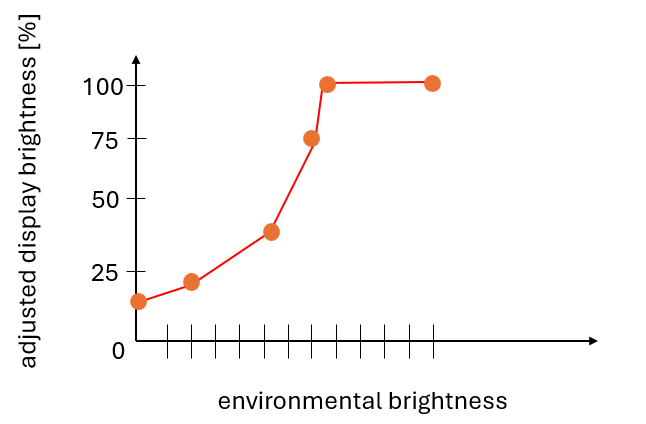
Put a “control curve” in the brightness app where the user can adjust the screen brightness according to the environmental brightness. Maybe with some control points. Similar to cooling fan curves for mainboards.
So everyone is able to adjust the dimming beaviour to his own requirements and you’re not forced to accept a dimming behaviour that someone else defined for you as OK.
That’s exactly what personalized adaptive brightness does for you. No need to set hard limits yourself. It will just learn your preferences in different environments. A FP does not do this unfortunately.
I don’t know which one did it for me, but I tried rebooting, clearing data on Digital wellbeing app and disabling pocket mode. When I’m in the dark it no longer goes back to zero brightness immediately, and it’s also learning my preferences.
And in darkness auto brightness is a nightmare, no chance to increase brightness any more manually. In low light it still works, adjust manually and it stays.
Exactly. I have to turn off auto brightness off every night. It is so annoying. This phone is flagged by bugs. Never again will I buy a Fairphone again.