I’ve installed Lineage (Android 12 - 19-20230220-NIGHTLY-FP3) after recieving my new FP3 some years ago.
But i’m actually looking to made call record work on this phone, and the app told me that i need root acces to this phone. Actually every records is empty.
I’ve actually try to do it following this turorial, but even if everything look ok, when i reboot after all, root verifier told me that i’m not.
i’ve tried to follow magisk instructions, but i really don’t get what i exactly have to do to get that boot.img from lineage.
If you don’t have already, get twrp also (Fairphone 3).
Then, transfer boot.img to the device (adb push boot.img /storage/emulated/0/Download), go into the magisk app, say install to file, select boot.img and have it patched.
Get this back on your computer: adb pull /storage/emulated/0/Download/magisk… (you have to check the chosen file name).
Then reboot into bootloader: adb reboot bootloader, temporarily boot twrp: fastboot boot twrp-3.7.0_9-0-FP3.img, and if twrp is there put the patched boot image on the device, e.g. adb push magisk… /cache
Then start a shell on twrp: adb shell and flash the boot image: dd if=/cache/magisk…,. of=/dev/block/bootdevice/by-name/boot
Then you can reboot and your devices should be rooted.
Don’t forget to setup magisk according your needs, especially the actions required to really grant root if requested
Unfortunately bad news:
I tried this call recorder a year ago (on FP3+) and also many others, incl root, none worked
In some countries there is the recording function directly in the telephony app, but mostly not
@lklaus Thanks for this very precise answere, i’ll try this as fast as i can.
@d2w Did you find finally find a way to record your call? They are talking about a built in solution on older versions, i’ve never heard of it. Maybe it’s possible to downgrade.
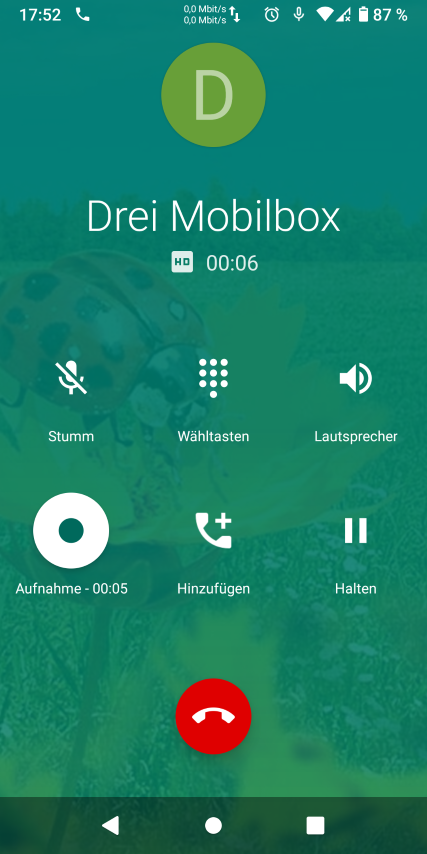
I am in Austria, and can start the recording directly from the telephony app, but automatically recording every call is not possible.
I have the FP3 since a year, and installed LOS 11 on it right away, other call recorders did never work on it, whether it worked with earlier LOS version I don’t know.
Here is a list of countries in which the telephony app has the recording function:
Here is another screenshot: “Aufnahme” means recording
 just did it a few hours ago with the update and could copy it from one of my terminal windows