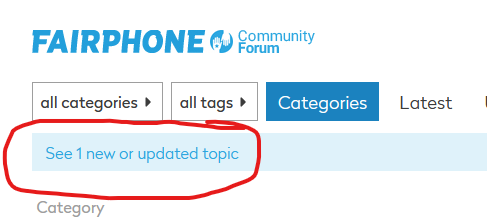
Can I disable the marked part of the screenshot somehow?
Can I disable the marked part of the screenshot somehow?
Seconded. That would be a HUGE relief.
As I am doing without a mouse for a while now and still dislike and try to reduce to a minimum my use of touch/trackpads, I finally taught myself some of the shortcuts (see the list by pressing SHIFT + ? on a QWERTZ keyboard). So as a workaround in this case, I now just type G + N (Go New) and then X + R and eventually G + H (Go Home) to return. But would still appreciate if Ingo’s wish could be realized.
UPDATE: My “workaround” only works with new topics, not updated ones.
I mean there is always the possibility to hide it the hard way via user styles.
This works in Firefox and the “Stylus” add-on
@-moz-document domain("forum.fairphone.com") {
.alert.alert-info.clickable {
    display: none
}
}
No sure if it will also hide e.g. the maintenance notification banners, though.
Was stört an dieser kleinen Nachricht?
So verschieden sind die Geschmäcker, sagte der Bäcker …
Did anybody try to disable Live Notifications in the user profile - Preferences - Notifications? (Edit: Nope. These are just browser notifications. I tried.)
Or “Do not disturb” in the avatar menu (whatever that’s really called)? (Edit: Nope. I tried that, too.)
Ok, you’re on to something here.
Luckily for me, I find that banner immensely practical.
Same for me.
The thing is, it doesn’t appear for me anymore. Can anyone confirm?
For me it appears when the browser is open while a new or updated topic is created.
Oops yes, it seems I had “cosmetic filtering” enabled in µBlock Origin.
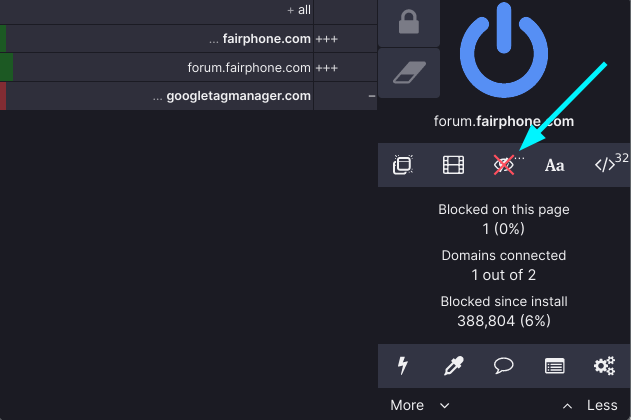
This is actually a solution to the problem and can be easily disabled and enabled again  I just tried setting a topic as a banner, it doesn’t seem to hide these banners, so it shouldn’t hide the maintenance notification banners.
I activated the option you suggested right after you brought it up here (I had UBlock Origin installed anyway), but I just got the “new or updated …” banner again.  (even after quitting and re-starting Firefox)
Strange… For me, as soon as I enable (not disable) cosmetic filtering, it hides the banner, even without reloading the page.
My browser cannot get updated anymore (78.15.0esr), might play a part here.
Might be, I’m on 91.8.0esr with µBlock 1.42.2.
It still cannot be disabled, but with today’s Discourse update all it takes to “dissolve” it is pressing the . dot key. 
(well, maybe this came with a previous update, but I found out today – see SHIFT+?)
EDIT: Apparently not new. I just tried on the /e/ forum and the dot works in the same manner.
Just to report back: I use “my” solution and can confirm that the maintenance banners are still shown. So I got what I wanted. 
This looks fine for those who are happy with pressing a button from time to time/uncomfortable with using an addon to suppress the notification permanently.
With two options available I mark this as solution.