Did the Calyx install script also overwrite the recovery?
At least there is one step executed during the installation (I saved it when I installed 3.7.2):
...
extracting recovery.img (96 MB) to disk... took 0.326s
archive does not contain 'recovery.sig'
Sending 'recovery' (98304 KB)                      OKAY [  3.703s]
Writing 'recovery'                                 OKAY [  0.254s]
...
Now I was looking for a way to flash a zip (in my case it just contains an app, which should be installed as system app - background is a test with a camera installed as system app - see here).
So I have a flashable zip and was looking for a way to install it. Normally there were options in recovery (probably I remember TWRP) to install such a zip directly or to start adb sideload and flash it on that way.
First thing which confused me was the way of accessing the recovery (I don’t remember that I booted into recovery with my FP4 before, so I cannot tell if it always looked like that):
- device off (no cable connected)
- hold “Volume Down” key + insert charger (release “Volume Down” key, when the fp logo shows up)
- select “recovery mode” (with “Volume Up/Down” keys) and confirm with power button
- I will boot in a “No command” screen (I did not remember from other recoveries I used before)

- Hold “Power” + “Volume Up” keys … and it will finally boot into the recovery menu
I assume in there
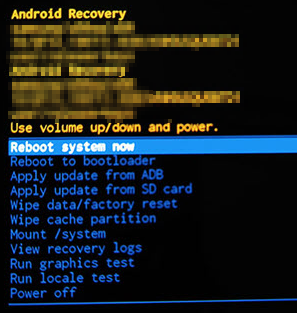
I can use “Apply update from ADB” to sideload a zip?
Or is there any other recommended way to do this?
e.g.:
- flashing a different recovery first with some more options or
- install system apps without flashing e.g. like described here (copying the apk to the right folder, set correct access permissions and reboot)