Device: Fairphone 5
OS version: fully up to date (latest available update installed)
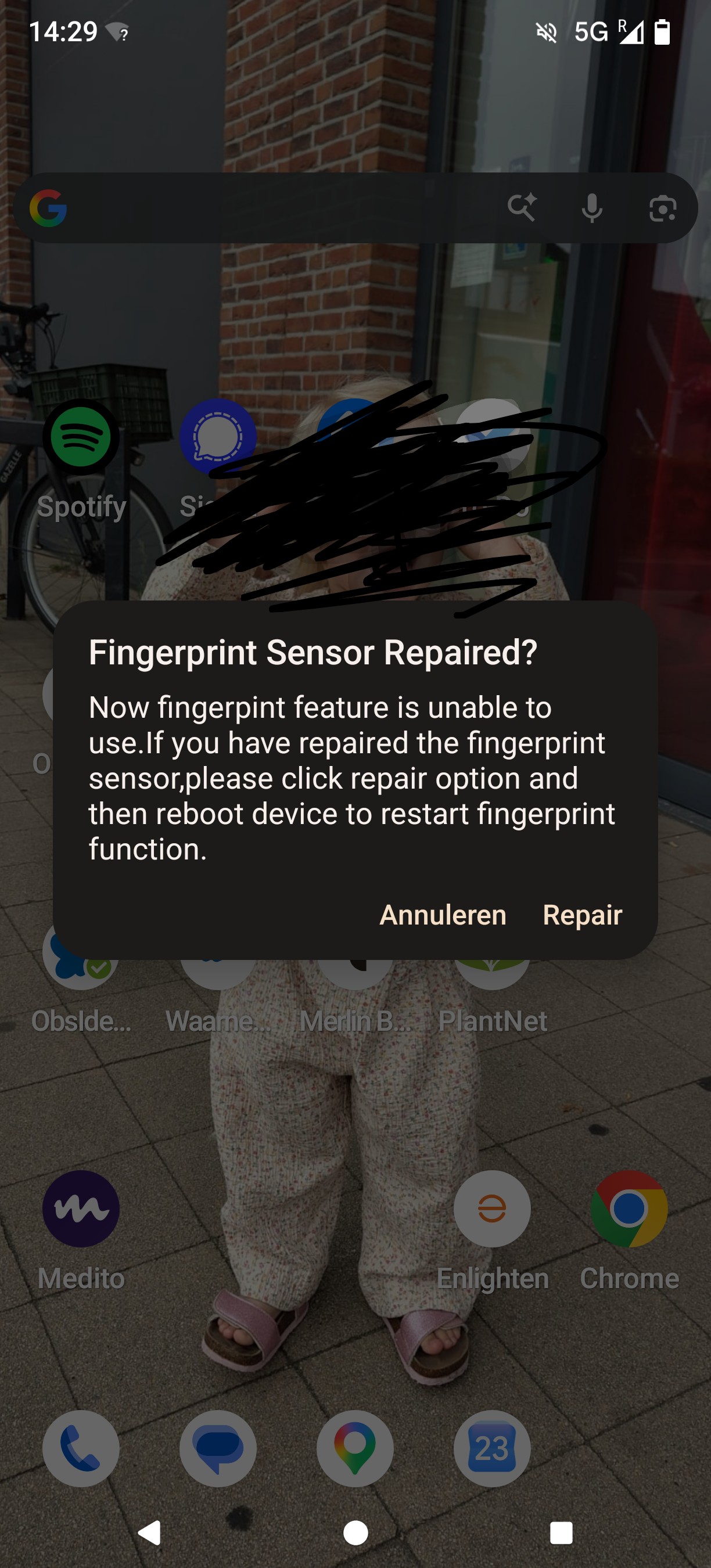
My fingerprint unlock stopped working. On reboot I get a system popup titled “Fingerprint Sensor Repaired?” with the following text:
“Now fingerpint feature is unable to use. If you have repaired the fingerprint sensor, please click repair option and then reboot device to restart fingerprint function.”
The wording here (note the typo “fingerpint”) honestly comes across as fishy/shady rather than like a normal Fairphone or Android system dialog. It doesn’t match the tone or quality of any other system message I’ve seen on this device. I tapped “Repair” and rebooted as instructed, but nothing changed. The fingerprint sensor still doesn’t work, no settings changed visibly, no new prompts.
I’ve run the internal hardware diagnostic tests available on the Fairphone (related to the fingerprint sensor), and everything comes back PASS. So this does not appear to be a hardware issue.
I found this thread with what looks like a similar/related issue:
In that post, another user reports the fingerprint settings disappearing and reappearing intermittently, an internal diagnostic tool showing the sensor “working” while unlock still fails, and banking apps refusing to accept fingerprint auth.
Given the hardware tests pass but the sensor still doesn’t function, and the popup itself looks off, I’d like to understand:
- Is this “Fingerprint Sensor Repaired?” dialog a legitimate Fairphone/Android system message, or should I be concerned about something else running on the device?
- Is there a known software-side fix for fingerprint unlock failing despite passing hardware diagnostics?
Happy to provide logs or more details if that helps track this down.