Fairphone 6 GCam port

I have the /e/OS edition of the Fairphone 6 and Open Camera has a terrible lag when taking photos. I started looking and found out that certain Fairphones support the GCam ports (FP3: Pixel camera app / Google Camera Port), so decided to give this a try.

Turns out that the snapcam version (as the FP6 has a Snapdragon chipset) of this Wichaya Gcam port is already working pretty well out of the box. There are issues, like no digital zoom, but it’s good enough for general use. The app auto-detects the phone as “Pixel 5”, and I wonder if there is a better app or configuration for the FP6?

Relatedly, how do I go about finding out which exact sensor is used on the FP6 camera?
The Pixel 5 has a 12MP camera but I vaguely recall it might be automatically using pixel binning on a higher-resolution sensor, so it’s theoretically possible that it’s actually the same sensor as the FP6’s 50MP sensor. That would help getting a better configuration for GCam on the FP6.

If you scroll down a little bit at https://shop.fairphone.com/the-fairphone-gen-6, you can access the Specs in the top bar:

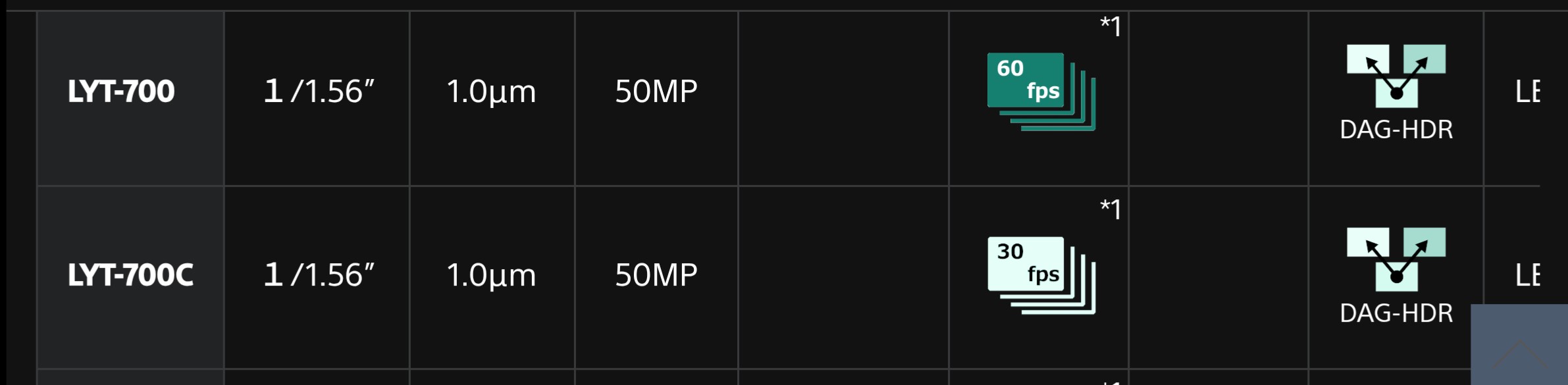
Main Camera: 50MP Sony Lytia 700C sensor, 1/1.56", 1.0μm pixel size

Selfie camera: Image Sensor: 32MP Samsung KD1, AF sensor

Thanks!

Okay so it’s surprisingly hard to find out in general what sensors various phones use in their cameras but here are the ones I could find using the LYT-700(C).

  • Motorola G96 5G & Motorola Edge 50 - both of these are Snapdragon 7 (Gen 2/Gen 1) and use the LYT-700C, did not find much about them on XDA/homebrew circles
  • OnePlus Nord 5 - was just released, it uses the LYT-700 and a Snapdragon 8 chipset, very similar cores as the FP6, not much in homebrew circles yet but worth looking out for a GCam port

Edit: And a couple more using the LYT-700C from this list:

  • Asus Zenfone 12 Ultra
  • Asus Rog Phone 9 Pro
  • Motorola Edge 60/60 Pro
  • Motorola Moto G Stylus 50G
  • Motorola ThinkPhone 25
  • OnePlus 13R
  • Oppo Find N5/X8/X8s/X8s+
  • Tecno Camon 40/40 Pro/40 Pro 5G
  • vivo S30

Apparently the only difference between the 700 and 700C is a Pantone-certified color pipeline.

Really nice pictures !

I wonder, did someone found a gcam port working with large angle camera ? It’s 0.6 in fp6 cam app but 0.7 in the few gcam I tried and it’s not “corrected” like the fp6 cam app (there’s an option for that btw).

To minimize the discussipn in the gallery topic I moved your post here and tagging those who seem to use Gcam ports @chrimehl @hvmf @Furdiburd

@chrimehl which Gcam port did you use? Does video stabilization works as well in this port

App-version is: 9.2.113.604778888.19

I made 2 videos using this app, quite pleased with the video image quality. But I knew beforehand I don’t need the sound…because that is not working at all…very, very quiet.

Poor sound and missing zoom seem to be e/OS specific problems and should be solved in v3.1 that should be released soon. Do you have a link to the GCam port you used?

I use this app with Android 15.

This should be the Site…first link there:

It seems to be the framerate in 4k, for Pantone there is no clue on Sony website

Hi everyone,

So which link do we need to use to install GCam on FP6, and what the good parameters we need to configure ?

Take a close look at the church pictures in FP6 Gallery first. GCam loses clearly, FP6 stock app wins.

Edit: At least that specific GCam port. As the stock app pic is better than the iPhone pic, IMHO there’s no need to install another photo app (save OpenCamera for better video sound). YMMV.

For e/OS users, selecting a proper GCam port is still important because the Fairphone camera app is not (yet?) available on e/OS and the stock app (a fork of opencamera) is pretty bad and misses some features (e.g. portrait or night modes etc).

Whatever you like the most

Realized too late that he might be on e/OS and was too lazy to edit again. My bad.

Currently I’m using SGCam (SGCAM_8.5.300.XX.10_STABLE_V24_SNAPCAM_PACKAGE.apk), it works well out of the box though not perfect. I haven’t been using it for videos as I prefer OpenCamera (the built in /e/OS camera app) for that, so can’t talk about sound quality.

SGCam has a custom config for the Motorola Edge 50, which supposedly has the same sensor as this phone, so theoretically that would suit the FP6 better, but in reality while it does change some things, it is not better. It, for example, unlocks higher resolution photos, but the quality degrades significantly.

Likely the way would be to create a custom config for the FP6 based on the Edge 50 and the other info available.

The /e/OS camera shows this config:

Summary

Camera v1.53.1
Code: 90
Package: foundation.e.camera
Android API version: 35
Device manufacturer: Fairphone
Device model: Fairphone 6
Display size: 1116x2302
Display metrics: 1116x2302
Current camera ID: 0
No. of cameras: 6
Multi-camera?: true
Camera API: Camera2 (Android L)
Camera orientation: 90
Photo mode: Standard
Min zoom factor: 1.0
Max zoom factor: 1.0
Preview resolutions: 1920x1080, 1920x1012, 1440x1080, 1280x960, 1080x1080, 1280x768, 1280x720, 1024x768, 1024x738, 800x600, 864x480, 800x480, 720x480, 640x480, 640x360, 352x288, 320x240, 240x320, 176x144
Preview resolution: 1920x1080
Photo resolutions: 4096x3072, 4032x3024, 4096x2304, 3072x3072, 4000x2250, 2976x2976, 4096x2160, 3840x2160, 3280x2460, 3264x2448, 3200x2400, 3104x2336, 3072x2304, 3264x1836, 3072x1728, 2304x2304, 2592x1944, 2688x1512, 2560x1440, 2048x1536, 1920x1440, 2048x1152, 1920x1080, 1920x1012, 1600x1200, 1536x1152, 1440x1080, 1152x1152, 1280x960, 1080x1080, 1280x768, 1280x720, 720x1280, 1024x768, 1024x738, 800x600, 864x480, 800x480, 720x480, 640x480, 640x360, 352x288, 320x240, 240x320, 176x144
Photo resolution: 4096x3072
Video qualities: 1_r4096x2160, 1, 6_r3264x1836, 6_r3072x1728, 6_r2592x1944, 6_r2688x1512, 6_r2560x1440, 6_r2048x1536, 6_r1920x1440, 6_r2048x1152, 6, 5_r1920x1012, 5_r1600x1200, 5_r1536x1152, 5_r1440x1080, 5_r1152x1152, 5_r1280x960, 5_r1080x1080, 5_r1280x768, 5, 5_r720x1280, 4_r1024x768, 4_r1024x738, 4_r800x600, 4_r864x480, 4_r800x480, 4, 3_r640x480, 3_r640x360, 3, 7, 7_r240x320, 2
Video resolutions: 4096x2160, 3840x2160, 3264x1836, 3072x1728, 2592x1944, 2688x1512, 2560x1440, 2048x1536, 1920x1440, 2048x1152, 1920x1080, 1920x1012, 1600x1200, 1536x1152, 1440x1080, 1152x1152, 1280x960, 1080x1080, 1280x768, 1280x720, 720x1280, 1024x768, 1024x738, 800x600, 864x480, 800x480, 720x480, 640x480, 640x360, 352x288, 320x240, 240x320, 176x144
Video quality: 5
Video frame width: 1280
Video frame height: 720
Video bit rate: 2000000
Video frame rate: 30
Video capture rate: 30.0
Video high speed: false
Video capture rate factor: 1.0
Auto-level?: Available
Auto-level enabled?: false
Face detection?: Available
RAW?: Available
HDR?: Available
Panorama?: Available
Gyro sensors?: Available
Expo?: Available
Expo compensation?: Available
Exposure compensation range: -12 to 12
Manual ISO?: Available
ISO range: 100 to 6400
Manual exposure?: Available
Exposure range: 47180 to 10500000000
Manual WB?: Available
WB temperature: 1000 to 15000
Optical stabilization?: Not available
Optical stabilization enabled?: true
Video stabilization?: Not available
Video stabilization enabled?: false
Tonemap curve?: Available
Tonemap max curve points: 64
Can disable shutter sound?: Available
Camera view angle: 72.46323 , 54.829765
Flash modes: flash_off, flash_auto, flash_on, flash_torch
Focus modes: focus_mode_auto, focus_mode_macro, focus_mode_locked, focus_mode_infinity, focus_mode_manual2, focus_mode_continuous_picture, focus_mode_continuous_video
Color effects: None
Scene modes: auto, action, portrait, landscape, night, night-portrait, theatre, beach, snow, sunset, fireworks, sports, party, candlelight
White balances: auto, manual, incandescent, fluorescent, warm-fluorescent, daylight, cloudy-daylight, twilight, shade
Magnetic accuracy?: -1
Using SAF?: false
Save Location: Camera
Save Location SAF:
Parameters: None
Thanks for your replies.

For posterity: yes as other people noted I am on /e/OS and the stock camera app is not (yet) available there.

Does anyone else have the problem of very faint sound when using GCAM? I also have it when using Blackmagic camera and OpenCamera - but OpenCamera allows to switch the audio source and one of the options works there…
Just checking to see whether there’s a solution out there.

I’m having issues with the stock camera where 1080p recording is basically unusable (especially with stabilization and video HDR on) and picture quality on gcam is much better, but I’ve not found a version that also records audio…

If you are on /e/OS, camera audio is a known issue.

If you are on stock Fairphone Android, I would imagine that GCam uses the wrong audio device on the FP6 and that could cause issues like this, and that needs to either be fixed in the GCam distro you are using or potentially via a custom config specifically for the FP6 - see: Fairphone 6 GCam port - #16 by flaki .