Hey there.
After the 4967th (+/- 5) time that I dropped my Fairphone 4, my phone stopped recognizing the SIM card. This had happened before, and usually a reboot and/or taking out the SIM and putting it back it worked. However, this time rebooting, taking it out, etc did not help.
I decided to take things apart and see what’s up. (Honestly, don’t ask me what i was looking for, because in hindsight, any idea I had was going to be wrong cuz I wasn’t thinking it through. I did not take pictures but tried to get the best visual aid from FP4 tear down videos)
My “idea “ was that if I could take out the module where the SIM slot is, then maybe I could figure something out.
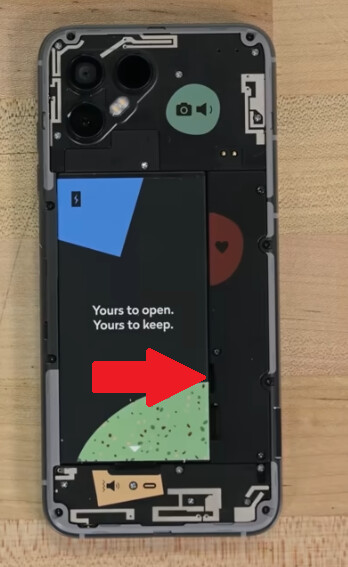
TL;DR, the module under the piece with the heart is quite large and involved to take apart, but the piece with the heart is actually just a lid. You can take this lid out by loosening up the lid of the camera module. (mostly the screws to the top right hand side.
This allowed me to see the piece that is the SIM slot (I had taken the SIM out) and then I noticed that the “legs“ that push the SIM card against the contacts were basically flat and not exerting any pressure. With utmost care I pushed in the legs a bit, did in reverse everything I had done before, and started the phone. VOILA! I have cell service again!
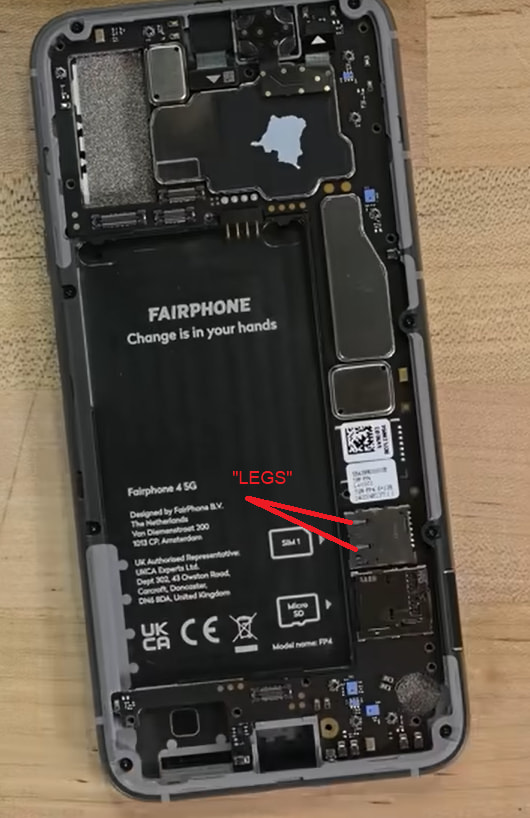
(Note that the rest of the teardown shown above is not needed, I just forgot to take pictures and don’t want to take everything apart again. You just need to take that one “lid“ off  )
)
As always, follow instructions at your own risk and use your best judgement!! But I hope this helps someone