So… How did you test? Because this form fails for me in all sorts of ways.
I’ve tried Edge, Firefox, and Chrome. I’ve disabled enhanced tracking protection and my ad-blocker on Firefox.
If I enter nothing and hit the “Submit” button, I get the expected error list of fields I didn’t fill in. But after that, but button is dead. So to try to figure this out I need to re-fill in the form each time, omitting fields as I go to try to find out which one is stopping it from submitting.
Can you (or anyone) at least confirm you’re/they’re seeing this behaviour?
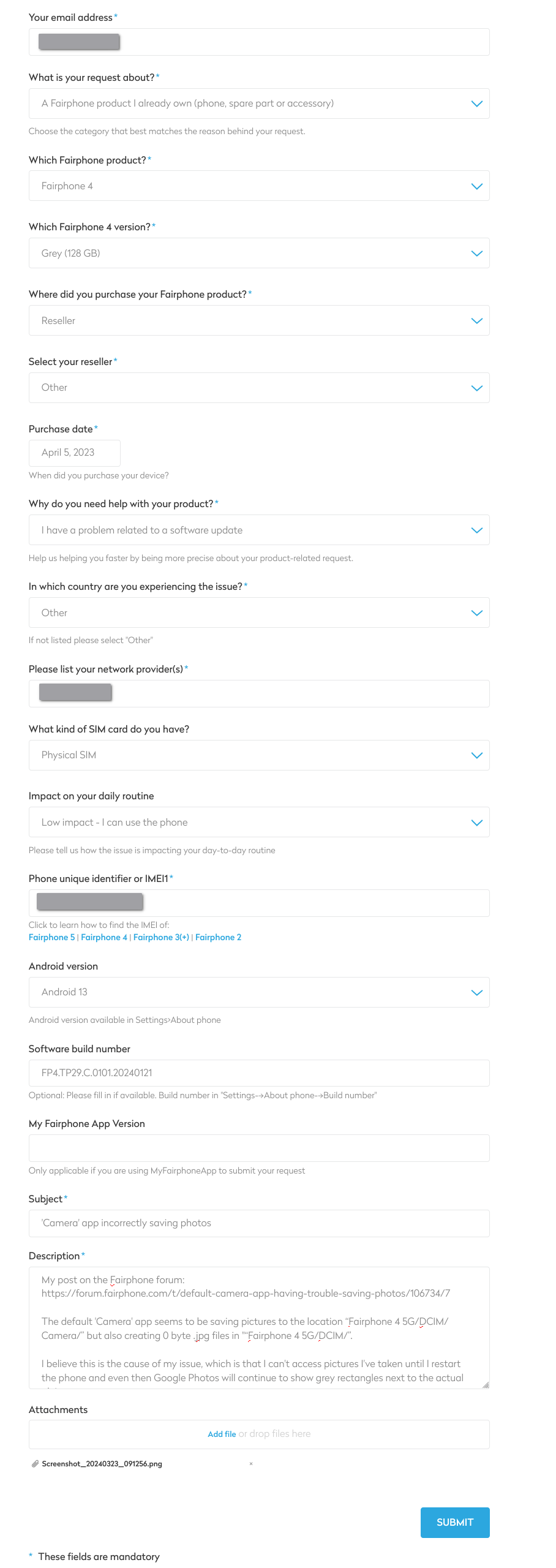
I’ve attached a screenshot of what I’d like to submit, but I’ve started trying different values to see if any combination works. I’ve been trying to use my browser developer console, but I don’t know enough of what I’m doing. I’m putting debug breakpoints in all over the place, and it really just seems like the button does nothing after some point.
Appreciate the help
Edit: Being logged in before trying to submit the form also doesn’t help.
Edit 2: I was able to submit the form with “What is your request about?” set to “Something else.”
Edit 3: It’s specific to “What is your request about?” “A Fairphone product I already own”
Last edit: Yup. That’s where I hit the roadblock. I can’t get any combination of values or attachment types will work once I select “What is your request about?” “A Fairphone product I already own”. I’ve even gone so far as to remove special characters from my subject and description. I’ve tried .png and .pdf attachments, a different email address, and different combinations of product and where I purchased it.